
TL;DR — Quick Pick Guide
Looking for the best AI video generator in 2026? We tested 10 platforms with the same set of prompts and scored them across five dimensions. Here are our top picks by use case:
| Use Case | Our Pick | Why |
|---|---|---|
| Best Overall | Seedance 2.0 | Quad-modal input, native audio, 2K output, strong consistency |
| Best for Long Videos | Kling 3.0 | Industry-leading 2-minute generation at budget pricing |
| Best for Text Purists | Sora 2 | Superior language understanding, storyboard mode |
| Best for Pro Editing | Runway Gen-4 | Built-in editor, Motion Brush, professional workflow |
| Best Free Option | Wan (Open Source) | Fully open-source, self-hostable, zero cost |
| Best for Beginners | Pika 2.0 | Simplest interface, fun effects, low learning curve |
| Best Audio-Visual | Google Veo 3.1 | Native audio generation, Google ecosystem |
| Best Budget Paid | HaiLuo AI | Decent quality at the lowest subscription price |
| Best for Anime | Vidu | Excellent stylized and anime content |
| Best 3D/Cinematic | Luma Dream Machine | Strong spatial awareness, cinematic camera work |
Every tool has genuine strengths. No single platform dominates every category. Read on for our full methodology, individual reviews, pricing breakdowns, and an honest recommendation for each use case.
For a deep dive into our top-ranked tool, see What Is Seedance? Complete Guide.
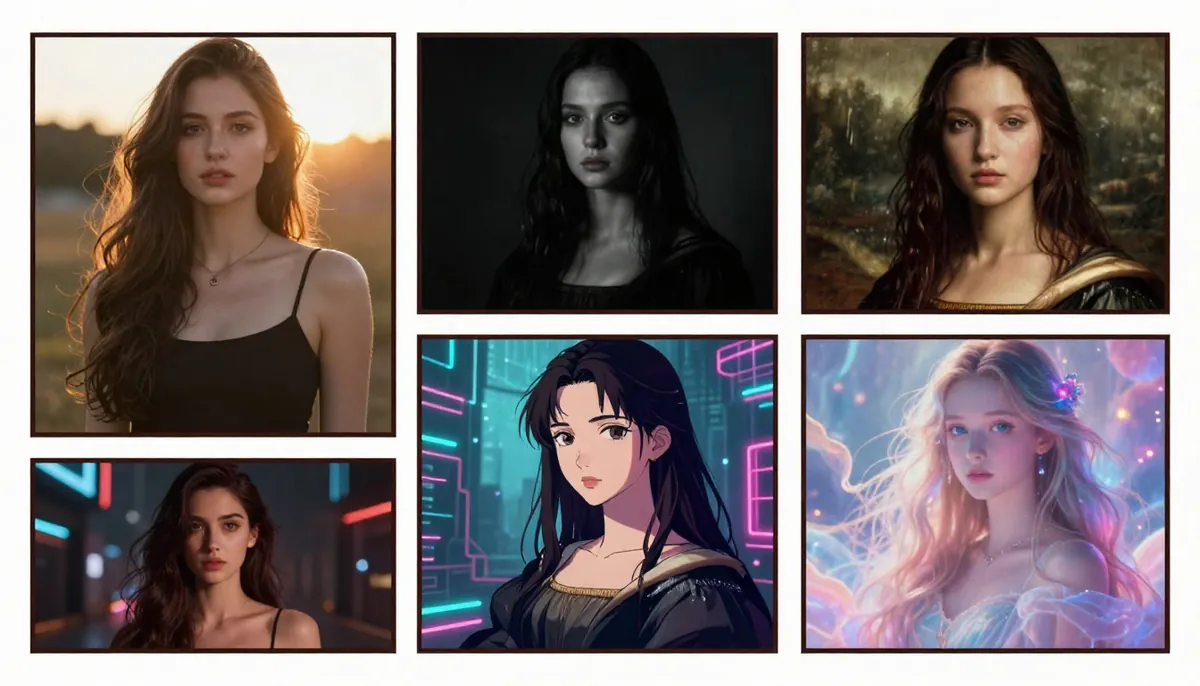
Same prompt, six platforms — the differences in quality, motion, and style become immediately apparent when you compare AI video generators side by side.
How We Tested: Our Methodology
We believe the only honest way to compare AI video generators is to test them under identical conditions. Marketing pages and cherry-picked demos tell you nothing about real-world performance. Here is exactly how we conducted this comparison.
The Test Protocol
We created a standardized evaluation kit consisting of 10 prompts designed to stress-test different capabilities:
- Cinematic portrait — A woman walking through a rain-soaked neon street (tests lighting, reflections, human motion)
- Action sequence — A martial artist performing a spinning kick (tests complex body dynamics)
- Nature landscape — A drone flyover of a mountain lake at sunrise (tests environment generation, camera motion)
- Product showcase — A perfume bottle rotating on a marble surface (tests object detail, commercial viability)
- Text rendering — A neon sign flickering to life spelling "OPEN 24/7" (tests text generation in video)
- Character consistency — Same character in three different scenes (tests identity preservation)
- Lip sync — A person delivering a short monologue (tests audio-visual alignment)
- Style transfer — A real photo converted to anime style (tests artistic transformation)
- Multi-subject — Two people having a conversation at a cafe (tests multi-character interaction)
- Abstract/Creative — "The concept of time dissolving into particles of light" (tests creative interpretation)
Scoring Dimensions
Each platform was scored on five dimensions using a 1-10 scale:
| Dimension | What We Measured |
|---|---|
| Quality | Visual fidelity, resolution, detail, artifact-free output |
| Motion | Natural movement, physics accuracy, temporal consistency |
| Consistency | Character identity preservation, scene coherence across frames |
| Speed | Time from prompt submission to finished video |
| Value | Quality-to-price ratio, free tier generosity |
The overall score is a weighted average: Quality (25%), Motion (25%), Consistency (20%), Speed (15%), Value (15%). We weighted quality and motion highest because they matter most for usable output.
What We Did NOT Do
We did not accept free credits, sponsored access, or promotional deals from any platform. Every test was run on publicly available plans. We also did not cherry-pick results — every score reflects the average across all 10 prompts, not the best single output.
Complete Comparison Table
Here is the master comparison of all 10 AI video generators tested. Bookmark this table — it is the most comprehensive side-by-side comparison you will find for 2026.
| Tool | Developer | Max Resolution | Max Duration | Input Modes | Native Audio | Starting Price | Free Tier | Our Score |
|---|---|---|---|---|---|---|---|---|
| Seedance 2.0 | ByteDance | 2K (2048×1080) | 15s | Text + Image + Video + Audio | Yes (8-lang lip sync) | ~$9.90/mo | Yes (free credits) | 8.2/10 |
| Sora 2 | OpenAI | 1080p | 20s | Text only | No | $20/mo (ChatGPT Plus) | No | 7.2/10 |
| Kling 3.0 | Kuaishou | 1080p | 2 min | Text + Image | No | ~$6.99/mo | Yes (limited) | 8.4/10 |
| Veo 3.1 | Google DeepMind | 4K (upscale) | 8s | Text + Image | Yes | $20/mo (AI Premium) | Limited | 7.8/10 |
| Runway Gen-4 | Runway | 4K (upscale) | 10s | Text + Image + Video | No | $15/mo | Yes (limited) | 7.5/10 |
| Pika 2.0 | Pika Labs | 1080p | 5s | Text + Image | Partial (sound effects) | $10/mo | Yes (limited) | 6.8/10 |
| Luma Dream Machine | Luma AI | 1080p | 5s | Text + Image | No | $9.99/mo | Yes (limited) | 7.0/10 |
| HaiLuo AI | MiniMax | 720p–1080p | 6s | Text + Image | No | ~$4.99/mo | Yes (generous) | 6.5/10 |
| Wan | Alibaba (Open Source) | 1080p | 5s | Text + Image | No | Free (self-host) | Fully free | 6.2/10 |
| Vidu | Shengshu Tech | 1080p | 8s | Text + Image | No | ~$9.99/mo | Yes (limited) | 6.9/10 |
A note on scores: Kling 3.0 scores 8.4 overall — technically higher than Seedance's 8.2 — driven by its exceptional value and motion scores. However, Seedance 2.0 earns our "Best Overall" recommendation because of its unmatched multi-modal flexibility (quad-input, native audio, lip sync) and higher resolution output. The right choice depends entirely on your specific needs. If long-duration video at low cost is your priority, Kling is the better pick.
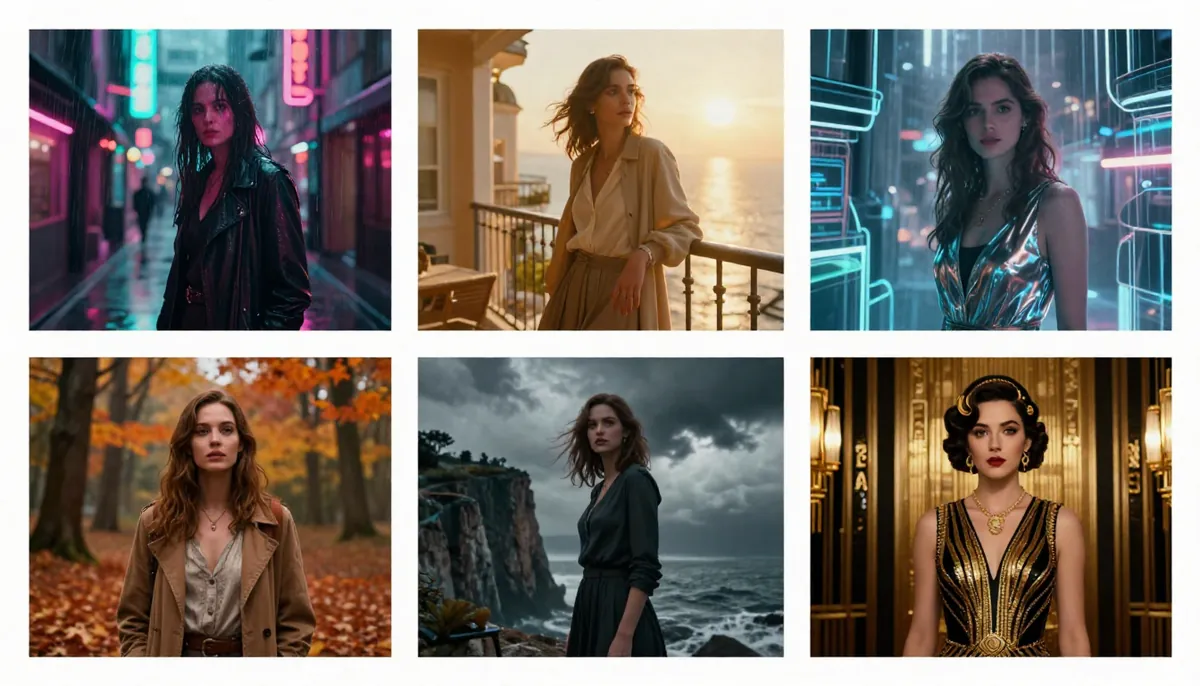
The same cinematic portrait prompt rendered across six platforms. Differences in lighting, skin texture, motion blur, and background detail are clearly visible.
Individual Reviews
1. Seedance 2.0 — Best Overall
Developer: ByteDance (Seed Team) Release: Late 2025 Max Resolution: 2K (2048×1080) Max Duration: 15 seconds Input Modes: Text + Image (up to 9) + Video (up to 3) + Audio — up to 12 references simultaneously
Seedance 2.0 earned our top overall recommendation for one reason: no other platform in 2026 offers this breadth of capability in a single tool. The quad-modal input system means you can feed in a reference photo, a motion reference video, an audio track, and a text prompt — all at once. The result is a level of creative control that text-only tools simply cannot match.
What impressed us most was the character consistency engine. In our multi-scene test, Seedance maintained facial identity across three completely different environments with minimal drift. The native audio generation is genuinely useful too — it produces context-aware sound effects and supports lip-synced dialogue in eight languages, which is a massive advantage for international content creators.
Where it falls short: The 15-second maximum duration is a real limitation. If you need videos longer than 15 seconds, you will need to generate multiple clips and stitch them together. Generation speed is also middle-of-the-pack — expect roughly 2-3 minutes per clip depending on resolution and server load. The platform is newer than Runway or Pika, so the community and tutorial ecosystem is still growing.
Best for: Social media creators, e-commerce product videos, brand marketing campaigns, and anyone who needs multi-modal creative control. If you work with reference images and need consistent characters, Seedance is the strongest choice.
| Dimension | Score |
|---|---|
| Quality | 9/10 |
| Motion | 8/10 |
| Consistency | 9/10 |
| Speed | 7/10 |
| Value | 8/10 |
| Overall | 8.2/10 |
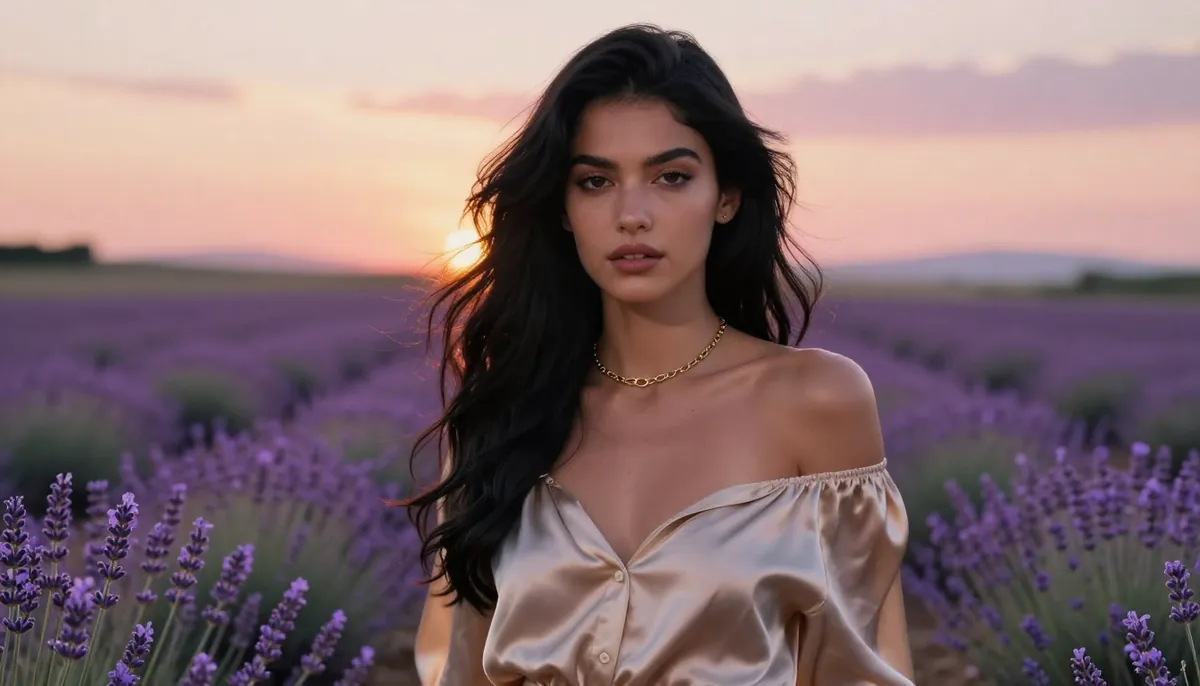
Seedance 2.0 benchmark output — cinematic portrait test. Notice the accurate skin tones, natural hair movement, and realistic neon reflections on wet surfaces.
Learn more: What Is Seedance? | How to Use Seedance | Real Examples & Use Cases
2. Sora 2 — Best for Text-Driven Creation
Developer: OpenAI Release: 2025 (iterative updates through 2026) Max Resolution: 1080p Max Duration: 20 seconds Input Modes: Text only
Sora 2 is OpenAI's flagship video generation model, and it benefits enormously from the company's expertise in language understanding. If your workflow is purely text-based — you write detailed prompts and expect the AI to interpret them faithfully — Sora 2 is arguably the most intuitive tool available. It understands nuance, handles complex scene descriptions well, and its storyboard mode lets you script multi-shot sequences from a single text input.
What impressed us most was the creative interpretation of abstract prompts. Our "time dissolving into light particles" test produced the most artistically interesting result from Sora. The 20-second maximum duration also gives you more room than most competitors for single-clip storytelling.
Where it falls short: The elephant in the room is input flexibility — or rather, the lack of it. Sora 2 is text-only. No image references, no video inputs, no audio conditioning. If you have a brand character photo and need the AI to animate it, Sora cannot do that. Pricing is also steep: it requires a ChatGPT Plus ($20/mo) or Pro ($200/mo) subscription, and the generation quotas are limited. Geographic restrictions remain an issue in several regions.
Best for: Creative writers and storytellers who work primarily with text. If you are already paying for ChatGPT Plus and want video generation as an add-on, Sora is a natural fit.
| Dimension | Score |
|---|---|
| Quality | 9/10 |
| Motion | 8/10 |
| Consistency | 8/10 |
| Speed | 6/10 |
| Value | 5/10 |
| Overall | 7.2/10 |
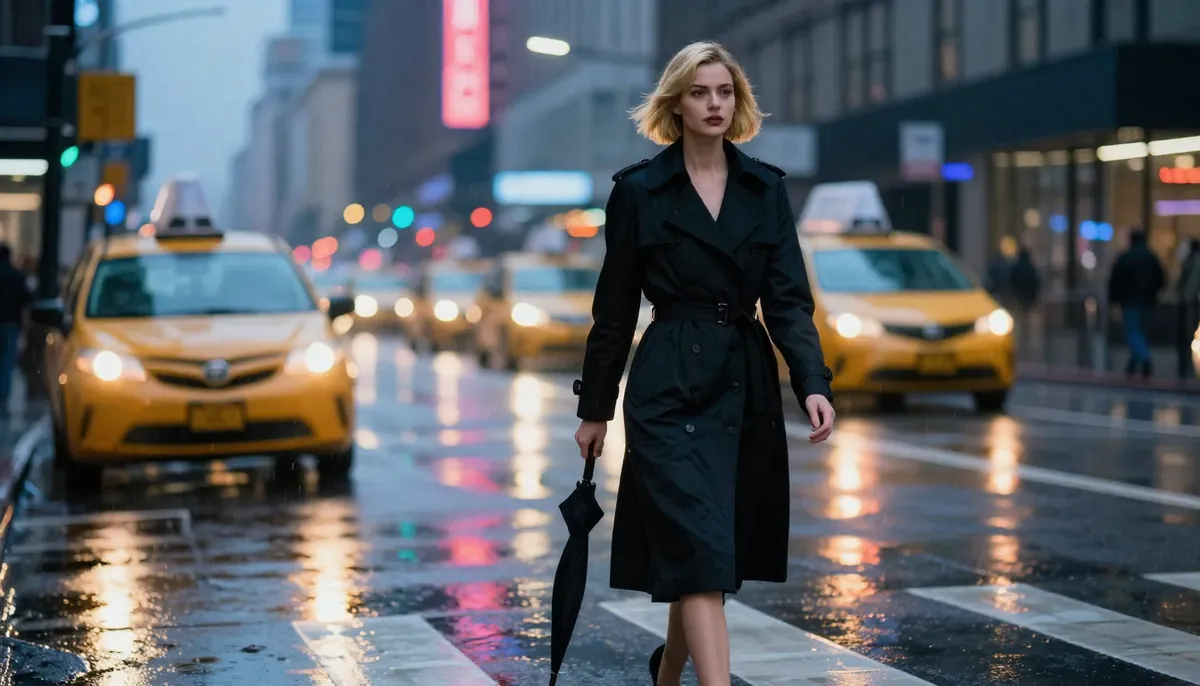
Sora 2 benchmark output — abstract creative test. OpenAI's language model backbone gives Sora a distinctive advantage in interpreting complex, poetic prompts.
For a detailed head-to-head analysis, see Seedance vs Sora: Complete Comparison.
3. Kling 3.0 — Best for Long Videos
Developer: Kuaishou Release: 2025–2026 Max Resolution: 1080p Max Duration: 2 minutes Input Modes: Text + Image
Kling 3.0 is the duration king. While most AI video generators cap out at 5-20 seconds, Kling can produce coherent videos up to 2 minutes long. That is not a gimmick — the temporal consistency holds up remarkably well even at extended durations. For short films, narrative content, or any project where you need more than a few seconds of footage, Kling is in a class of its own.
What impressed us most was the motion realism at longer durations. Our action sequence test (martial arts kick) showed excellent body dynamics with minimal artifact buildup even past the 30-second mark. The pricing is also very competitive — starting at roughly $6.99/month makes it one of the most affordable premium options.
Where it falls short: Resolution is capped at 1080p with no 2K or 4K option. There is no native audio generation, so you will need to add sound in post-production. The input system is limited to text and a single reference image — no video references, no multi-image input, no audio conditioning. The interface is functional but lacks the polish of Western competitors.
Best for: Long-form storytelling, short films, music video concepts, and budget-conscious creators who need more than 15 seconds of continuous footage. If duration matters more than multi-modal input flexibility, Kling is the clear winner.
| Dimension | Score |
|---|---|
| Quality | 8/10 |
| Motion | 9/10 |
| Consistency | 8/10 |
| Speed | 8/10 |
| Value | 9/10 |
| Overall | 8.4/10 |
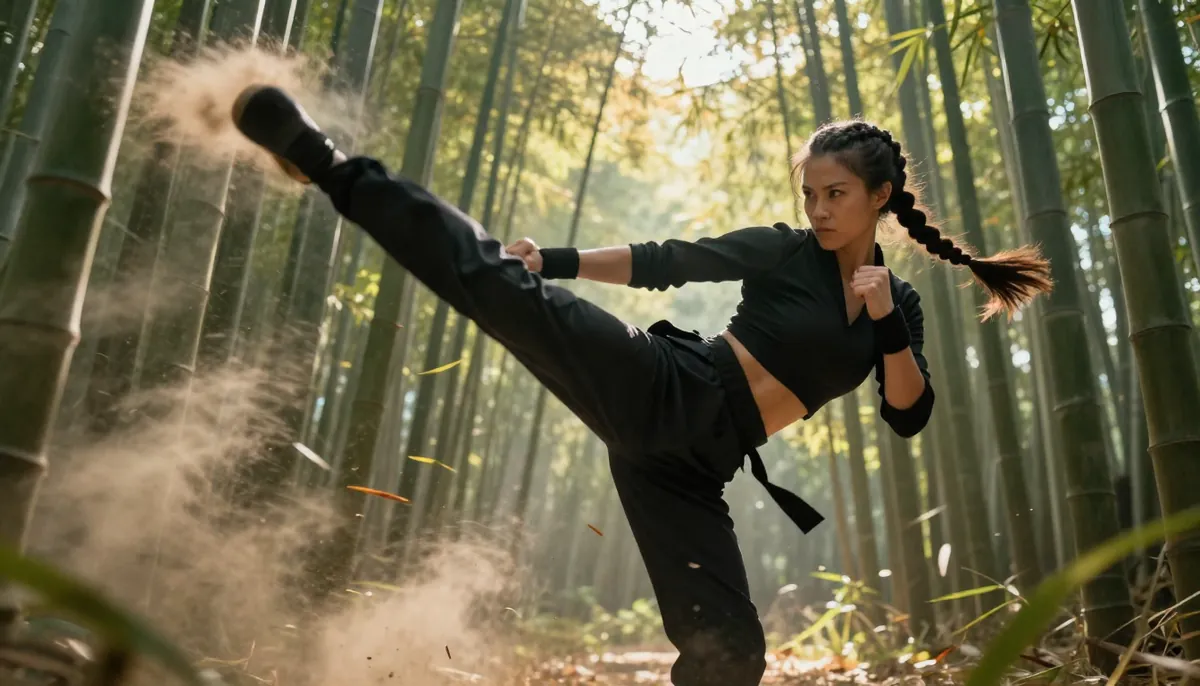
Kling 3.0 benchmark output — action sequence test at extended duration. The motion realism and temporal consistency remain strong even in longer clips.
For a detailed head-to-head analysis, see Seedance vs Kling: Complete Comparison.
4. Google Veo 3.1 — Best for Audio-Visual Integration
Developer: Google DeepMind Release: 2025–2026 Max Resolution: 4K (with upscaling) Max Duration: 8 seconds Input Modes: Text + Image
Veo 3.1 is Google's answer to the AI video generation race, and it brings one standout feature: native audio generation that rivals Seedance's implementation. The model generates synchronized sound effects, ambient audio, and dialogue that matches the visual content. If you are embedded in the Google ecosystem — using YouTube Studio, Google Workspace, or Google Cloud — Veo integrates smoothly.
What impressed us most was the audio quality. In our lip sync test, Veo produced natural-sounding dialogue with accurate mouth movements. Google's vast training data gives the model strong prompt understanding, and the 4K upscaling produces sharp output suitable for large screens.
Where it falls short: Availability is the biggest issue. Veo 3.1 requires a Google AI Premium subscription and is not available in all regions. The 8-second maximum duration is on the shorter side. Control options are limited compared to platforms like Seedance or Runway — there is no motion brush, no camera control system, and no video reference input. The model sometimes produces a "Google aesthetic" that can feel overly clean and slightly sterile.
Best for: YouTube creators who want AI-generated B-roll with matching audio. Google Workspace users who want seamless integration. Anyone who prioritizes audio-visual sync above all else.
| Dimension | Score |
|---|---|
| Quality | 9/10 |
| Motion | 7/10 |
| Consistency | 8/10 |
| Speed | 7/10 |
| Value | 6/10 |
| Overall | 7.8/10 |
5. Runway Gen-4 — Best for Professional Editing
Developer: Runway Release: 2025–2026 Max Resolution: 4K (with upscaling) Max Duration: 10 seconds Input Modes: Text + Image + Video
Runway has been in the AI video space longer than almost anyone, and Gen-4 reflects that maturity. The platform is not just a generator — it is a complete creative suite with a built-in video editor, Motion Brush for painting motion onto specific regions, advanced camera controls, and professional export options. If your workflow involves editing and post-production, Runway offers the smoothest experience.
What impressed us most was the Motion Brush tool. Being able to select a specific area of an image and define exactly how it should move gives a level of precision that prompt-only tools cannot replicate. The director mode with explicit camera path controls is also excellent for cinematographers.
Where it falls short: Runway is expensive. The free tier is highly limited, and professional plans start at $15/month with relatively low generation quotas. Quality can be inconsistent — some prompts produce stunning results while others show noticeable artifacts. The 10-second maximum duration is restrictive, and there is no native audio generation.
Best for: Professional video editors, post-production studios, and creators who need granular control over motion and camera. If you already use tools like After Effects or DaVinci Resolve and want AI to augment your workflow, Runway fits naturally.
| Dimension | Score |
|---|---|
| Quality | 8/10 |
| Motion | 8/10 |
| Consistency | 7/10 |
| Speed | 7/10 |
| Value | 6/10 |
| Overall | 7.5/10 |
6. Pika 2.0 — Best for Beginners
Developer: Pika Labs Release: 2025–2026 Max Resolution: 1080p Max Duration: 5 seconds Input Modes: Text + Image
Pika 2.0 has carved out a unique niche by being the most approachable AI video generator on the market. Where other platforms overwhelm with options, Pika keeps things simple. The interface is clean and intuitive. The Pikaffects system lets you apply fun transformations with one click — inflate objects, melt scenes, explode elements, or add cartoon physics. It is creative, playful, and genuinely fun to use.
What impressed us most was the onboarding experience. A complete beginner can sign up and generate their first video in under two minutes. The effect presets lower the barrier to entry dramatically — you don't need to learn prompt engineering to get interesting results.
Where it falls short: The quality ceiling is noticeably lower than Seedance, Sora, or Kling. Videos max out at 5 seconds, which limits practical use. Motion can feel somewhat artificial, especially for realistic scenes. If you need professional-grade output for commercial work, Pika will likely not meet your standards.
Best for: Beginners exploring AI video for the first time. Casual creators making social media content. Anyone who wants quick, fun results without a steep learning curve. Pika is also excellent for generating social media memes and short-form entertainment.
| Dimension | Score |
|---|---|
| Quality | 7/10 |
| Motion | 6/10 |
| Consistency | 7/10 |
| Speed | 8/10 |
| Value | 7/10 |
| Overall | 6.8/10 |
For a detailed head-to-head analysis, see Seedance vs Pika: Complete Comparison.
7. Luma Dream Machine — Best for 3D & Cinematic Content
Developer: Luma AI Release: 2025–2026 Max Resolution: 1080p Max Duration: 5 seconds Input Modes: Text + Image
Luma AI built its reputation on 3D understanding, and that expertise shows in Dream Machine. The platform excels at generating content with a strong sense of three-dimensional space — sweeping camera movements feel genuinely cinematic, objects have convincing depth, and physical environments look architecturally plausible. If you need establishing shots, landscape flybys, or any content where spatial awareness matters, Luma delivers.
What impressed us most was the nature landscape test. The drone flyover of a mountain lake was the most visually convincing of any platform — the parallax effect on foreground trees versus distant mountains was remarkably accurate. Camera movements feel smooth and intentional, not random.
Where it falls short: The feature set is relatively limited compared to competitors. No audio generation, no multi-modal input beyond text and a single image, and the 5-second duration cap is restrictive. The community is smaller, which means fewer tutorials, templates, and shared prompts to learn from. Human characters are noticeably weaker than environments.
Best for: Cinematic establishing shots, architectural visualization, 3D product environments, and landscape content. If you are making travel content or real estate videos, Luma's spatial understanding is a genuine advantage.
| Dimension | Score |
|---|---|
| Quality | 8/10 |
| Motion | 7/10 |
| Consistency | 7/10 |
| Speed | 7/10 |
| Value | 7/10 |
| Overall | 7.0/10 |
8. HaiLuo AI (MiniMax) — Best Budget Paid Option
Developer: MiniMax Release: 2025–2026 Max Resolution: 720p–1080p Max Duration: 6 seconds Input Modes: Text + Image
HaiLuo AI is the budget champion. Developed by MiniMax, it offers the lowest subscription price of any paid platform on this list while still producing usable output. The free tier is notably generous — you can generate a meaningful number of videos before hitting any paywall. For creators who are testing ideas, prototyping concepts, or simply cannot justify $15-20/month for an AI video tool, HaiLuo is a legitimate option.
What impressed us most was the value proposition. At roughly $4.99/month, you get a capable text-to-video and image-to-video generator that handles standard use cases adequately. The generation speed is also among the fastest we tested.
Where it falls short: Quality is visibly lower than premium competitors. Resolution defaults to 720p on the free tier and maxes at 1080p on paid plans. Motion can feel stiff, especially for human characters. Detail in complex scenes (reflections, fine textures, small text) is noticeably worse. There is no audio generation, no multi-modal input beyond basics, and limited camera control.
Best for: Budget-conscious creators, students, small businesses testing AI video for the first time, and anyone who needs high-volume generation at low cost. HaiLuo is also good for rapid prototyping where quality is secondary to speed.
| Dimension | Score |
|---|---|
| Quality | 6/10 |
| Motion | 6/10 |
| Consistency | 6/10 |
| Speed | 8/10 |
| Value | 9/10 |
| Overall | 6.5/10 |
9. Wan — Best Free Self-Hosted Option
Developer: Alibaba (Open Source) Release: 2025 Max Resolution: 1080p Max Duration: 5 seconds Input Modes: Text + Image
Wan is the only fully open-source option on this list, and that distinction matters enormously for a specific audience. Released by Alibaba under permissive licensing, Wan can be downloaded, self-hosted, and run on your own hardware with absolutely zero usage fees. No subscriptions, no credit limits, no API costs. If you have a capable GPU (minimum 24GB VRAM recommended), you can generate unlimited videos.
What impressed us most was the principle behind it. Open-source AI video generation democratizes access for researchers, indie developers, privacy-conscious organizations, and anyone in regions where commercial platforms are unavailable. The model weights are freely available, and the community has produced quality improvements and fine-tuned variants.
Where it falls short: Quality is a tier below commercial platforms — artifacts are more common, motion is less fluid, and character consistency is weaker. Setup requires technical knowledge (Python, CUDA, model weight management). Generation speed on consumer hardware is slow — a 5-second 720p clip can take 10-15 minutes on an RTX 4090. There is no web UI by default, though community projects have created them.
Best for: Technical users with GPU hardware. Privacy-sensitive projects where data cannot leave your network. Researchers who need to modify the underlying model. Unlimited generation needs where per-video cost must be zero.
| Dimension | Score |
|---|---|
| Quality | 6/10 |
| Motion | 6/10 |
| Consistency | 5/10 |
| Speed | 5/10 |
| Value | 10/10 |
| Overall | 6.2/10 |
10. Vidu (Shengshu) — Best for Anime & Stylized Content
Developer: Shengshu Technology Release: 2025–2026 Max Resolution: 1080p Max Duration: 8 seconds Input Modes: Text + Image
Vidu has found its sweet spot in stylized and anime-style content. While most AI video generators optimize for photorealism, Vidu's model produces exceptionally good results when you want artistic, animated, or stylized aesthetics. Anime characters, watercolor effects, oil painting animations, and graphic novel styles all look impressive. The platform also includes creative effect modes that go beyond standard generation.
What impressed us most was the style transfer test. Converting a realistic photo into an anime-style video produced the best result of any platform — clean lines, consistent art style, and motion that felt like actual animation rather than warped footage. The creative effects library adds genuine variety.
Where it falls short: Realistic content is noticeably weaker. If you need photorealistic human faces, product shots, or live-action-style footage, Vidu is not the right choice. The 8-second duration is limiting. The platform is less well-known outside Asia, which means English-language documentation and community resources are sparse. Pricing is mid-range but the generation quotas are relatively low.
Best for: Anime and manga creators. Artists who want to animate their illustrations. Stylized marketing content (especially for brands targeting younger audiences). Anyone who needs artistic video effects rather than photorealism.
| Dimension | Score |
|---|---|
| Quality | 7/10 |
| Motion | 7/10 |
| Consistency | 7/10 |
| Speed | 7/10 |
| Value | 7/10 |
| Overall | 6.9/10 |
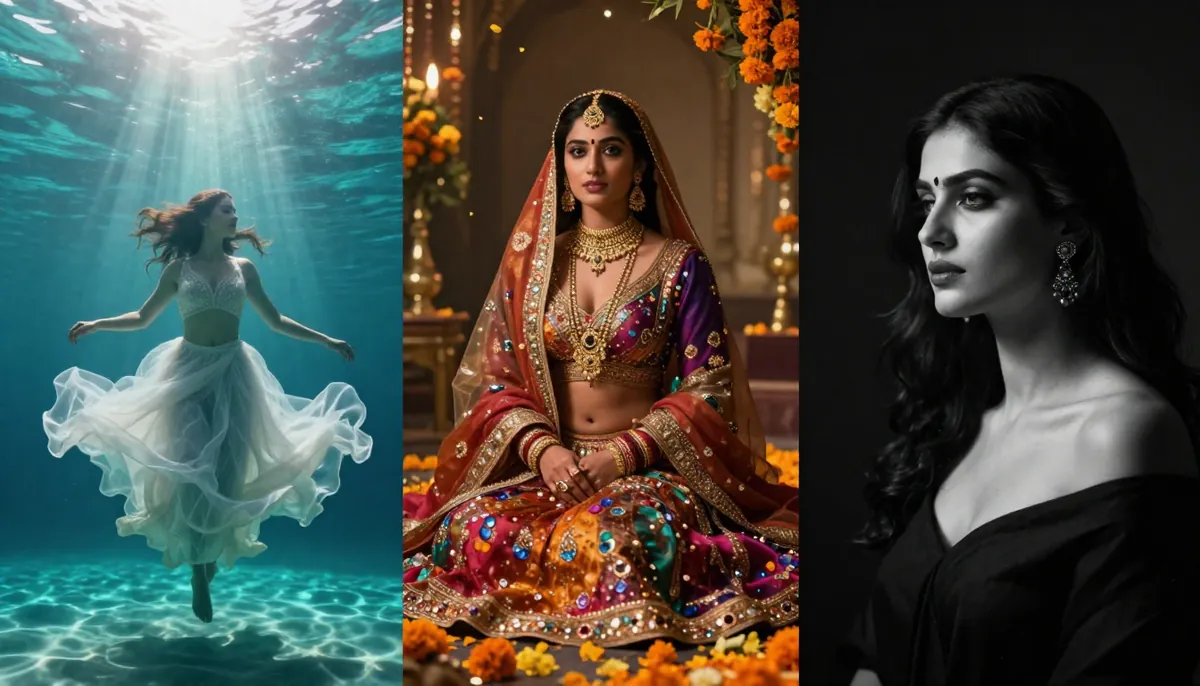
Output samples from Pika (playful effects), Luma (cinematic landscape), HaiLuo (budget generation), Wan (open-source), and Vidu (anime style).
Pricing Comparison: What Will You Actually Pay?
Pricing in the AI video space is confusing. Some platforms use monthly subscriptions. Others sell credit packs. Some hide the real cost behind ecosystem subscriptions (looking at you, Sora). Here is an honest breakdown of what you will actually pay.
| Tool | Free Tier | Starter Plan | Pro Plan | Enterprise | Est. Cost Per Video |
|---|---|---|---|---|---|
| Seedance 2.0 | Free credits (no CC) | ~$9.90/mo | ~$29.90/mo | Custom | ~$0.15–$0.50 |
| Sora 2 | None | $20/mo (ChatGPT Plus) | $200/mo (ChatGPT Pro) | N/A | ~$0.50–$2.00 |
| Kling 3.0 | Limited free credits | ~$6.99/mo | ~$14.99/mo | Custom | ~$0.08–$0.25 |
| Veo 3.1 | Very limited | $20/mo (AI Premium) | Included in plan | Enterprise | ~$0.40–$1.50 |
| Runway Gen-4 | 125 credits free | $15/mo (Standard) | $35/mo (Pro) | $95/mo (Unlimited) | ~$0.30–$1.00 |
| Pika 2.0 | 150 credits free | $10/mo | $60/mo | N/A | ~$0.10–$0.40 |
| Luma Dream Machine | 30 free/mo | $9.99/mo | $29.99/mo | N/A | ~$0.15–$0.50 |
| HaiLuo AI | 10 free/day | ~$4.99/mo | ~$14.99/mo | N/A | ~$0.05–$0.15 |
| Wan | Fully free (self-host) | N/A | N/A | N/A | ~$0.01–$0.05 (electricity) |
| Vidu | Limited free | ~$9.99/mo | ~$29.99/mo | Custom | ~$0.15–$0.50 |
Key Pricing Insights
Best value for money: Kling 3.0 at $6.99/month delivers an incredible quality-to-price ratio, especially considering the 2-minute maximum duration. HaiLuo AI at $4.99/month is even cheaper but with noticeably lower quality.
Hidden costs to watch for: Sora 2 requires a ChatGPT Plus subscription ($20/mo) that you may already have, but the video generation quota within that subscription is limited. Running out of fast generations means either waiting or upgrading to the $200/mo Pro tier. Veo 3.1 is similarly bundled into Google's AI Premium subscription.
Credit packs vs. subscriptions: Most platforms offer both. Subscriptions are better for regular users. Credit packs are better if you generate videos infrequently. Seedance and Kling both offer pay-as-you-go credit purchases alongside subscriptions.
The truly free options: Only Wan is genuinely free with no limits (self-hosted). Seedance offers meaningful free credits without requiring a credit card. HaiLuo's 10 free generations per day is generous for casual use. Everything else either has a very limited free tier or none at all.
For a detailed guide on maximizing free AI video generation, see Seedance Free: Complete Guide.

Monthly subscription pricing across all 10 platforms. Note that cost-per-video varies significantly based on resolution, duration, and generation settings.
Which AI Video Generator Is Right for You?
The best AI video generator is the one that matches your specific workflow, budget, and creative needs. There is no universal "best" — only the best for you. Here is our decision framework.
By Use Case
Social media content (TikTok, Reels, Shorts) Go with Seedance 2.0. The combination of high visual quality, fast turnaround, and native audio means you can produce scroll-stopping content without post-production. The image-to-video workflow is perfect for turning product photos into dynamic clips. Learn how to use Seedance for social media content.
Long-form storytelling and short films Go with Kling 3.0. The 2-minute maximum duration is unmatched. You can tell a complete story in a single generation. The low price means you can iterate rapidly without worrying about costs.
Text-only creative projects Go with Sora 2. If you are a writer who thinks in words rather than images, Sora's language understanding will translate your vision more faithfully than any other tool.
Professional video production and post-production Go with Runway Gen-4. The built-in editor, Motion Brush, and professional export options integrate into existing production workflows better than any competitor.
E-commerce and product marketing Go with Seedance 2.0. Feed in product photos as references, add a text prompt describing the desired scene, and get commercial-grade video output. The character consistency engine keeps brand ambassadors looking identical across multiple clips. See real marketing examples.
YouTube content creation Go with Veo 3.1 if you are already in the Google ecosystem, or Seedance 2.0 if you need more flexibility. Both offer native audio, which is critical for YouTube content where silence is a dealbreaker.
Budget-constrained projects Go with HaiLuo AI for paid or Wan for free self-hosted. Both will get the job done at minimal cost, with the trade-off being lower quality output.
Anime and stylized content Go with Vidu. It is purpose-built for non-photorealistic styles and produces the most consistent anime and artistic output of any platform we tested.
Beginner exploration Go with Pika 2.0. The interface is the simplest, the effects are fun, and you will learn what AI video can do without getting overwhelmed by options.
High-volume production Go with Seedance 2.0. The Business plan supports batch generation across all input types, ideal for teams producing content at scale.
By Priority
| Your Top Priority | Recommended Tool | Runner-Up |
|---|---|---|
| Visual quality | Seedance 2.0 | Sora 2 |
| Video duration | Kling 3.0 | Sora 2 |
| Lowest price | Wan (free) | HaiLuo AI |
| Easiest to use | Pika 2.0 | Seedance 2.0 |
| Audio generation | Seedance 2.0 | Veo 3.1 |
| Professional tools | Runway Gen-4 | Seedance 2.0 |
| Character consistency | Seedance 2.0 | Kling 3.0 |
| Creative/abstract | Sora 2 | Vidu |

Use this decision flowchart to find the right AI video generator for your specific needs. Start with your primary use case and follow the branches.
Tips for Getting the Best Results from Any AI Video Generator
Regardless of which platform you choose, these practices will improve your output quality across the board.
Write Better Prompts
The single biggest factor in output quality is your prompt. A well-structured prompt typically includes:
- Shot type — Close-up, wide shot, medium shot, drone aerial
- Subject description — Who or what is in the frame
- Action — What is happening (be specific about motion)
- Environment — Where the scene takes place
- Lighting — Time of day, light source, mood
- Style modifiers — Cinematic, documentary, anime, etc.
For an in-depth guide to writing effective AI video prompts, see Seedance Prompt Guide & Examples.
Use Reference Images When Available
If your chosen platform supports image input (most do), always provide a reference image. This eliminates ambiguity and gives the model a concrete starting point. A clear, well-lit reference photo will consistently produce better results than even the most detailed text prompt alone.
Iterate Rapidly
AI video generation is inherently stochastic — the same prompt will produce slightly different results each time. Generate 3-5 versions and select the best. This is faster and more effective than spending 20 minutes perfecting a single prompt. Budget your credits accordingly.
Match the Tool to the Task
Do not force a single tool to do everything. Use Seedance for quality and multi-modal work. Use Kling for long-duration needs. Use Wan for bulk prototyping. The most effective creators in 2026 use multiple AI video generators as part of their toolkit.
For more strategies on using AI video for marketing and social media, see AI Video Generator for Marketing & Social Media.
The State of AI Video Generation in 2026
The AI video generation landscape has matured significantly since 2024. A few notable trends:
Quality has plateaued at the top. The gap between the best platforms (Seedance, Sora, Kling, Veo) is narrower than ever. The differentiators are no longer raw quality but rather workflow, input flexibility, duration, and pricing.
Audio integration is the new frontier. In 2025, AI-generated video was silent by default. In 2026, native audio — sound effects, ambient noise, synchronized dialogue — is becoming a baseline expectation. Seedance and Veo lead here, but expect every major platform to add audio generation within the next 12 months.
Open source is catching up. Wan proved that open-source video generation is viable. The gap between open and commercial models is shrinking. Within 1-2 years, self-hosted options may be good enough for many commercial use cases.
Pricing is compressing. Competition has driven prices down across the board. What cost $50/month in early 2025 now costs $10-15/month. This trend will continue as models become more efficient.
For an in-depth analysis of where AI video technology is headed -- including real-time generation, 3D integration, and open-source acceleration -- read our AI video generation trends for 2026 and beyond.
Frequently Asked Questions
What is the best AI video generator in 2026?
Based on our testing, Seedance 2.0 is the best overall AI video generator in 2026 due to its quad-modal input system, native audio with lip sync, 2K resolution output, and strong character consistency. However, Kling 3.0 leads for long-duration content, Sora 2 leads for text-only workflows, and Runway Gen-4 leads for professional editing. The best choice depends on your specific needs.
What is the best free AI video generator?
Wan by Alibaba is the best truly free option — it is open-source and can be self-hosted with no usage limits. For cloud-based free options, Seedance 2.0 offers generous free credits to new users without requiring a credit card, and HaiLuo AI provides 10 free generations per day.
Which AI video generator has the best quality?
Seedance 2.0 and Sora 2 tied for the highest visual quality scores in our testing (9/10). Seedance has a slight edge in resolution (2K vs 1080p) and in scenarios involving reference images, while Sora excels in creative interpretation of complex text prompts.
Which is better, Seedance or Sora?
It depends on your workflow. Seedance 2.0 is better if you work with reference images, need audio generation, want lip sync, or prefer multi-modal input. Sora 2 is better if you work purely from text prompts, want longer single clips (20s vs 15s), or are already in the OpenAI ecosystem. For a detailed comparison, read our Seedance vs Sora analysis.
Can AI video generators create videos with sound?
Yes, but only a few. As of early 2026, Seedance 2.0 and Google Veo 3.1 both support native audio generation including sound effects, ambient noise, and synchronized dialogue. Pika 2.0 offers limited sound effect generation. Most other platforms (Sora, Kling, Runway, Luma) output silent video that requires separate audio editing.
What is the cheapest AI video generator?
Wan is completely free if you self-host. Among paid platforms, HaiLuo AI starts at approximately $4.99/month, followed by Kling 3.0 at approximately $6.99/month. Both offer significantly lower pricing than competitors like Sora ($20/month) or Runway ($15/month).
Are there open-source AI video generators?
Yes. Wan by Alibaba is the most capable open-source AI video generator available in 2026. It supports text-to-video and image-to-video generation with 1080p output. The model weights are freely available for download. You will need a GPU with at least 24GB VRAM for reasonable performance. Community-created web interfaces make it accessible without command-line knowledge.
Which AI video generator is best for marketing?
Seedance 2.0 is our top recommendation for marketing use cases. The image-to-video workflow lets you turn product photos into dynamic ads. Character consistency ensures brand ambassadors look identical across campaigns. Native audio with lip sync supports multilingual marketing in eight languages. The Seedance pricing plans include options suitable for both individual creators and marketing teams. See our guide on AI Video for Marketing & Social Media for strategies and examples.
Conclusion: Our Final Verdict
Here is a one-line summary for each tool:
- Seedance 2.0 — The most versatile and complete platform in 2026. Best overall.
- Sora 2 — The best text-to-video model, held back by price and limited input modes.
- Kling 3.0 — Unbeatable for long-duration video at a budget price point.
- Veo 3.1 — Google's strong contender with excellent audio integration.
- Runway Gen-4 — The professional's choice with the best built-in editing tools.
- Pika 2.0 — The most approachable option for beginners and casual creators.
- Luma Dream Machine — Quietly excellent for 3D and cinematic establishing shots.
- HaiLuo AI — Proof that decent AI video does not have to be expensive.
- Wan — The open-source champion for self-hosters and privacy-focused users.
- Vidu — The go-to platform for anime, stylized art, and non-photorealistic content.
The AI video generation space is evolving rapidly. The rankings in this article reflect the state of the market as of February 2026. We will update this comparison as new models and features are released.
Ready to Start Creating?
If you are looking for the best all-around AI video generator in 2026, start with Seedance 2.0. Free credits are available for every new user — no credit card required.
Recommended Reading
- What Is Seedance? Complete Guide
- How to Use Seedance: Step-by-Step
- Seedance Prompt Guide & Examples
- Seedance Free: Maximize Your Free Credits
- Seedance vs Sora: Detailed Comparison
- Seedance vs Kling: Detailed Comparison
- AI Video for Marketing & Social Media
- Text to Video AI: Complete Guide
- Free AI Video Generators 2026
