
Free tool, works in your browser

TikTok Safe Zone Checker

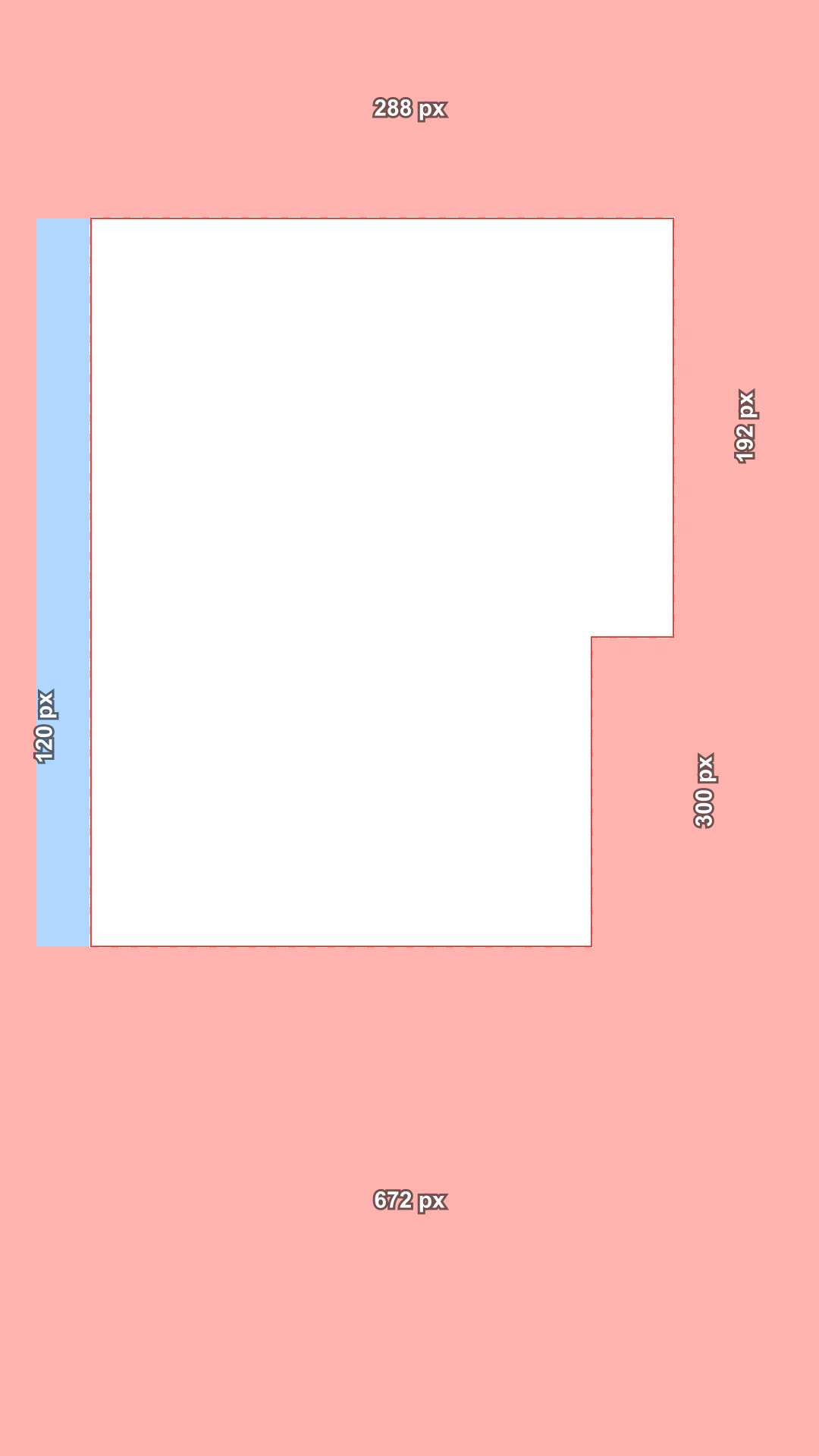
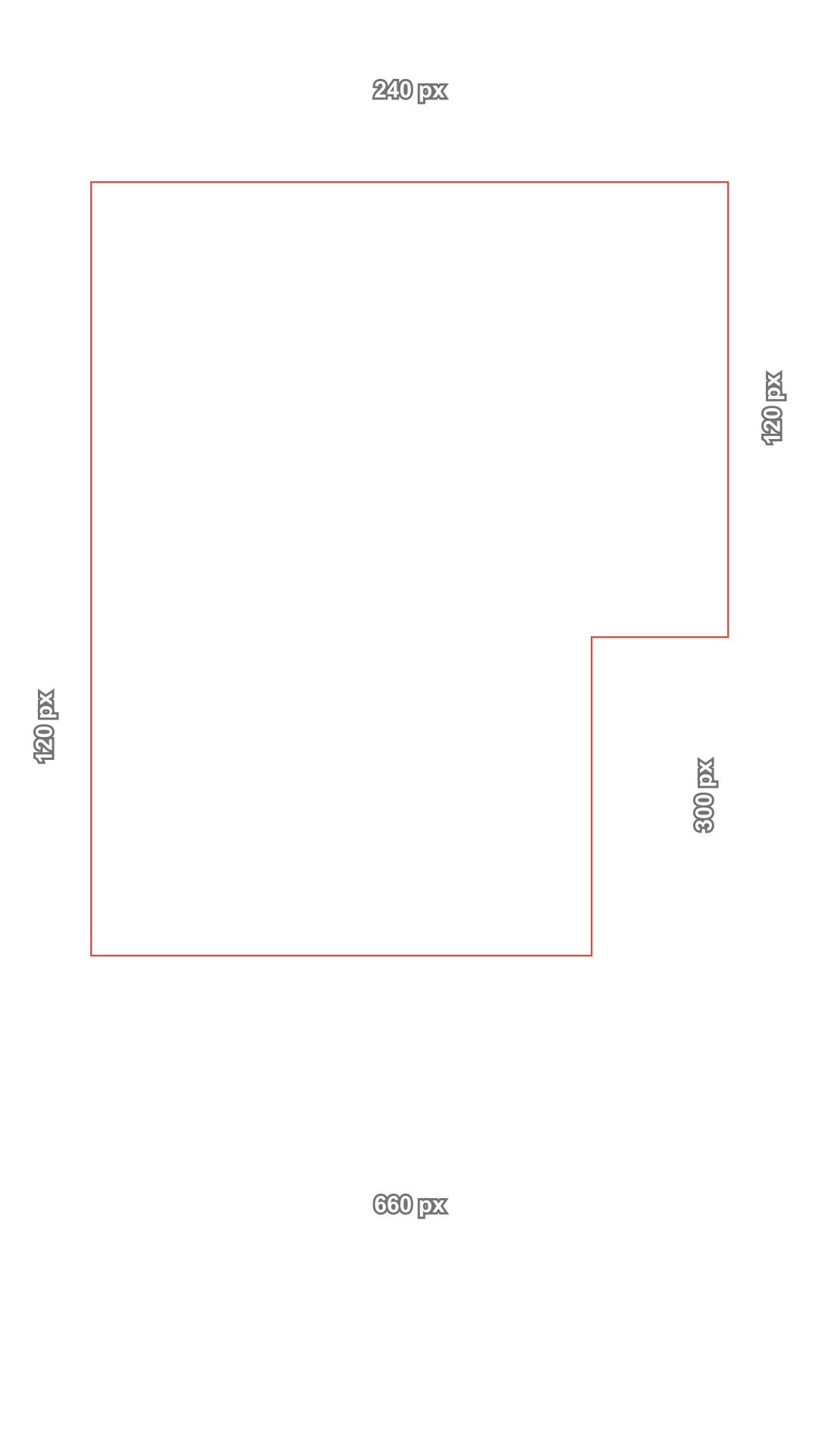
The TikTok safe zone on a 1080 × 1920 video starts 240 px below the top and ends 660 px above the bottom, with 120 px at each side and a 300 px wide buttons column on the right from y 840 down. Drop your video or a frame to see what the app covers, mark your captions, and download a free transparent template.

Platform

Stays in your browser. Nothing is uploaded.

TikTok placement
Caption length
TikTok's current ad file (2025), one zone for every caption.
Top
240 px
Bottom
660 px
Left
120 px
Right
120 px
Buttons
300 px from y 840

TikTok Ads Help: Auction In-Feed Ads (safe zone file, 2025) · Checked October 17, 2026

These are the platforms' own safe zones for ads. None of them publishes numbers for regular posts, so the ad zones are the safest guide for both.

240 px660 px

Choose or drop a vertical video or image

Or use the overlay as it is. Nothing is uploaded.

Drag on the frame to mark text, a logo or a face. On a phone, tap Add a caption box.

Show
The sketch shows where buttons and text usually sit. It is an illustration, not the real app.

Marked areas

Drag on the frame to mark a caption, a logo or a face, and see if each one is safe on every platform.

    Download

    Template style
    Template size

    Transparent PNG, no watermark. Put it on the top track in CapCut, Premiere or DaVinci, or as the top layer in Canva, and hide it before you export.

    • 240 / 660 / 120 pxTop, bottom and sides, measured from TikTok's own safe zone file (April 2025).
    • Covered or croppedRed sits under the app's buttons and text; blue may be cut off on some phones.
    • Captions, logos, facesMark them and get the exact move that makes each one safe.
    • PrivateYour video stays in this browser. Nothing is uploaded.

    Check the TikTok safe zone in 3 steps

    Drop a clip, mark what matters, download what you need. No account, no upload.

    1. Sample vertical frame with the safe zone overlay
      PlatformTikTokReelsShortsChoose or drop a vertical video or imageNothing is uploaded
      1

      Drop your video or frame

      Drag in an MP4, MOV, PNG or JPG, or start with the empty 9:16 frame. Scrub through a video to check every moment, with the safe zone drawn on top.

    2. Sample vertical frame with the safe zone overlay
      TikTok: CoveredReels: CoveredShorts: CoveredMove up 310 pxMove it
      2

      Mark your captions

      Drag a box around each caption, logo or face. The checker tells you if it is safe on TikTok, Reels, Stories and Shorts, and how many pixels to move it.

    3. Download template: TikTok feedAll templates (ZIP)
      3

      Download the template

      Save a transparent template in 1080 × 1920 or 2160 × 3840, the whole pack as a ZIP, or the checked frame with the overlay to share with your team.

    A TikTok safe zone checker built on TikTok's own file

    No guessed margins. Every line on the overlay comes from a file TikTok publishes, and the page tells you which one.

    Every number has a source

    TikTok does not print pixel values in its help text; it links safe zone files. We measured the current In-Feed file from April 2025 and draw exactly that: 240 px at the top, 660 px at the bottom, 120 px at the sides and a buttons column 300 px wide from y 840.

    TopBottomSidesButtons
    TikTok240660120300 @ y 840
    Reels26967265227 @ y 1152
    Stories26967265227 @ y 1152
    Shorts28867248 / 192·
    All platforms288672120 / 192300 @ y 840

    Covered or cropped, not one vague box

    TikTok's file uses two colors. Red marks what the interface may cover: the top tabs, the caption and account name, the buttons. Blue marks the 120 px side bands that some phones crop. The checker keeps that difference.

    Sample vertical frame with the safe zone overlay
    Covered by the appMay be croppedSafe area

    Longer captions, smaller safe zone

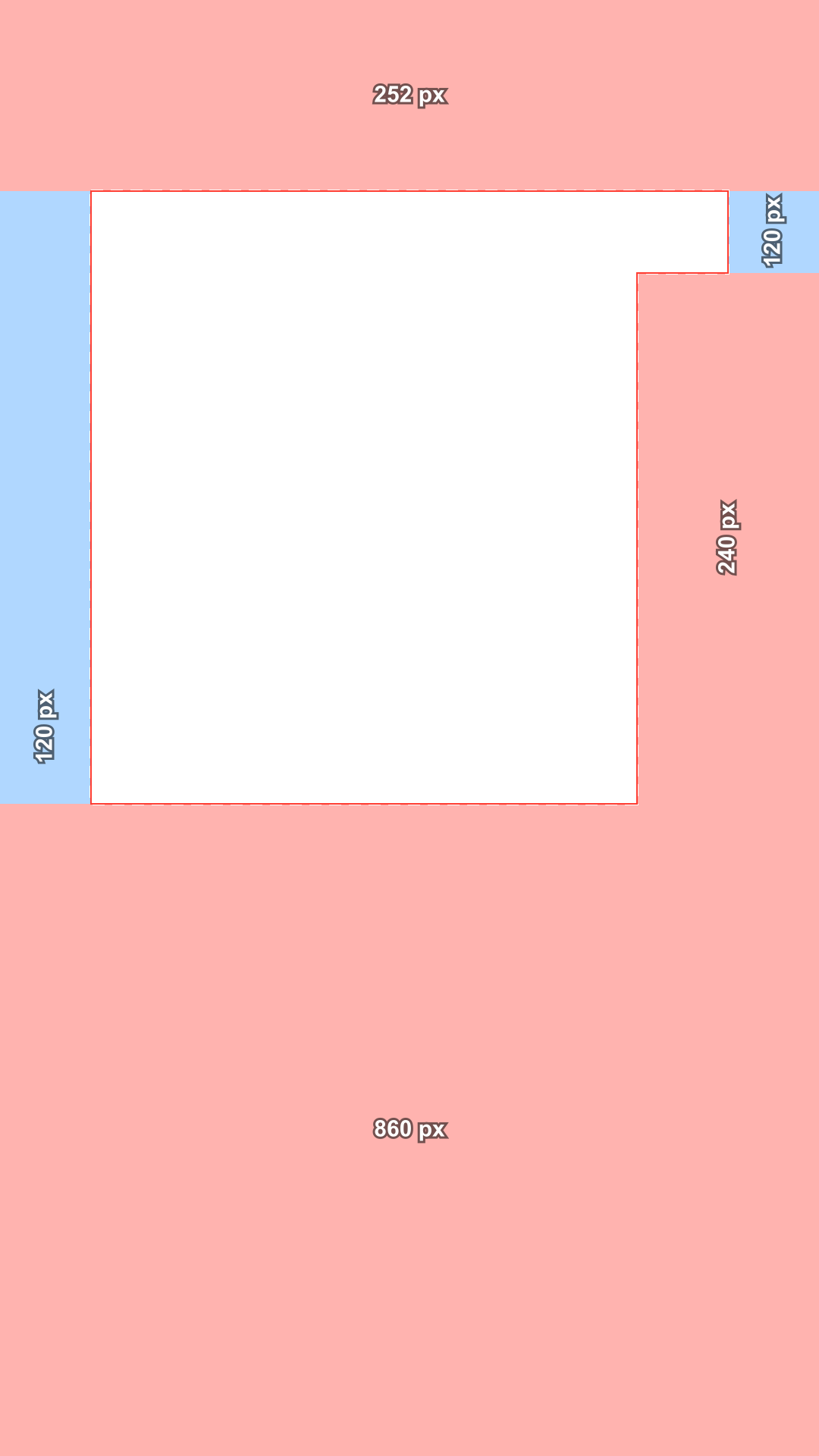
    TikTok says the longer the caption, the smaller the safe zone. Pick 1 to 4 caption lines and the bottom margin grows from 704 px to 860 px, taken from TikTok's 2021 files that were made for exactly this. Those files also start the buttons column higher, at y 360.

    2025 file
    660 px
    1 line
    704 px
    2 lines
    756 px
    4 lines
    860 px

    Mark text and get the move

    Drag a box around a caption, a logo or a face. Each box shows whether it is safe, which part of the app covers it, and the shortest move to fix it, such as move up 310 px. One click moves it.

    Sample vertical frame with the safe zone overlay
    1. Text: CoveredMove up 310 px2. Text: Safe

    One check for TikTok, Reels and Shorts

    Posting the same clip everywhere? The all platforms view combines TikTok's zone with Meta's Reels zone and Google's Shorts zone, so whatever stays inside is safe on all three.

    Sample vertical frame with the safe zone overlay
    TikTokReelsShortsSafe everywhere: 768 × 960 px, minus the buttons corner

    Free overlay templates

    Transparent PNG overlays with nothing in the safe area: no tint, no logo, no watermark. Shaded or lines only, in 1080 × 1920 or 2160 × 3840, for CapCut, Premiere, DaVinci or Canva.

    Transparent PNG, 1080 × 1920, no watermark

    Free TikTok safe zone templates (PNG)

    Ready to drop on the top track of your editor. Each file is 1080 × 1920, transparent where your content is safe and tinted where the app covers it.

    • TikTok feed safe zone template, shaded, transparent PNGTikTok feedT 240 · B 660 · L 120 · R 120 · shadedDownload PNG
    • TikTok feed safe zone template, lines, transparent PNGTikTok feedT 240 · B 660 · L 120 · R 120 · linesDownload PNG
    • TikTok, 4 line caption safe zone template, shaded, transparent PNGTikTok, 4 line captionT 252 · B 860 · L 120 · R 120 · shadedDownload PNG
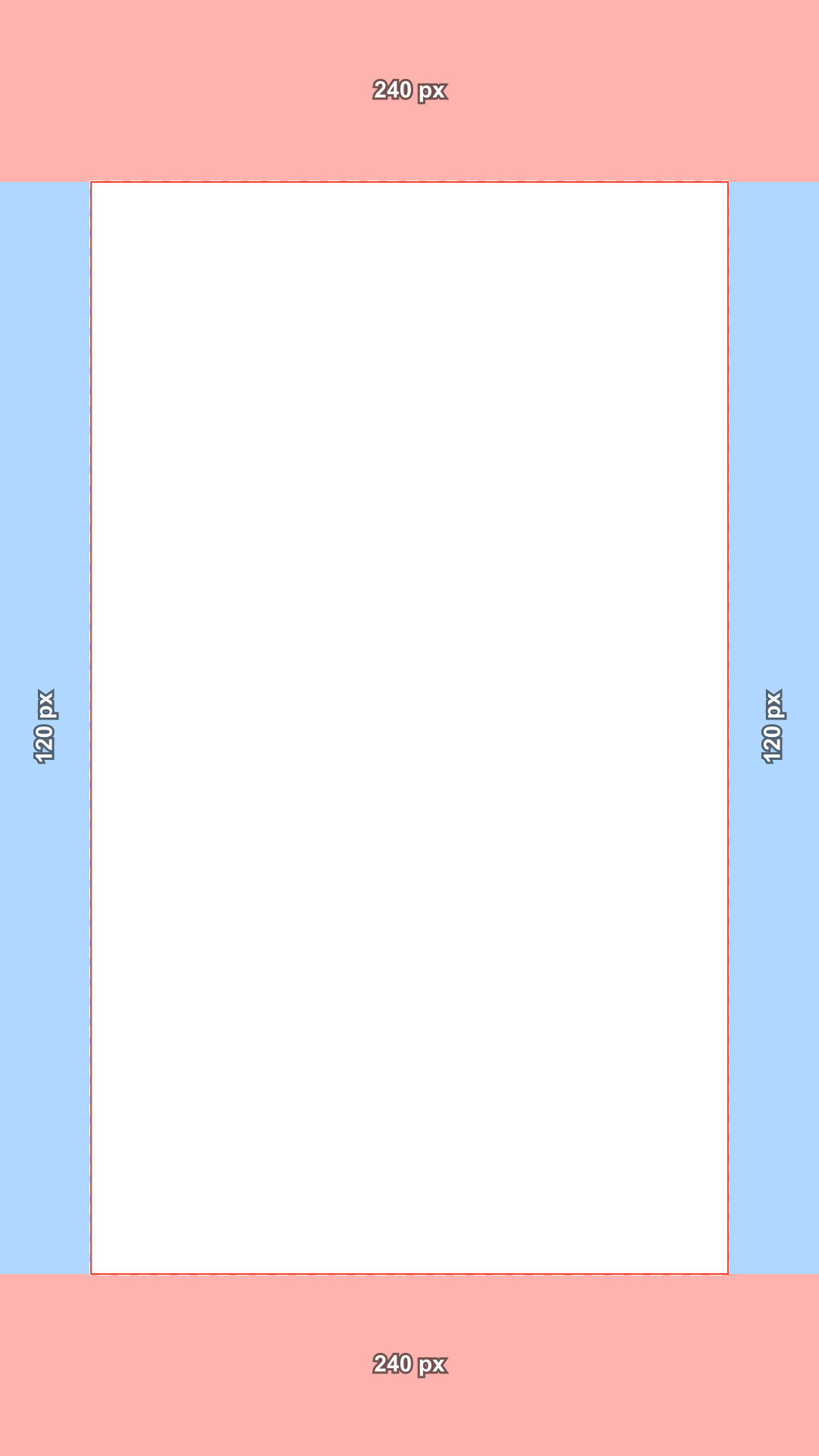
    • TikTok TopView safe zone template, shaded, transparent PNGTikTok TopViewT 240 · B 240 · L 120 · R 120 · shadedDownload PNG
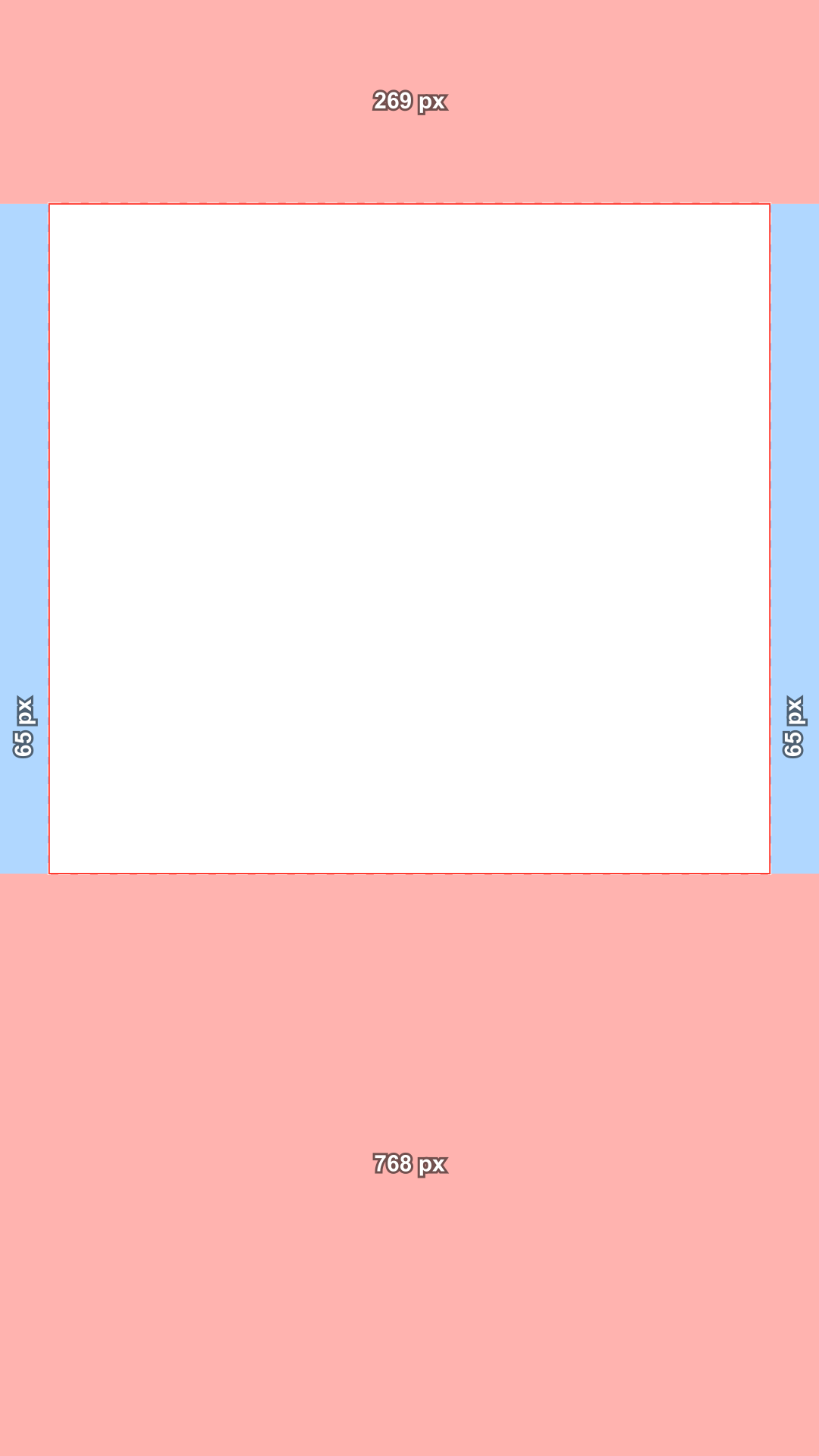
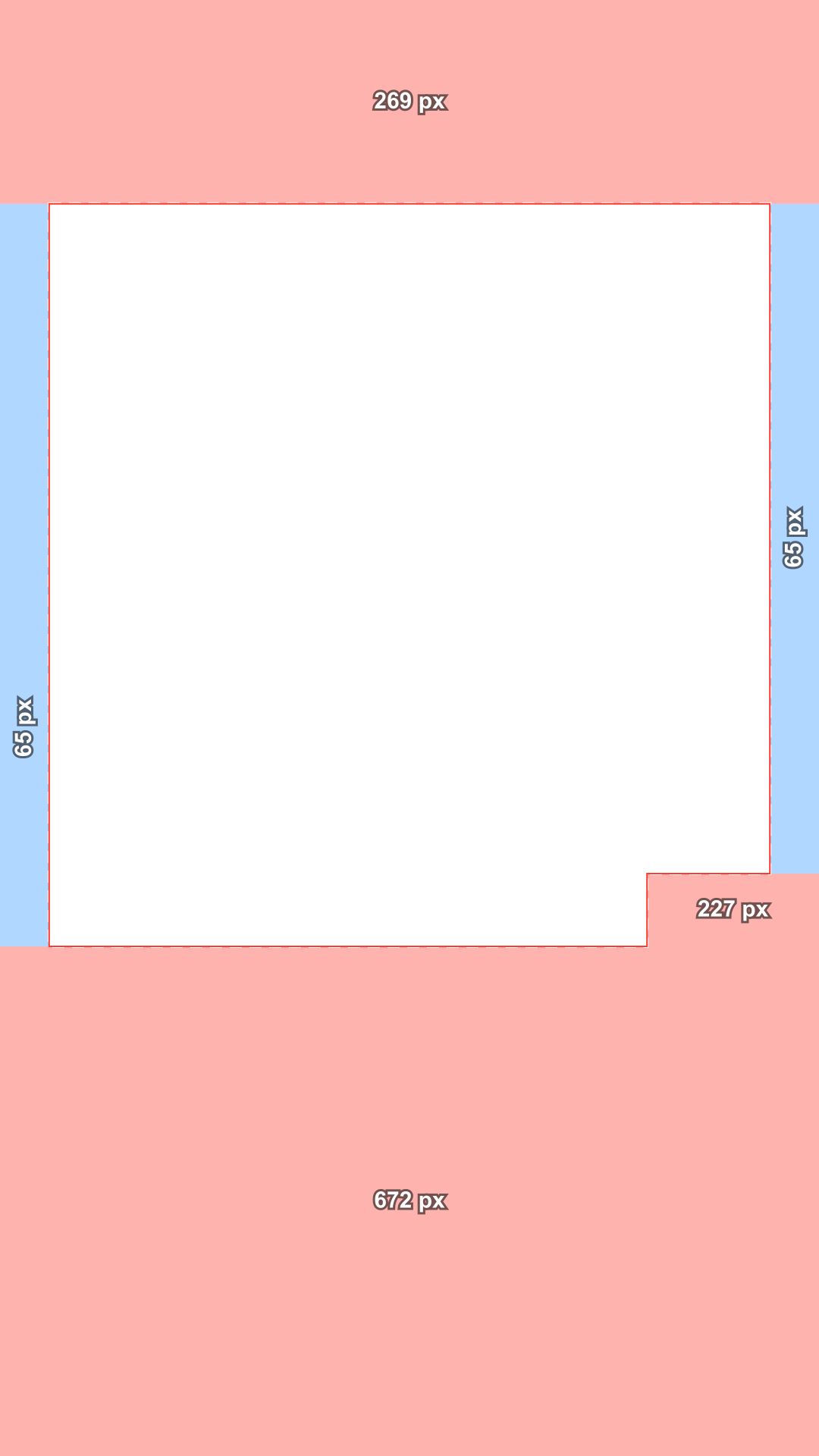
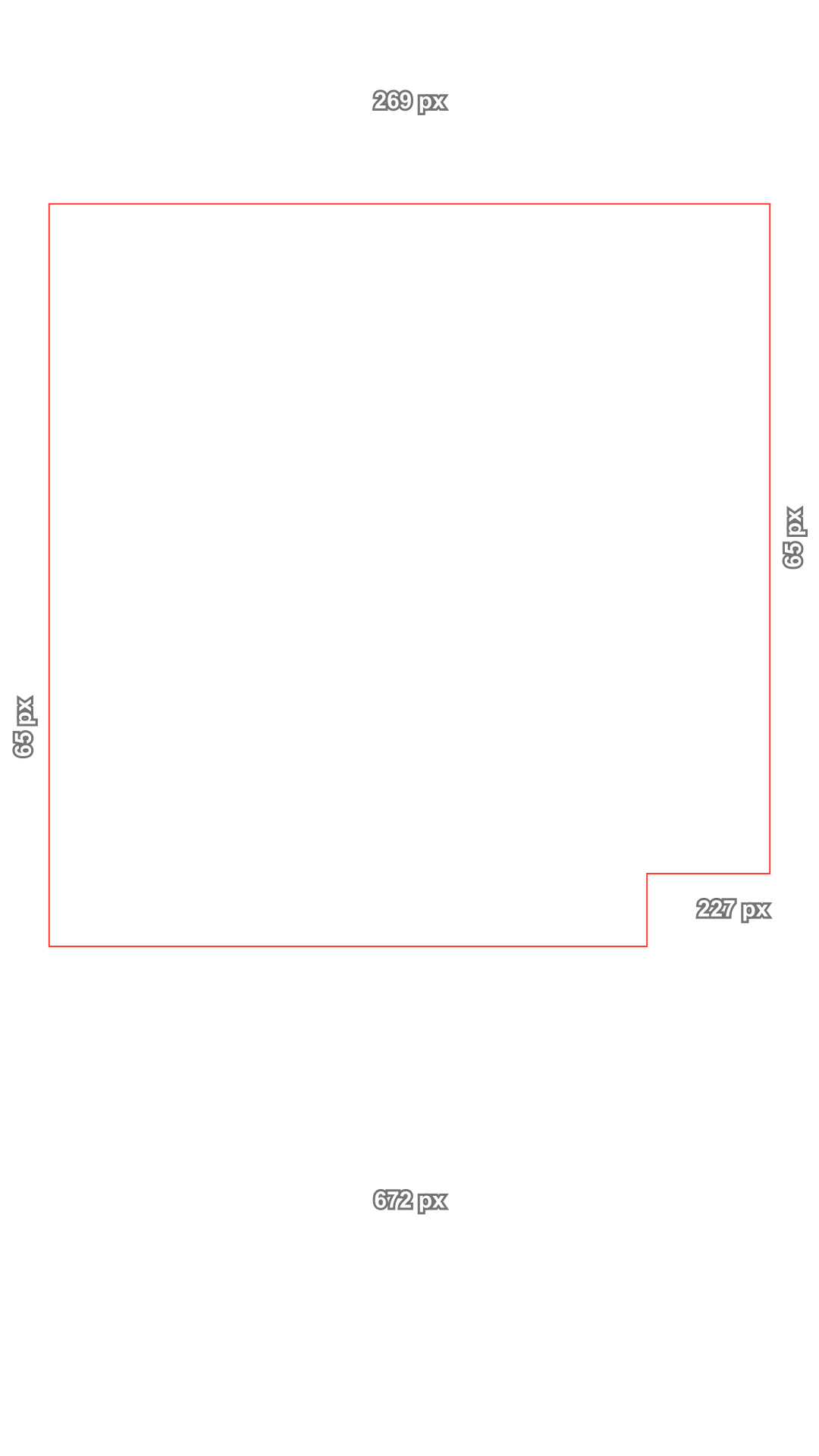
    • Instagram Reels safe zone template, shaded, transparent PNGInstagram ReelsT 269 · B 672 · L 65 · R 65 · shadedDownload PNG
    • Instagram Reels safe zone template, lines, transparent PNGInstagram ReelsT 269 · B 672 · L 65 · R 65 · linesDownload PNG
    • Reels ad with disclaimer safe zone template, shaded, transparent PNGReels ad with disclaimerT 269 · B 768 · L 65 · R 65 · shadedDownload PNG
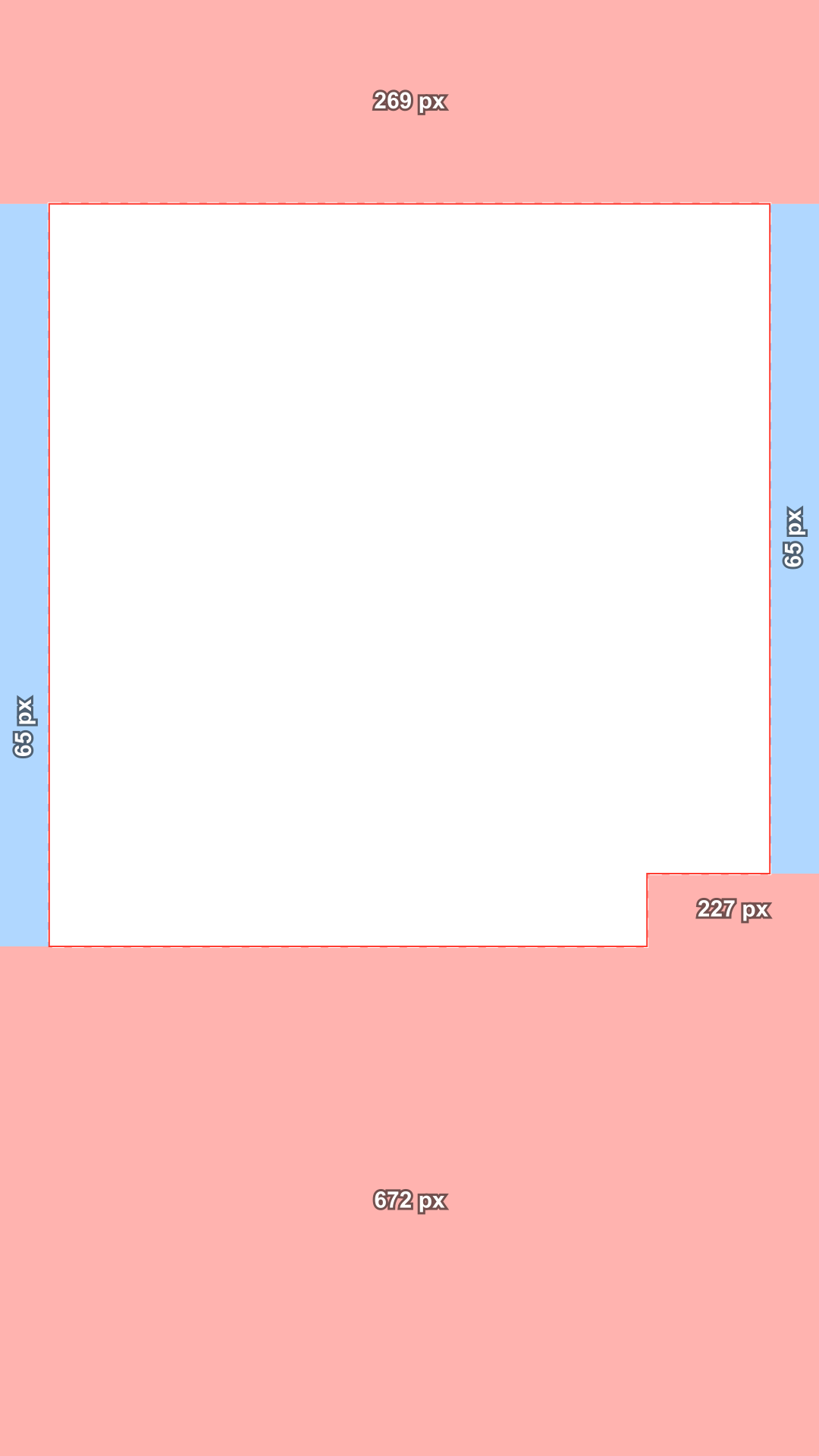
    • Instagram Stories safe zone template, shaded, transparent PNGInstagram StoriesT 269 · B 672 · L 65 · R 65 · shadedDownload PNG
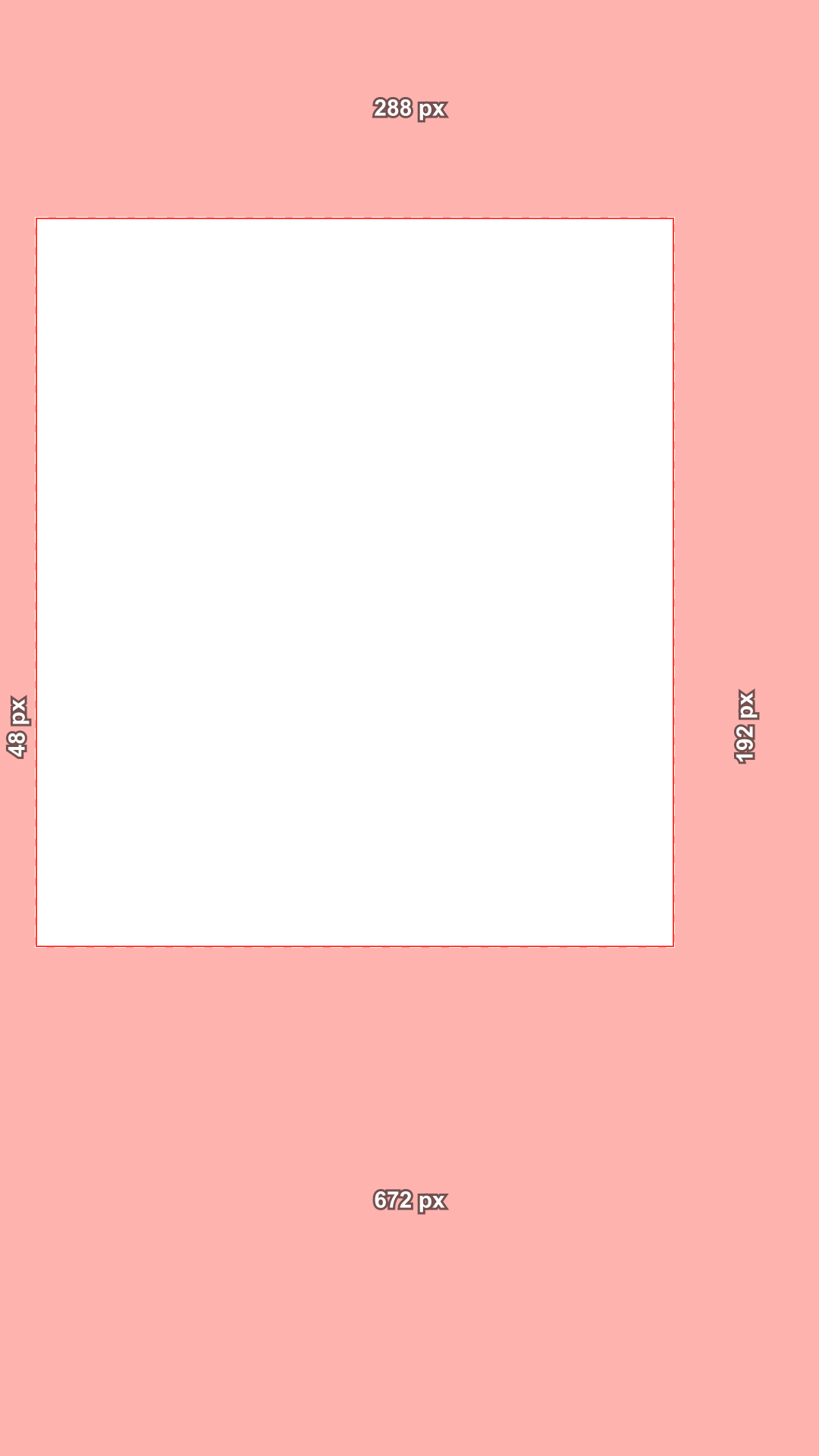
    • YouTube Shorts safe zone template, shaded, transparent PNGYouTube ShortsT 288 · B 672 · L 48 · R 192 · shadedDownload PNG
    • All platforms safe zone template, shaded, transparent PNGAll platformsT 288 · B 672 · L 120 · R 192 · shadedDownload PNG

    T, B, L and R under each file are the top, bottom, left and right margins in px. Need 2160 × 3840 or the lines only style? Make it with the checker above, or download every template as one ZIP.

    Guide: the TikTok safe zone in 2026

    The official numbers, what they mean, why sites disagree, and how to use a template while you edit.

    What is the TikTok safe zone?

    The TikTok safe zone is the part of a vertical video that the app does not cover with its own interface. Outside it, the top tabs, your caption, your account name and the buttons for likes, comments and shares sit on top of the picture, and anything you put there can be hidden.

    TikTok publishes the safe zone as files in its Ads Help Center rather than as numbers in text. Measured on a 1080 × 1920 frame, the current In-Feed file from April 2025 gives these margins:

    • Top: 240 px (12.5%)
    • Bottom: 660 px (34.4%)
    • Left and right: 120 px each, which some phones may crop
    • Buttons column: the right 300 px, from y 840 to the bottom
    • Safe area: 840 × 1020 px, minus the buttons corner
    TopBottomSidesButtonsBasis
    TikTok, Feed240660120300 @ y 840TikTok file, 2025
    TikTok, 4 lines252860120240 @ y 360TikTok file, 2021
    TikTok, TopView240240120·TikTok file, 2025
    Reels / Stories26967265227 @ y 1152Meta text
    Reels, disclaimer26976865·Meta text
    Shorts28867248 / 192·Google file

    Covered by the app or cropped by the phone

    TikTok's file draws two kinds of unsafe area. The red zone may be blocked by interface elements. The blue zone, the 120 px at each side, may be cropped depending on the device, because many phones are taller and narrower than 9:16.

    In practice, keep text, logos and faces out of both. If something has to sit near an edge, the blue band is the lesser risk: it is often still visible, while the red zone sits under the interface whenever the interface is shown.

    Sample vertical frame with the safe zone overlay
    Covered by the appMay be croppedSafe area

    How caption length changes the safe area

    TikTok's help text says it plainly: the longer the caption, the smaller the safe zone. A short caption takes one or two lines over the bottom of the video; a long one can take up to four lines, the most TikTok displays.

    The current file has a single size. TikTok's 2021 files were drawn for each caption length, with a bottom margin of 704 px for one line, 756 px for two, 808 px for three and 860 px for four. They also keep 252 px at the top and run a 240 px buttons column from y 360. If you write long captions, check your video against the four line version.

    2025 file
    660 px
    1 line
    704 px
    2 lines
    756 px
    4 lines
    860 px

    Why TikTok safe zone numbers online disagree

    Search online and you will find bottom margins anywhere from about 235 to 864 px. We measured 19 tools and templates in October 2026: most never say where their numbers come from, several draw something different from what they state, and many leave less room at the bottom than TikTok's own file.

    Some of the confusion has simple causes. Numbers like 160, 440 and 80 are the same file measured on a 720 × 1280 frame. Values such as 252 at the top and a buttons column from y 360 come from TikTok's older 2021 files. And some guides measured the TikTok website instead of the app, which has a different layout.

    Topseen 108 to 269 px · official 240
    Bottomseen 235 to 864 px · official 660
    Sidesseen 0 to 147 px · official 120
    Buttons columnseen 140 to 300 px · official 300
    TikTok, px on a 1080 × 1920 frame. Ranges from 19 safe zone tools and templates we measured on October 17, 2026; the blue mark is TikTok's own file.

    How to use a TikTok safe zone template while you edit

    A safe zone overlay works in any editor that supports transparent PNG files. Put it above everything else, place your captions and logos where the overlay is clear, then hide or delete the overlay before you export, so it does not end up in your video.

    • CapCut: add the PNG as an overlay, stretch it to the full frame and lock it.
    • Premiere Pro or DaVinci Resolve: put the PNG on the top video track, set the sequence to 1080 × 1920 and turn the track off before export.
    • Canva: use the PNG as the top layer of a 1080 × 1920 design and remove it before you download.
    • Check again with the checker above, using a frame from the finished video.
    V3 · templateV2 · captionsV1 · videoTemplate on the top track, captions below it, video at the bottom. Hide the template track before you export.

    Ads, regular posts and other apps

    The zone in these files is published for ads, and TikTok has no separate file for regular posts. Its Creator Academy only asks creators to keep everything inside the safe zone and away from the buttons, so the ad file is the best guide for both. For the first 3 seconds of a TopView ad, the file keeps only 240 px at the top and at the bottom and 120 px at the sides, with no buttons column.

    Reels and Shorts cover the frame in other places. Meta asks for 14% at the top, 35% at the bottom and 6% at the sides; Google's vertical template keeps 288 px at the top, 672 px at the bottom, 48 px on the left and 192 px on the right. Switch platforms in the checker to compare, or use the all platforms view.

    Sample vertical frame with the safe zone overlay
    TikTok
    Sample vertical frame with the safe zone overlay
    Reels
    Sample vertical frame with the safe zone overlay
    Shorts

    Who uses this TikTok safe zone checker

    Anyone who puts text, logos or faces on a vertical video before it goes to TikTok.

    • Sample vertical frame with the safe zone overlay

      AI video creators

      Make a 9:16 clip with an AI video generator, then check that the captions you add afterwards stay clear of the TikTok buttons and caption area.

    • Sample vertical frame with the safe zone overlay

      UGC and talking head creators

      Mark the face and check it sits in the TikTok safe area, away from the buttons column and the account name.

    • Sample vertical frame with the safe zone overlay
      V3 · templateV2 · captionsV1 · videoThe template over the clip in the preview, on the top track

      Video editors

      Keep a safe zone template on the top track of every vertical project in CapCut, Premiere or DaVinci.

    • Sample vertical frame with the safe zone overlay
      TikTokMay be cropped
      Sample vertical frame with the safe zone overlay
      ReelsSafe
      Sample vertical frame with the safe zone overlay
      StoriesSafe
      Sample vertical frame with the safe zone overlay
      ShortsCovered

      Social media managers

      Check one master video for TikTok, Reels and Shorts at once before it goes out on three channels.

    • Sample vertical frame with the safe zone overlay

      Advertisers

      Use the same zone TikTok publishes for In-Feed ads, plus the TopView opening for the first 3 seconds.

    • Sample vertical frame with the safe zone overlay
      1. Text: Safe2. Logo: May be croppedMove left 60 px

      Designers

      Plan titles and logos on the frame first, mark them, and hand over a layout that already clears the TikTok interface.

    TikTok safe zone FAQ

    Short answers about the numbers, the captions and the templates.

    Make the video with AI, then check the safe zone

    Create a 9:16 clip with Text to Video, add your captions, and come back to check them against the TikTok safe zone before you post.

    The checker runs in your browser
    The checker is free
    No sign-up to check a video