
Free tool, works in your browser

Instagram Reels Safe Zone Checker

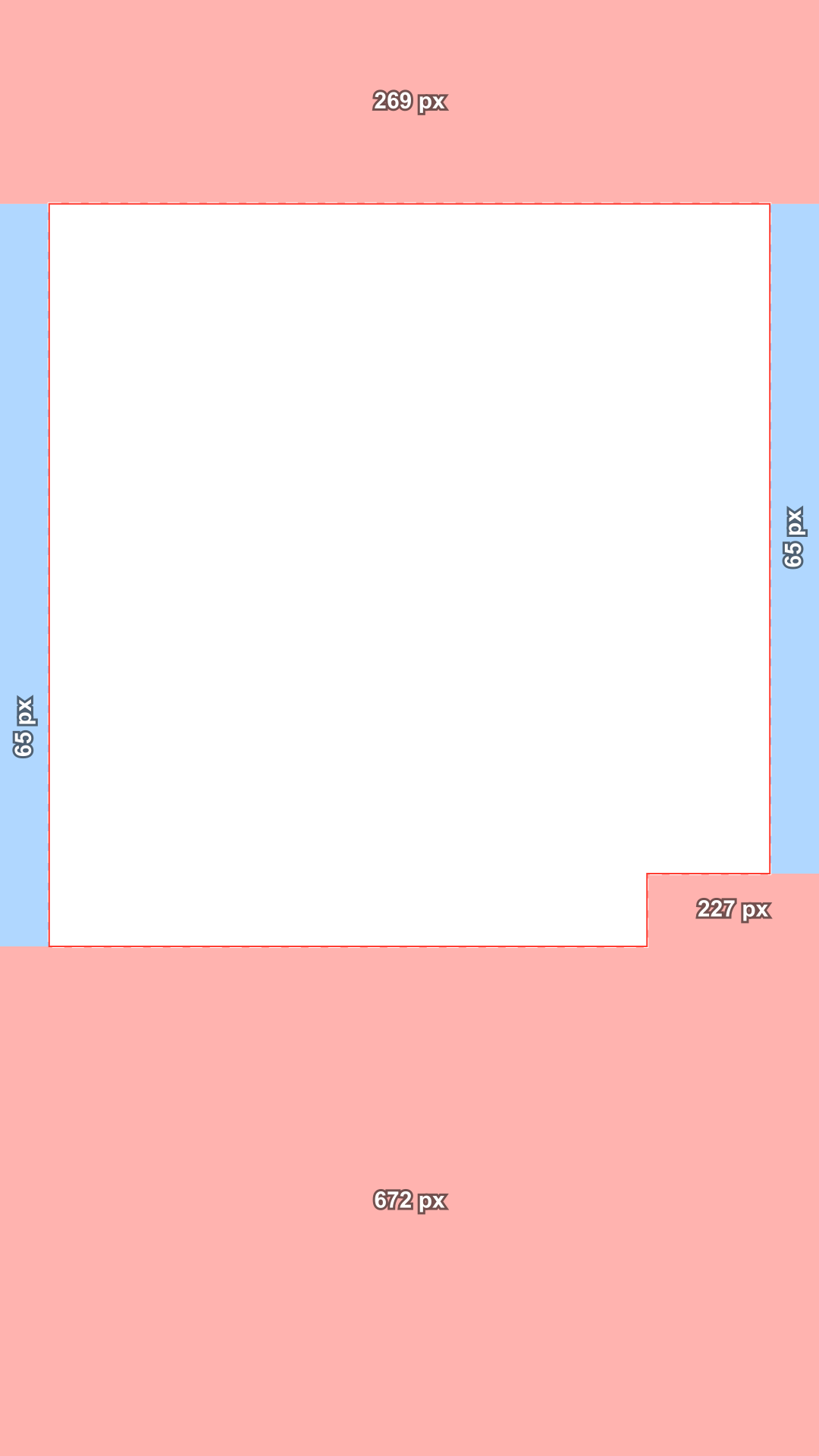
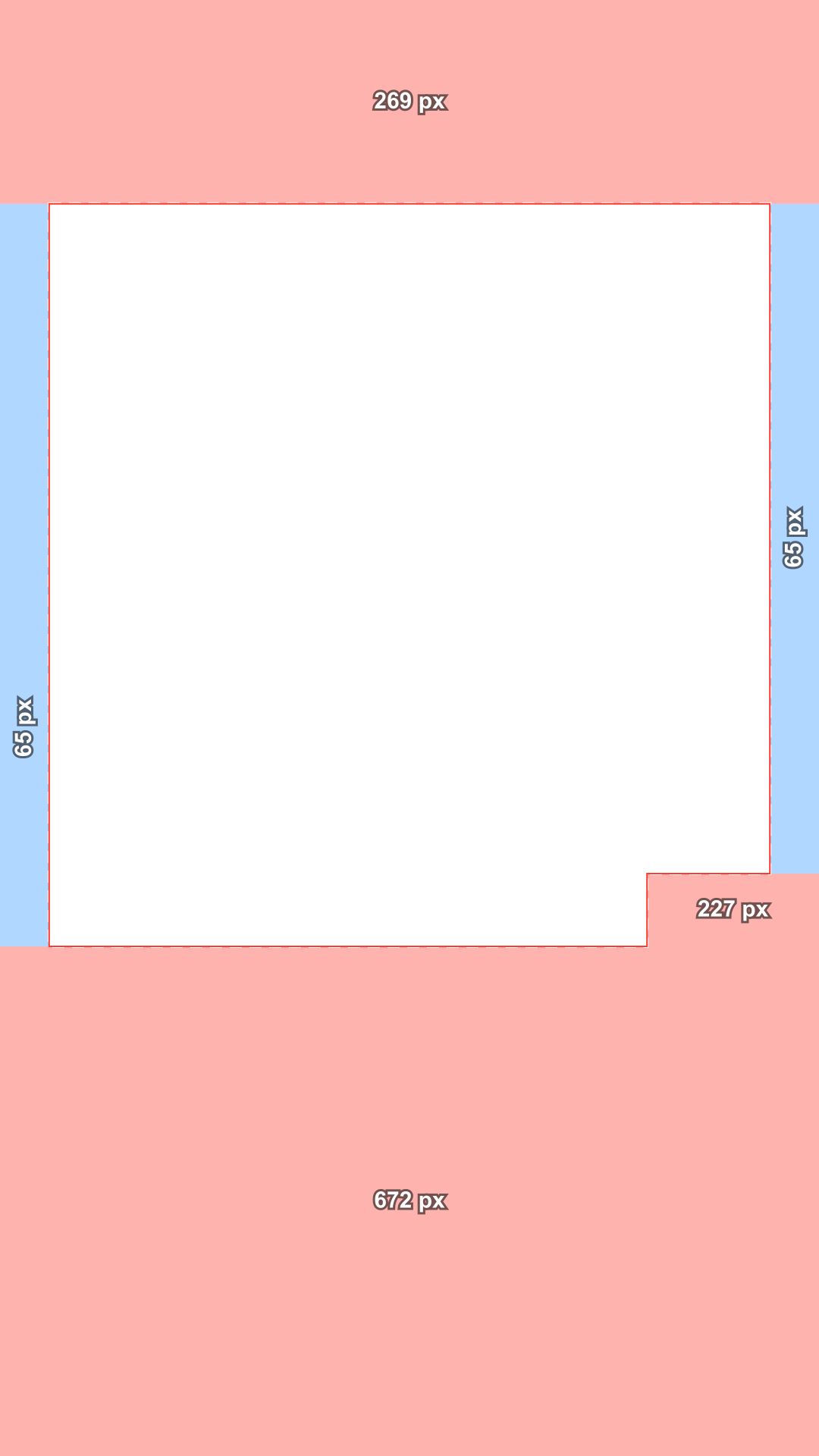
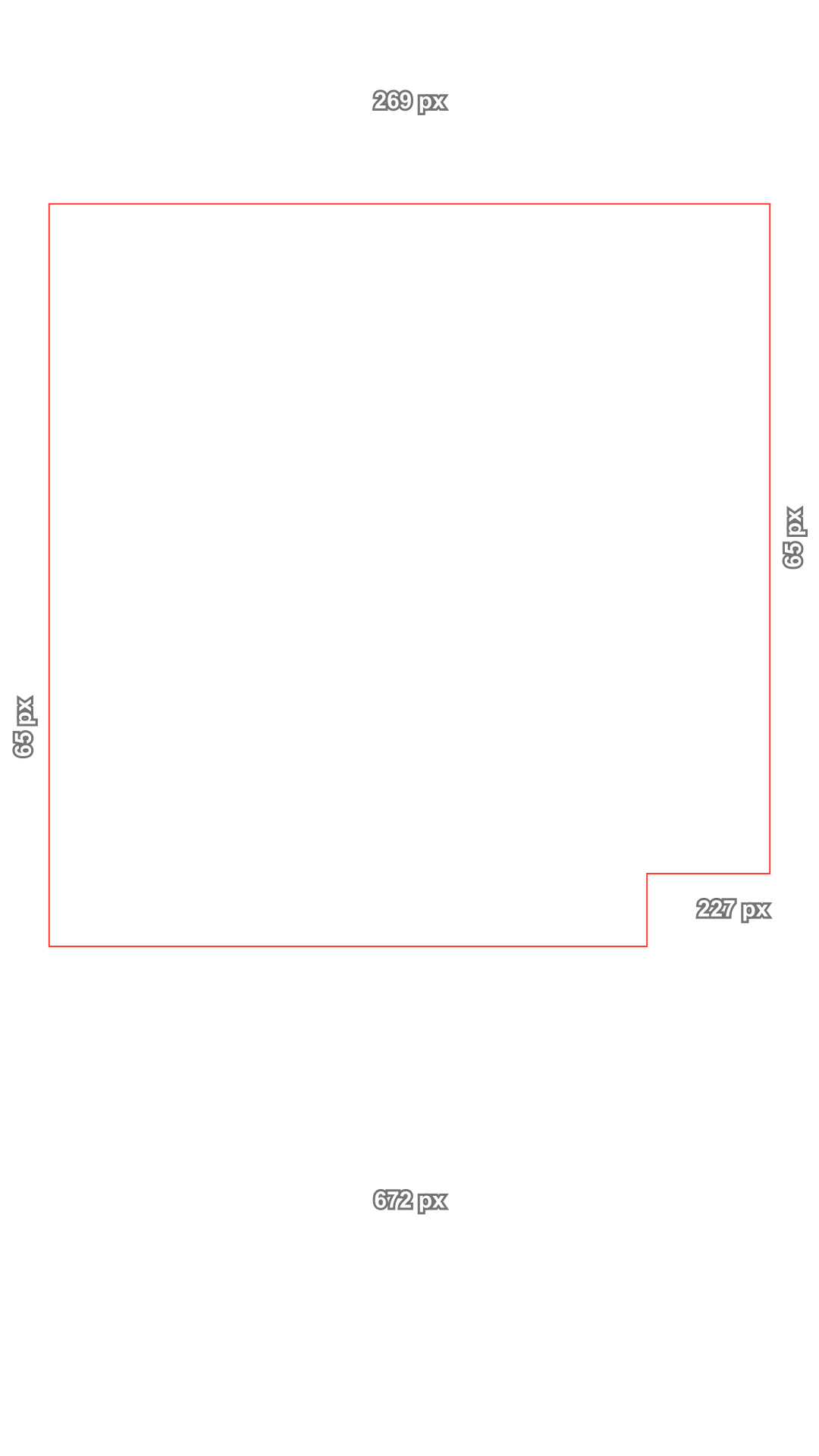
The Instagram Reels safe zone keeps 14% of a 1080 × 1920 video free at the top (269 px), 35% at the bottom (672 px) and 6% at each side (65 px), plus a corner 227 px wide at the bottom right where the buttons sit. Drop your Reel or a frame, mark your text, and download a free transparent template.

Platform

Stays in your browser. Nothing is uploaded.

Reels ad with a disclaimer
Top
269 px
Bottom
672 px
Left
65 px
Right
65 px
Buttons
227 px from y 1152

Meta Ads Guide: Instagram Reels video · Meta Business Help Center: safe zones for 9:16 ads · Checked October 17, 2026

These are the platforms' own safe zones for ads. None of them publishes numbers for regular posts, so the ad zones are the safest guide for both.

269 px672 px

Choose or drop a vertical video or image

Or use the overlay as it is. Nothing is uploaded.

Drag on the frame to mark text, a logo or a face. On a phone, tap Add a caption box.

Show
The sketch shows where buttons and text usually sit. It is an illustration, not the real app.

Marked areas

Drag on the frame to mark a caption, a logo or a face, and see if each one is safe on every platform.

    Download

    Template style
    Template size

    Transparent PNG, no watermark. Put it on the top track in CapCut, Premiere or DaVinci, or as the top layer in Canva, and hide it before you export.

    • 14% / 35% / 6%Top, bottom and sides, in Meta's own words for Reels and Stories.
    • 269 / 672 / 65 pxThe same zone on a 1080 × 1920 frame, plus a 227 × 768 px buttons corner.
    • Reels, Stories, adsOne zone for Reels and Stories, and a 40% bottom for ads with disclaimers.
    • PrivateYour Reel stays in this browser. Nothing is uploaded.

    Check the safe zone of a Reel in 3 steps

    Drop a Reel, mark your text, download a template. No account, no upload.

    1. Sample vertical frame with the safe zone overlay
      PlatformReelsTikTokShortsChoose or drop a vertical video or imageNothing is uploaded
      1

      Open your Reel or a frame

      Pick an MP4, MOV, PNG or JPG from your computer or phone, or paste a screenshot of your design. A video plays under the overlay, so you can stop on the frame with the most text.

    2. Sample vertical frame with the safe zone overlay
      Reels: CoveredTikTok: CoveredShorts: CoveredMove up 322 pxMove it
      2

      Box your text and faces

      Outline the hook, the subtitles, a sticker or your face. You get a verdict for Reels, Stories, TikTok and Shorts side by side, and the pixel move that fixes each problem.

    3. Download template: ReelsAll templates (ZIP)
      3

      Save a Reels template

      Get the Reels or Stories overlay as a transparent PNG at 1080 × 1920 or 2160 × 3840, or a ZIP with every app. The checked frame can be saved too, ready to send for approval.

    An Instagram Reels safe zone checker that uses Meta's own numbers

    Meta writes the zone down in percentages. The checker draws exactly that, and tells you where each line comes from.

    Meta's numbers, not a guess

    Meta's Ads Guide asks you to leave at least 14% of the top, 35% of the bottom and 6% of each side free of text, logos and other key elements. On a 1080 × 1920 Reel that is 269, 672 and 65 px, and the checker draws exactly those lines.

    TopBottomSidesButtons
    Reels26967265227 @ y 1152
    Stories26967265227 @ y 1152
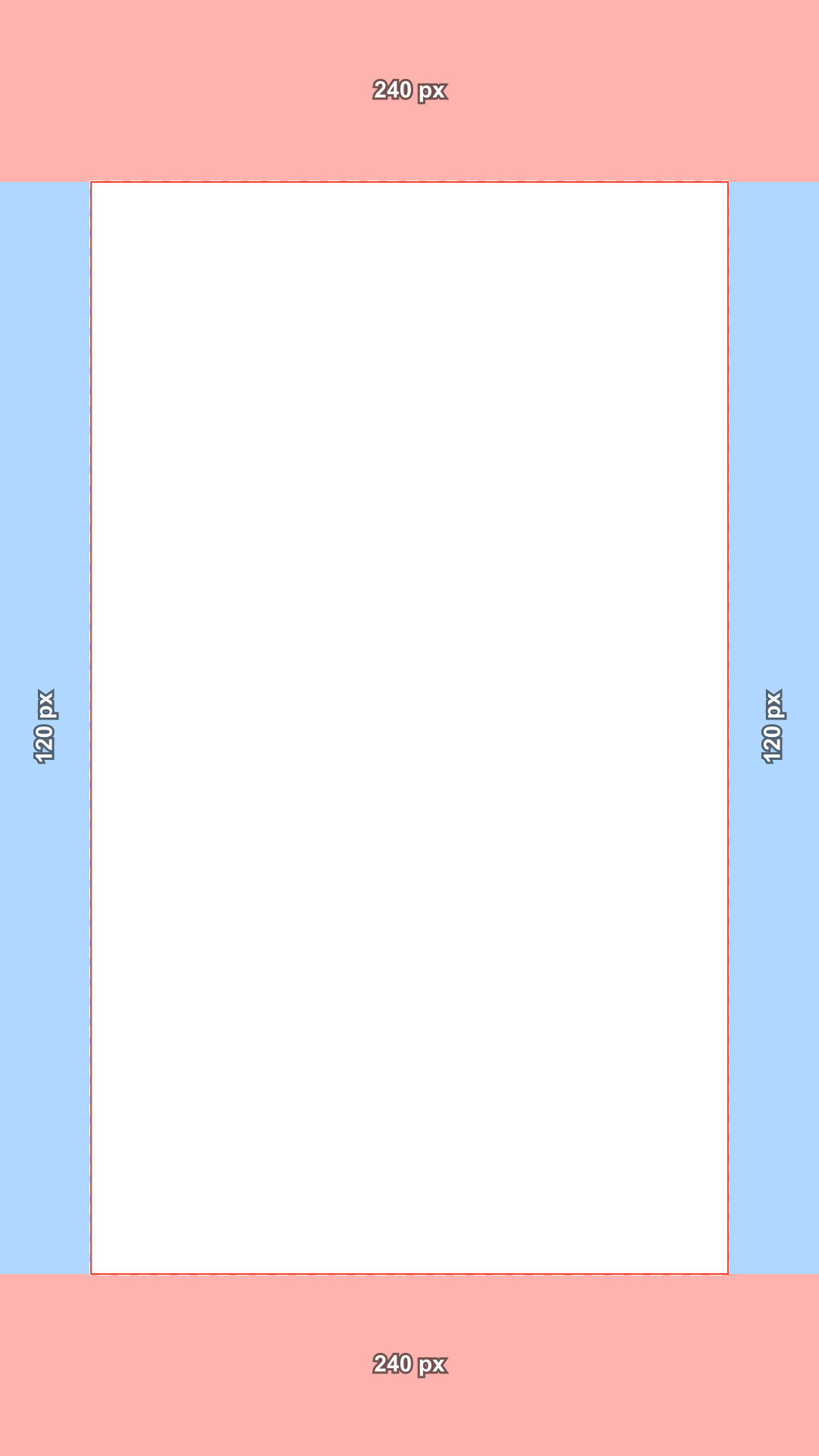
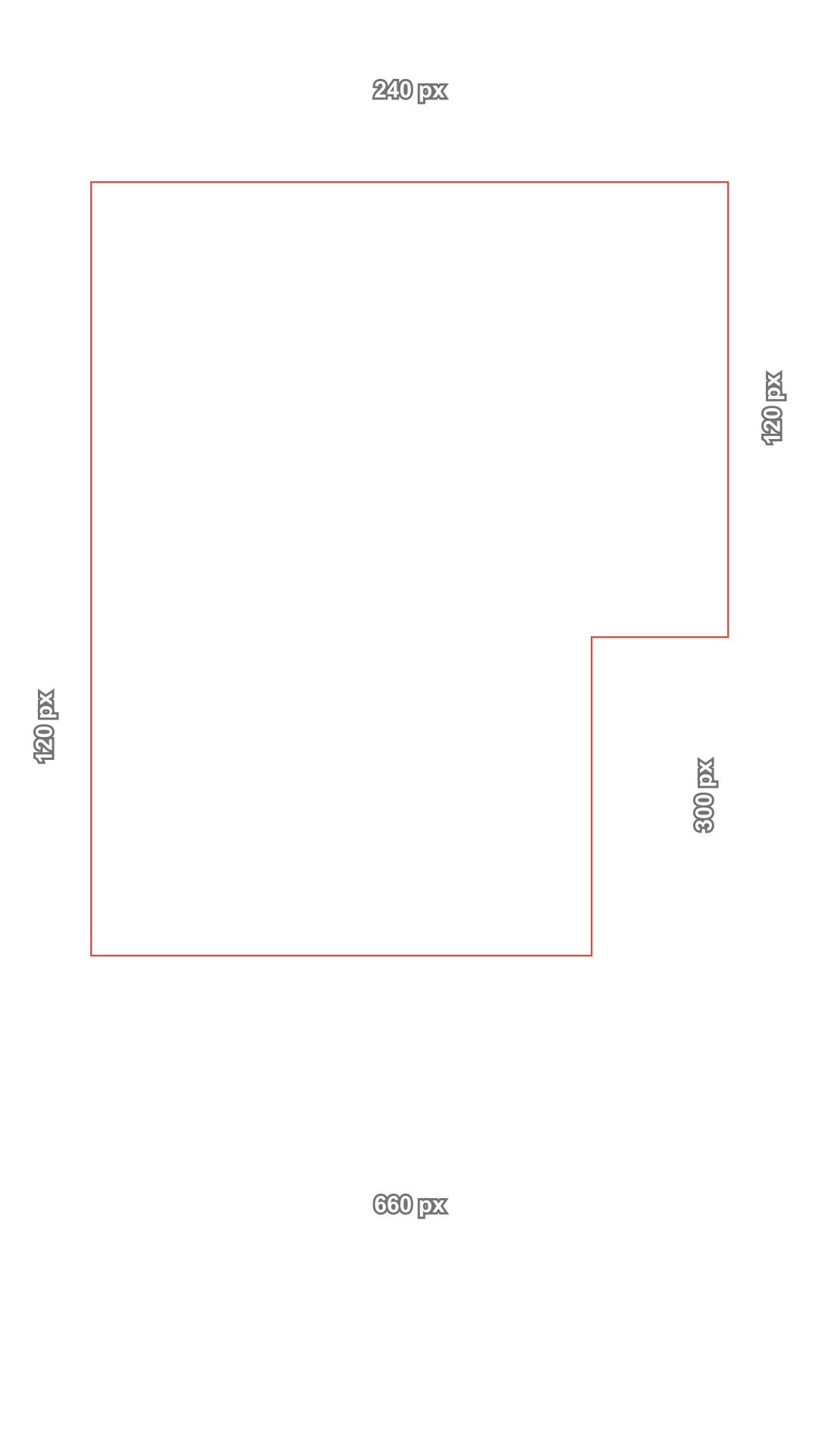
    TikTok240660120300 @ y 840
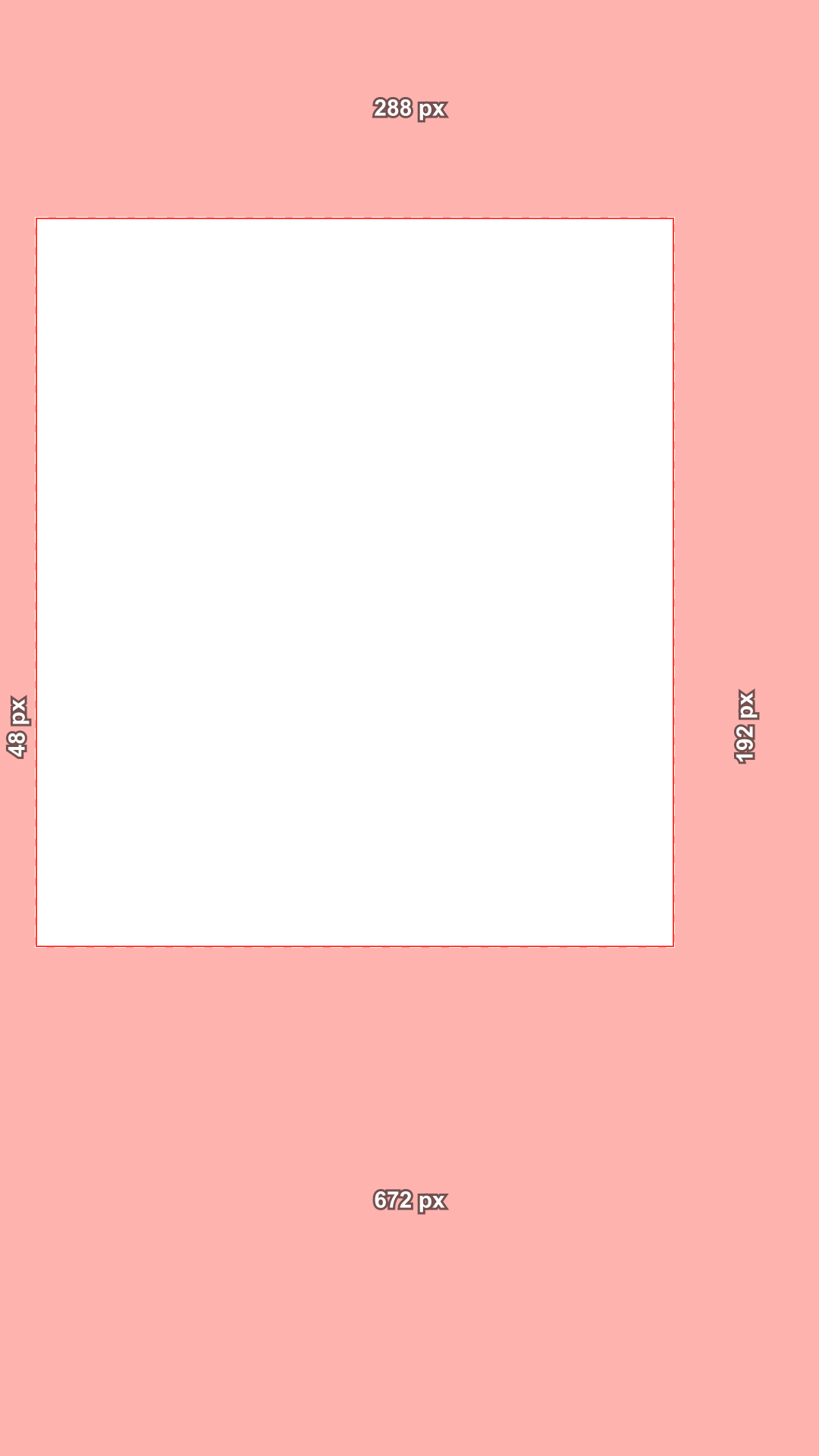
    Shorts28867248 / 192·
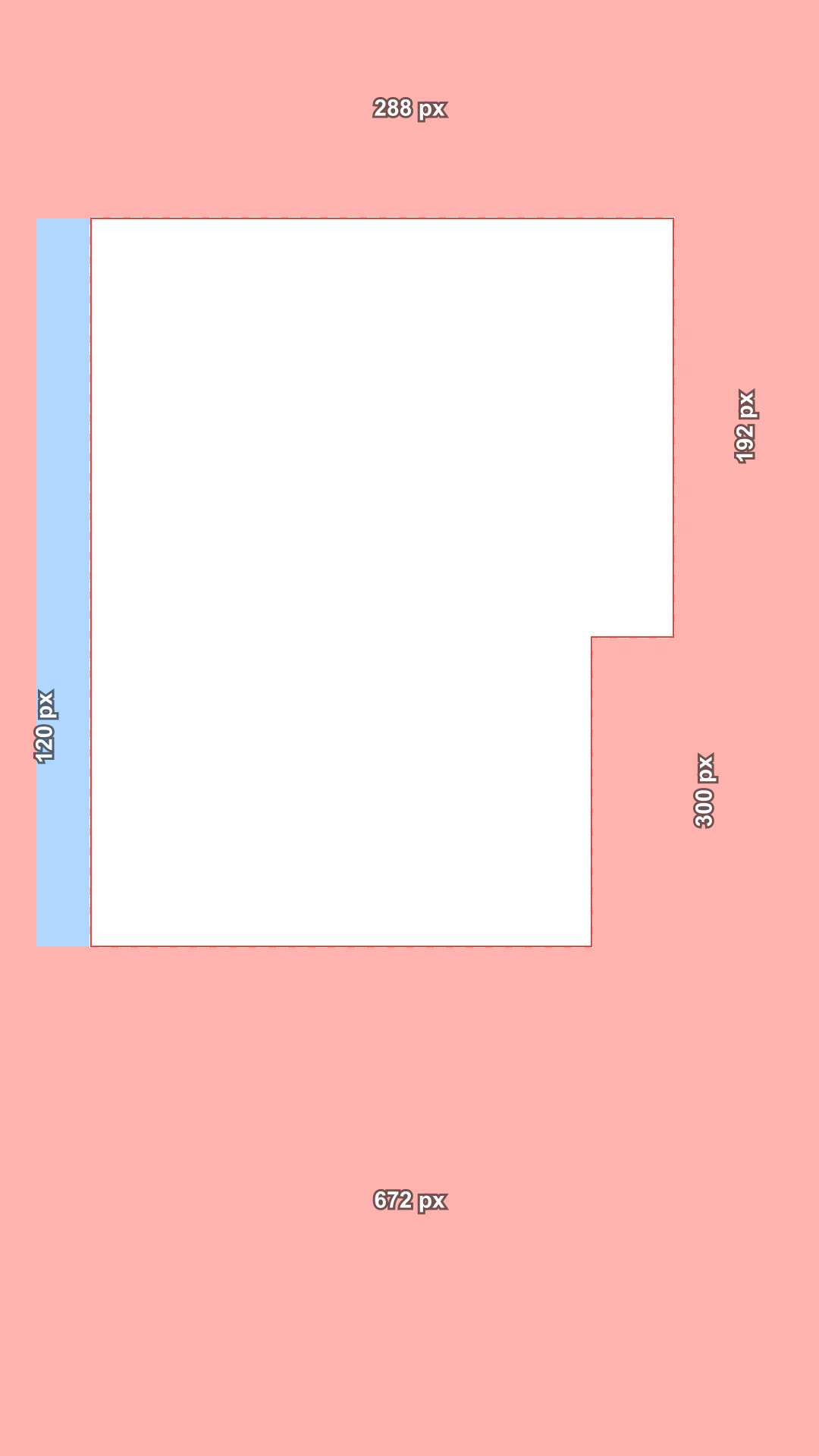
    All platforms288672120 / 192300 @ y 840

    The buttons corner many overlays miss

    Meta's safe zone diagram also cuts out the bottom right corner, 21% wide and 40% tall, where the like, comment and share buttons sit. Many Reels overlays leave it out; this one draws it, so a logo in that corner shows up as covered.

    Sample vertical frame with the safe zone overlay
    Covered by the appMay be croppedSafe area

    Reels, Stories and disclaimers

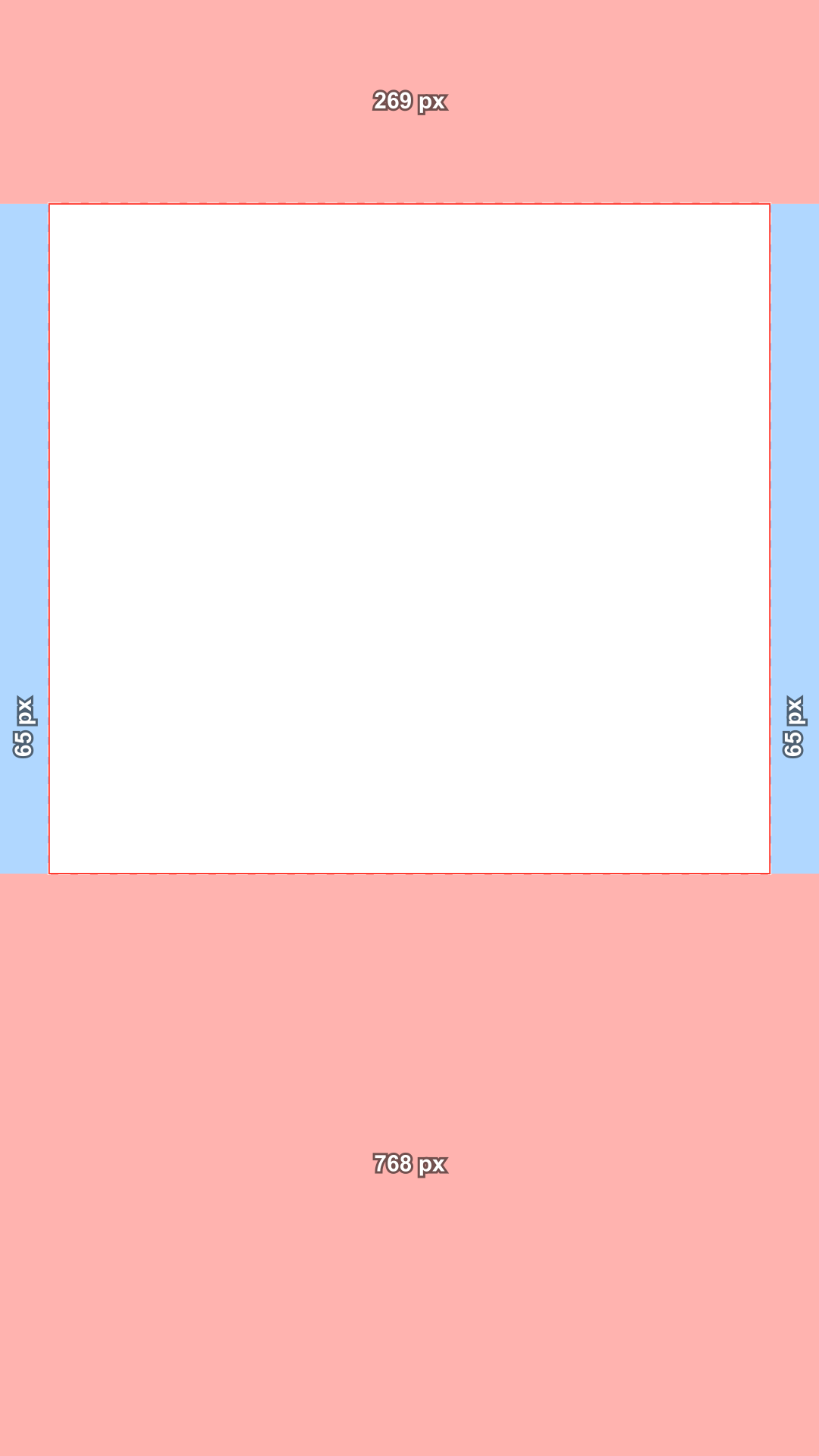
    Meta now uses one safe zone for Reels and Stories on Instagram and Facebook. Reels ads with disclaimers need the bottom 40% free; switch it on and the bottom margin becomes 768 px.

    Sample vertical frame with the safe zone overlay
    Reels
    Sample vertical frame with the safe zone overlay
    Stories
    Meta uses one safe zone for Reels and Stories: 14% top, 35% bottom, 6% sides.

    Mark text and get the move

    Box a caption, a logo or a face and see whether it is safe, which part of Instagram covers it, and the shortest move to fix it. One click moves the box into the safe area.

    Sample vertical frame with the safe zone overlay
    1. Text: CoveredMove up 322 px2. Text: Safe

    One check for Reels, TikTok and Shorts

    The all platforms view combines Meta's zone with TikTok's and YouTube Shorts', so one master video can go everywhere without a caption under a button.

    Sample vertical frame with the safe zone overlay
    ReelsTikTokShortsSafe everywhere: 768 × 960 px, minus the buttons corner

    Free Reels and Stories templates

    Transparent PNG overlays for Reels and Stories with nothing in the safe area: no tint, no logo, no watermark. Shaded or lines only, in 1080 × 1920 or 2160 × 3840.

    Transparent PNG, 1080 × 1920, no watermark

    Free Instagram Reels safe zone templates (PNG)

    Put one on the top layer of your editor or your Canva design. Each file is 1080 × 1920, transparent where your content is safe and tinted where Instagram covers it.

    • Instagram Reels safe zone template, shaded, transparent PNGInstagram ReelsT 269 · B 672 · L 65 · R 65 · shadedDownload PNG
    • Instagram Reels safe zone template, lines, transparent PNGInstagram ReelsT 269 · B 672 · L 65 · R 65 · linesDownload PNG
    • Reels ad with disclaimer safe zone template, shaded, transparent PNGReels ad with disclaimerT 269 · B 768 · L 65 · R 65 · shadedDownload PNG
    • TikTok feed safe zone template, shaded, transparent PNGTikTok feedT 240 · B 660 · L 120 · R 120 · shadedDownload PNG
    • TikTok feed safe zone template, lines, transparent PNGTikTok feedT 240 · B 660 · L 120 · R 120 · linesDownload PNG
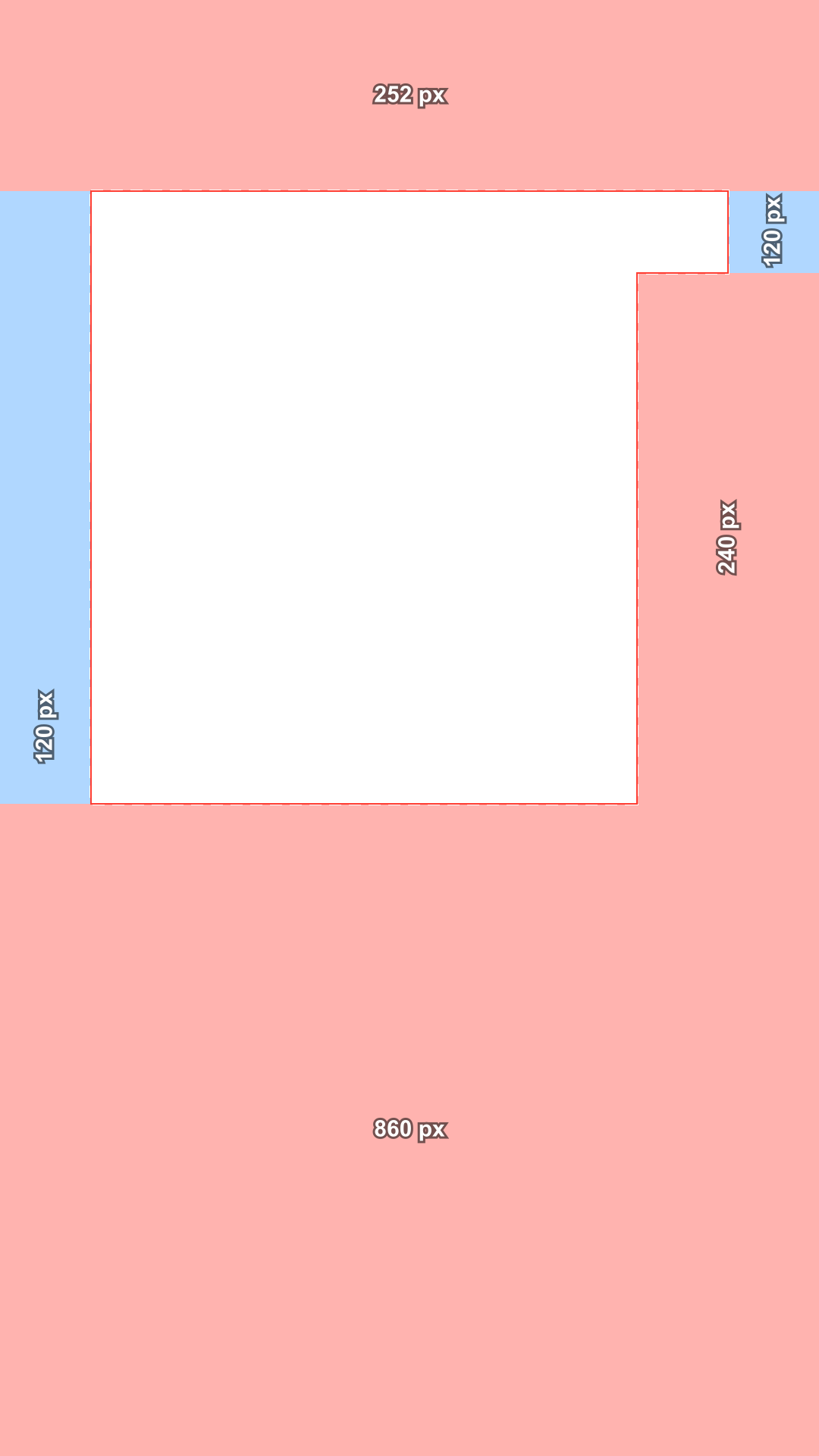
    • TikTok, 4 line caption safe zone template, shaded, transparent PNGTikTok, 4 line captionT 252 · B 860 · L 120 · R 120 · shadedDownload PNG
    • TikTok TopView safe zone template, shaded, transparent PNGTikTok TopViewT 240 · B 240 · L 120 · R 120 · shadedDownload PNG
    • Instagram Stories safe zone template, shaded, transparent PNGInstagram StoriesT 269 · B 672 · L 65 · R 65 · shadedDownload PNG
    • YouTube Shorts safe zone template, shaded, transparent PNGYouTube ShortsT 288 · B 672 · L 48 · R 192 · shadedDownload PNG
    • All platforms safe zone template, shaded, transparent PNGAll platformsT 288 · B 672 · L 120 · R 192 · shadedDownload PNG

    Under each file, T, B, L and R give the margins at the top, bottom, left and right in px. For 2160 × 3840, the lines only style or every platform in one ZIP, use the checker above.

    Guide: the Instagram Reels safe zone in 2026

    Meta's numbers in pixels, the corner many templates miss, Stories, ads, and why other sites quote different values.

    What is the Instagram Reels safe zone?

    The Instagram Reels safe zone is the part of a 9:16 video that the Reels interface does not cover. Outside it, Instagram shows the Reels title and camera at the top, your profile picture, account name, caption and audio at the bottom, and the like, comment, share and more buttons along the right.

    Meta states the zone in its Ads Guide: leave at least 14% of the top, 35% of the bottom and 6% on each side free of text, logos and other key elements. On a 1080 × 1920 Reel, that works out as:

    • Top: 14%, which is 268.8 px (round up to 269)
    • Bottom: 35%, which is 672 px
    • Left and right: 6%, which is 64.8 px (65)
    • Buttons corner: 21% wide (227 px) by 40% tall (768 px), bottom right
    • Safe area: 950 × 979 px, minus the buttons corner
    TopBottomSidesButtonsBasis
    Reels / Stories26967265227 @ y 1152Meta text
    Reels, disclaimer26976865·Meta text
    TikTok, Feed240660120300 @ y 840TikTok file, 2025
    Shorts28867248 / 192·Google file

    The buttons corner and the side margins

    The percentages are the part everyone quotes. Meta's safe zone diagram adds one more thing: a cut out in the bottom right corner, 21% of the width and 40% of the height, where the buttons column runs into the frame. Text placed just above the 35% line on the right can still end up under the share button.

    The 6% side margins have a different reason. Meta says they keep elements from sitting too close to the edges of devices with screens taller than 9:16, where the video can be cropped. The checker shows them in blue, as may be cropped, and the top, bottom and corner in red, as covered.

    Sample vertical frame with the safe zone overlay
    Covered by the appMay be croppedSafe area

    Instagram Stories safe zone

    Instagram Stories now use the same safe zone as Reels: 14% at the top, 35% at the bottom and 6% at each side. For years Meta's Stories page said something else, roughly 250 px at the top and 340 px at the bottom, and many Instagram story safe zone templates still use those numbers.

    Stories put the progress bar and your account at the top and the reply bar at the bottom. Choose Stories in the checker to see that layout sketch over the same official zone.

    Sample vertical frame with the safe zone overlay
    Reels
    Sample vertical frame with the safe zone overlay
    Stories
    Meta uses one safe zone for Reels and Stories: 14% top, 35% bottom, 6% sides.

    Why Reels safe zone numbers online disagree

    You will find templates with 108 px at the top, 220 px at the top, 320 px or 420 px at the bottom, and no buttons corner at all. Some were measured on an older app, some look like numbers from a 540 × 960 frame used without scaling, and many never say where their numbers come from.

    Meta's own wording changed too. In 2023 it said 14% at the top and 20% at the bottom; since 2024 it says 35% at the bottom. A template made before then leaves your caption under Instagram's text. When in doubt, use Meta's current numbers, which this checker shows with the date it last read them.

    Often quotedOfficial (October 17, 2026)
    TikTok feed252 / 704, buttons from y 360TikTok's 2021 file, still used for caption lengths240 / 660, buttons from y 840
    Instagram Stories250 top, 340 bottomnot in any official guide269 / 672 (14% / 35%)
    Instagram Reels14% top, 20% bottomnot in any official guide14% / 35% / 6%
    TikTok at 720 px wide160 / 440 / 80the same zone on a 720 px frame240 / 660 / 120 at 1080

    How to use an Instagram Reels safe zone template

    A safe zone template is a transparent PNG that goes above your video while you edit. Keep captions, stickers and logos where the template is clear, then hide it before you export.

    • Editing in the Instagram app? Save the finished Reel to your phone and open it in the checker above.
    • Desktop editors such as CapCut, Premiere Pro or DaVinci Resolve: stack the PNG above all video tracks and mute that track when you render.
    • Canva: start a 1080 × 1920 Reel design, lock the PNG as the highest layer, and delete it before you download.
    • Posting the same video to Facebook Reels? Meta uses the same safe zone there.
    V3 · templateV2 · captionsV1 · videoTemplate on the top track, captions below it, video at the bottom. Hide the template track before you export.

    Ads, regular Reels and other apps

    Meta publishes this zone in its ad guidance, and Instagram has no separate numbers for regular Reels. This checker therefore uses the ad zone for both, as the closest official guide. Reels ads with disclaimers should keep the bottom 40% free, which is 768 px.

    TikTok and YouTube Shorts cover different parts of the frame. TikTok's file keeps 240 px at the top and 660 px at the bottom with a buttons column from y 840; Google's Shorts template keeps 288 px at the top and 192 px on the right. Switch platforms in the checker, or pick all platforms to see where all three are safe.

    Sample vertical frame with the safe zone overlay
    Reels
    Sample vertical frame with the safe zone overlay
    TikTok
    Sample vertical frame with the safe zone overlay
    Shorts

    Who uses this Instagram Reels safe zone checker

    Anyone who adds text, stickers, logos or faces to a Reel or a Story.

    • Sample vertical frame with the safe zone overlay

      AI video creators

      Make a 9:16 clip with an AI video generator, add your captions, and check them against Meta's safe zone before you post.

    • Sample vertical frame with the safe zone overlay

      Creators and influencers

      Mark your face and your hook text and keep both clear of the account name, caption and buttons.

    • Sample vertical frame with the safe zone overlay

      Story designers

      Use the same official zone for Instagram Stories and keep the reply bar clear.

    • Sample vertical frame with the safe zone overlay

      Meta advertisers

      Check Reels and Stories ads against Meta's 14% / 35% / 6% rule, and the 40% bottom when a disclaimer is shown.

    • Sample vertical frame with the safe zone overlay
      ReelsSafe
      Sample vertical frame with the safe zone overlay
      StoriesSafe
      Sample vertical frame with the safe zone overlay
      TikTokMay be cropped
      Sample vertical frame with the safe zone overlay
      ShortsCovered

      Social media managers

      Plan one cut for Reels, TikTok and Shorts and see in a single view which text has to move for which app.

    • Sample vertical frame with the safe zone overlay
      V3 · templateV2 · captionsV1 · videoThe template over the clip in the preview, on the top track

      Video editors

      Lay the Reels PNG over a client's edit and catch the caption that runs into the buttons corner before the review call.

    Instagram Reels safe zone FAQ

    Short answers about the Reels and Stories safe zones and the templates.

    Need a Reel to check? Make one with AI

    Text to Video turns a prompt into a 9:16 clip. Add your hook and captions, then bring a frame back here and test it against the Instagram Reels safe zone.

    The checker runs in your browser
    The checker is free
    No sign-up to check a video