
TL;DR
Most AI video prompts fail because they are too vague, too contradictory, or missing motion instructions. This guide walks you through 10 real prompts -- each iterated from a weak V1 to an optimized V3 -- so you can see exactly what to change and why it matters. Every prompt is copy-paste ready for Seedance, Sora, Kling, Runway, and other generators. By the end, you will understand the anatomy of a great prompt and have a library of proven examples across cinematic portraits, product shots, anime, food, fashion, sports, image-to-video, and brand commercials. Try these prompts in Seedance now -->
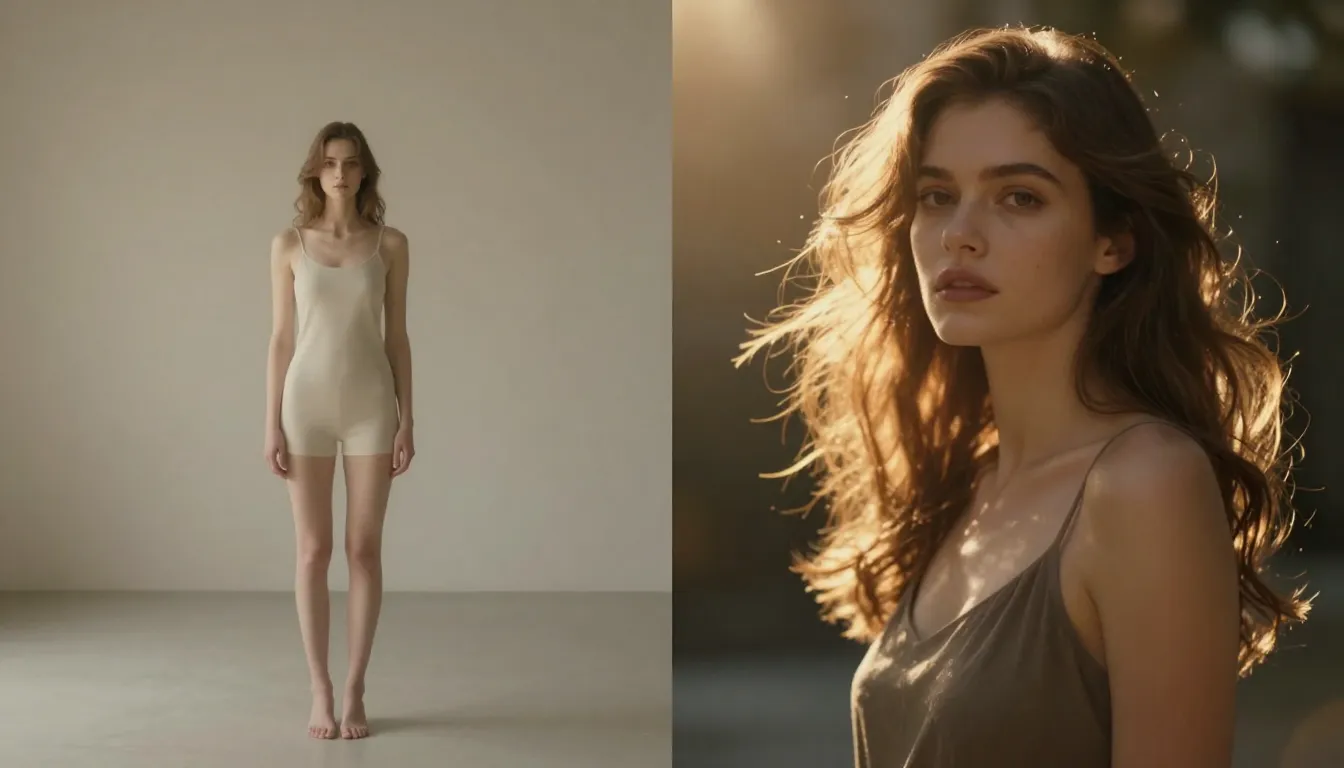
The difference between a vague prompt and an optimized one is not subtle. Same concept, completely different results.
Why Most AI Video Prompts Fail
You type something into an AI video generator. You click generate. The result looks nothing like what you imagined. This happens to everyone, and it happens for predictable reasons.
Three Common Failure Modes
1. Too vague. A prompt like "a beautiful sunset" gives the AI almost no direction. It does not know where the camera should be, what the subject is, how light should behave, or what emotion to convey. Vague prompts produce generic, forgettable outputs.
2. Contradictory instructions. "An extreme close-up wide-angle shot of a person sprinting in slow motion fast" is nonsensical. Close-up and wide-angle conflict. Slow motion and fast conflict. The AI tries to reconcile impossible instructions and produces visual chaos.
3. No motion instructions. Text-to-video is not text-to-image. If you describe a static scene without any movement, camera direction, or dynamic elements, many generators will produce something that looks like a still image with subtle breathing artifacts. You need to tell the AI what moves and how.
What Makes a Great Prompt
A great AI video prompt has three pillars:
- Clear subject: The AI knows exactly what to render. Not "a person" but "a woman in her 30s with silver-streaked black hair wearing a weathered leather jacket."
- Specific motion: Something is happening. The subject moves, the camera moves, particles drift, fabric flows, light shifts. Motion is the entire point of video.
- Defined atmosphere: Lighting, color temperature, mood, and style are not optional. They are the difference between a tech demo and something that looks intentional.
The Iteration Mindset
The best prompt writers do not write perfect prompts on the first attempt. They iterate. Every prompt in this guide follows a three-version progression:
- V1 -- The basic attempt. This is what most people type on their first try. It produces something, but it is generic and uncontrolled.
- V2 -- Adding detail. We introduce specific elements: setting, lighting, camera movement, or mood. The output improves noticeably.
- V3 -- The final version. Every element is dialed in. Subject, motion, atmosphere, camera, lighting, and quality modifiers work together to produce a cohesive result.
This iteration process teaches you more than any single "perfect prompt" ever could. You learn what each addition does and why it matters.
The Anatomy of a Great AI Video Prompt
Here is the formula that every strong prompt follows:
[Subject] + [Action/Motion] + [Style/Mood] + [Camera] + [Lighting] + [Quality]Each element serves a specific purpose:
| Element | What It Controls | Example |
|---|---|---|
| Subject | Who or what is in the scene | "A young woman with flowing auburn hair in a charcoal wool coat" |
| Action/Motion | What is happening, what moves | "walks slowly through falling snow, breath visible in the cold air" |
| Style/Mood | Visual aesthetic and emotional tone | "melancholic, muted earth tones, indie film aesthetic" |
| Camera | Shot type and camera movement | "medium tracking shot following from the side, slow dolly" |
| Lighting | Light source, quality, direction | "overcast winter light, soft diffused shadows, cool blue undertones" |
| Quality | Technical specifications | "8K, shallow depth of field, anamorphic lens, film grain" |
You do not need all six elements in every prompt. But the more elements you include, the more control you have over the output. Let's see this in action across 10 real-world scenarios.
Prompt #1: Cinematic Portrait -- "The Living Photograph"
The Scene
A cinematic portrait that feels like a still from an award-winning film. The subject is not posing for a camera -- she is living a moment. Wind catches her hair. Her expression carries weight. The lighting sculpts her features like a Renaissance painting brought to life.
V1 -- The Basic Attempt
A woman looking at cameraThis is what most beginners type. The result will be a flat, passport-photo-style face with neutral expression, default lighting, and no sense of place or story. The AI has no guidance on mood, setting, or visual style. You get randomness.
V2 -- Adding Detail
A woman with dark curly hair looks directly at the camera with a slight
smile. Wind blows her hair across her face. She stands in a golden wheat
field at sunset. Warm light on her skin.
Better. We now have a setting (wheat field), a time of day (sunset), physical interaction (wind in hair), and an expression (slight smile). The result will have more visual interest. But we still lack camera specifics, precise lighting direction, and quality modifiers.
V3 -- The Final Version
Cinematic close-up portrait of a woman in her late 20s with dark curly
hair and deep brown eyes. She gazes directly into the camera with quiet
intensity, lips slightly parted. A warm breeze lifts strands of hair
across her face. She stands in a vast golden wheat field stretching to
the horizon. Golden hour backlighting creates a luminous halo around her
hair and shoulders. Warm amber fill light from a reflector below. Slow,
subtle dolly in. Shallow depth of field, f/1.4, 85mm lens. Gentle lens
flare from the low sun. Film grain, anamorphic bokeh. Ultra-realistic
cinematic 4K quality.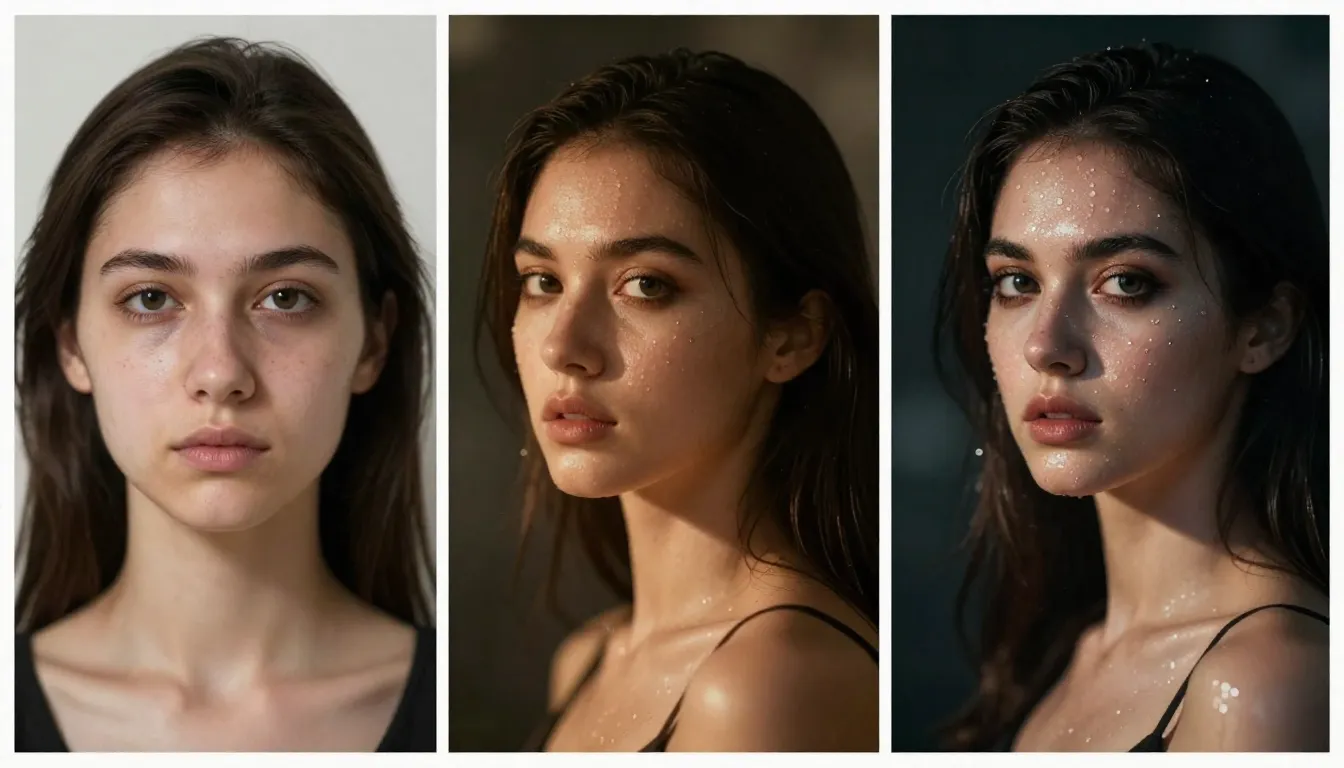
V1 to V3 iteration: the same concept progresses from a generic face to a cinematic portrait with intentional lighting, camera movement, and atmosphere.
Why This Works
- 85mm lens at f/1.4 tells the AI to create compressed perspective with creamy background blur -- the signature look of professional portrait cinematography.
- Golden hour backlighting + amber fill creates dimensional lighting. Backlighting separates the subject from the background. Fill light ensures the face is not silhouetted.
- Slow dolly in adds subtle motion without distracting from the subject. The viewer feels drawn toward her.
- "Quiet intensity, lips slightly parted" gives the AI an emotional target, not just a physical description.
Variations
Variation A -- Rainy Urban Portrait:
Cinematic close-up of a man in his 30s with a shaved head and stubble,
standing still on a rain-soaked city street at night. Rain streams down
his face. He stares into the distance with exhausted resolve. Neon signs
reflect pink and blue on the wet pavement behind him. Shallow depth of
field. Slow push-in. Anamorphic lens flares. Cool blue tones with warm
neon accents. Ultra-realistic 4K, film grain.
Variation B -- Winter Portrait:
Tight close-up of an elderly woman with silver hair and deep laugh lines,
eyes glistening with emotion. She stands outdoors in gently falling snow.
Snowflakes settle on her dark wool shawl. Overcast soft light. A single
warm tear traces down her weathered cheek. Extremely shallow depth of
field. Static camera, no movement. 85mm lens. Muted, desaturated color
palette. Cinematic 4K, photorealistic.
Prompt #2: Product Showcase -- "The Floating Product"
The Scene
A luxury perfume bottle presented like a jewel -- floating, rotating, catching light. This is the kind of shot that brands pay production studios thousands of dollars to create. With the right prompt, AI can generate commercial-grade product footage in seconds.
V1 -- The Basic Attempt
A perfume bottle on a tableThe output: a flat, poorly lit product sitting on a random surface. No drama. No desire. No reason to buy. The AI defaults to mundane realism when you give it mundane instructions.
V2 -- Adding Detail
A luxury glass perfume bottle with gold accents floating in mid-air against
a dark background. Soft light reflects off the glass surface. The bottle
slowly rotates. Professional product photography style.
Significant improvement. We now have floating motion, a dark background for contrast, light reflections, and a style reference. But we can push further with specific lighting rigs, atmospheric elements, and camera behavior.
V3 -- The Final Version
A luxury crystal perfume bottle with faceted edges and a gold cap floats
weightlessly in a void of deep matte black. The bottle rotates slowly on
its vertical axis, completing a quarter turn. Razor-sharp caustic light
refractions dance across the glass surface. Two opposing strip lights --
one warm amber, one cool white -- create dramatic dual-tone reflections on
the faceted crystal. Tiny golden particles drift lazily through the air
around the bottle. A single droplet of amber liquid clings to the bottle's
shoulder, catching the light. Smooth orbiting camera movement. Extreme
product close-up. 8K commercial quality, ultra-sharp focus throughout,
professional studio lighting.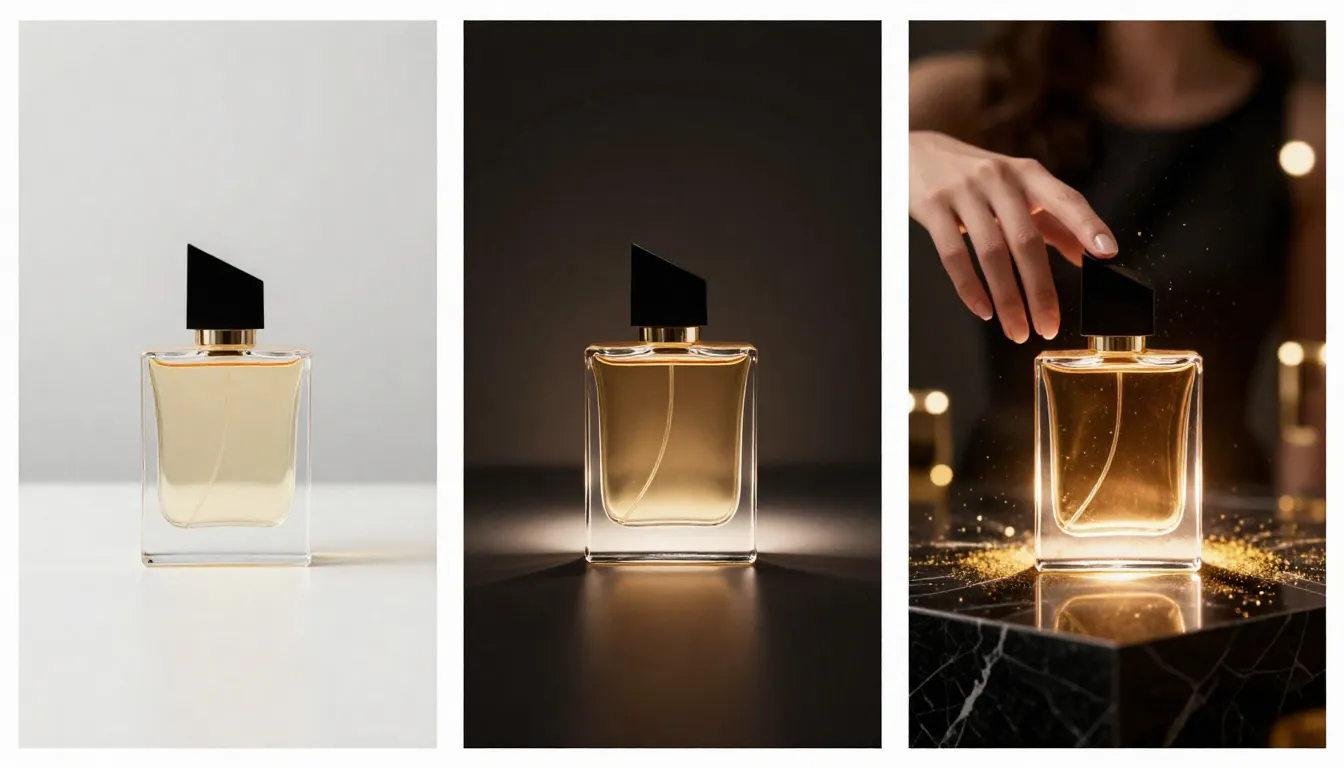
V1 to V3: a perfume bottle transforms from a flat tabletop snapshot into a commercial-grade product showcase with professional lighting and atmospheric details.
Why This Works
- "Matte black" void eliminates background distractions and forces all attention onto the product. This is standard practice in luxury product photography.
- Dual strip lights (warm amber + cool white) create the multi-tonal reflections that make glass products look expensive. Single-source lighting produces flat, cheap-looking results.
- "Caustic light refractions" is a specific technical term that AI models understand well. It triggers the complex light patterns that pass through transparent objects.
- Golden particles add environmental depth without competing with the product.
Variations
Variation A -- Tech Product Launch:
A matte black wireless earbud case floats against a gradient of deep
navy to black. The case slowly opens, revealing pearl-white earbuds inside.
Volumetric blue light emanates from within the case. Tiny light particles
drift upward. Orbiting camera. Edge-lit rim lighting in electric blue.
Ultra-clean, Apple-style product aesthetic. 8K, ultra-sharp.
Variation B -- Cosmetics Commercial:
A rose-gold lipstick tube rotates slowly against soft pink studio
backdrop. The cap twists off and separates, floating beside the tube.
Creamy lipstick bullet catches soft ring light. Rose petals in soft focus
drift across the foreground. Smooth macro close-up. Beauty commercial
lighting with soft key and gentle fill. Ultra-realistic 4K.
Prompt #3: Nature Cinematic -- "The Epic Landscape"
The Scene
A sweeping epic landscape shot -- the kind you see in nature documentaries or as the establishing shot in a Tolkien adaptation. Scale, atmosphere, and grandeur are everything here.
V1 -- The Basic Attempt
Mountains with cloudsYou will get mountains. You will get clouds. You will not get awe. The AI has no guidance on time of day, weather dynamics, scale, camera, or mood. The result is a stock-photo screensaver.
V2 -- Adding Detail
Dramatic mountain range at sunrise with clouds flowing through the valleys.
Golden light hits the peaks. Aerial drone shot slowly moving forward.
Mist and fog in the valleys below. Epic landscape photography.
Much stronger. We have a time of day, light direction, atmospheric effects, camera movement, and a style reference. But we can make this truly cinematic by adding specific geography, weather dynamics, and production-level quality cues.
V3 -- The Final Version
Epic aerial establishing shot of a jagged snow-capped mountain range
resembling the Dolomites at dawn. The camera drifts slowly forward over
a sea of low-lying clouds that fill the valleys like white rivers.
Golden-pink alpenglow illuminates the highest peaks while the valleys
remain in cool blue shadow. Wisps of cloud catch on rocky spires and
trail into the wind. A single eagle soars far below the camera, its
wings outstretched against the cloud sea. Volumetric god rays break
through a gap between two peaks. Slow, majestic forward dolly. IMAX
quality, ultra-wide 21:9 aspect ratio, photorealistic, extreme detail
in rock textures and snow patterns. 8K resolution.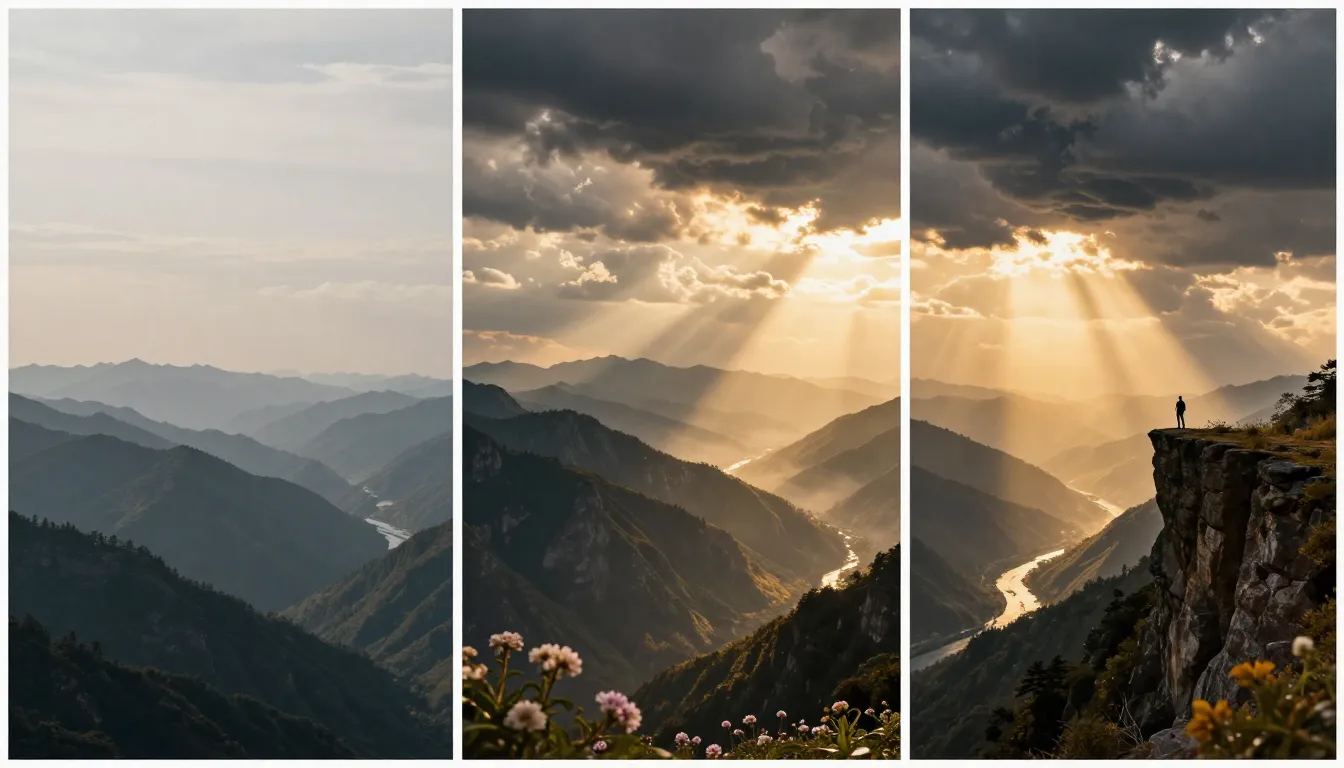
V1 to V3: generic mountains become an IMAX-worthy establishing shot with volumetric light, flowing clouds, and a sense of scale.
Why This Works
- "Resembling the Dolomites" gives the AI a specific geographic reference. Real locations produce more coherent geology than abstract "mountains."
- "Alpenglow" is a specific lighting phenomenon (warm pink light on peaks before the sun rises above the horizon). AI models trained on nature photography know this term.
- The eagle adds a living scale reference. Without it, the scene could feel miniature. A single bird in a vast landscape communicates enormity.
- "God rays break through a gap" creates a focal point in the composition, guiding the viewer's eye.
Variations
Variation A -- Storm Approaching:
Dramatic time-lapse-style shot of a vast Icelandic black sand desert.
Towering cumulonimbus storm clouds roll in from the horizon, their bases
dark and heavy with rain. Lightning flickers within the cloud mass.
A solitary volcanic peak stands defiant in the middle distance. The light
shifts from warm gold to ominous green-grey as the storm advances.
Wide-angle static camera. 4K cinematic, photorealistic.
Variation B -- Tropical Serenity:
Aerial overhead shot drifting slowly over a turquoise tropical lagoon.
Crystal-clear water reveals coral reefs and white sand below. A small
wooden boat with a red sail drifts lazily across the lagoon. Palm trees
line the crescent beach. Gentle ripples catch sunlight and create dancing
caustic patterns on the seabed. Golden afternoon light. Smooth, dreamlike
camera movement. 4K ultra-realistic, vivid but natural colors.
Prompt #4: Urban Street -- "The City Pulse"
The Scene
A moody night-time city street that pulses with energy. Rain, neon, reflections, and human motion come together to create the kind of urban footage that makes you feel like you are standing on that corner at 2 AM.
V1 -- The Basic Attempt
A city street at nightThe result: a dark, ambiguous blob of buildings. Maybe some lights. No atmosphere, no story, no visual identity. "City street at night" could be a quiet suburban road or Times Square.
V2 -- Adding Detail
A rainy city street at night with neon signs reflecting on the wet
pavement. People walk with umbrellas. A taxi passes through a puddle,
splashing water. Colorful lights everywhere. Cinematic look.
Now we have weather, reflections, human activity, and a vehicle. The scene has life. But we need to nail the specific aesthetic, the camera behavior, and the lighting hierarchy to make it truly compelling.
V3 -- The Final Version
A rain-soaked Tokyo side street at night. The narrow road glistens with
reflections of dozens of vertical neon signs in Japanese characters --
hot pink, electric blue, acid green. A lone figure in a black trench coat
walks away from the camera, their silhouette dark against the neon glow.
Steam rises from a ramen shop's exhaust vent on the left. A bicycle
leans against a vending machine glowing soft white. Rain falls steadily,
each drop catching neon color as it descends. Slow tracking shot following
the figure from behind. Shallow depth of field: the figure is sharp, the
distant neon blurs into bokeh circles. Wet pavement acts as a mirror,
doubling every light source. Anamorphic lens flares. Blade Runner meets
Lost in Translation atmosphere. 4K cinematic, film grain, moody cool
blue-purple color grade.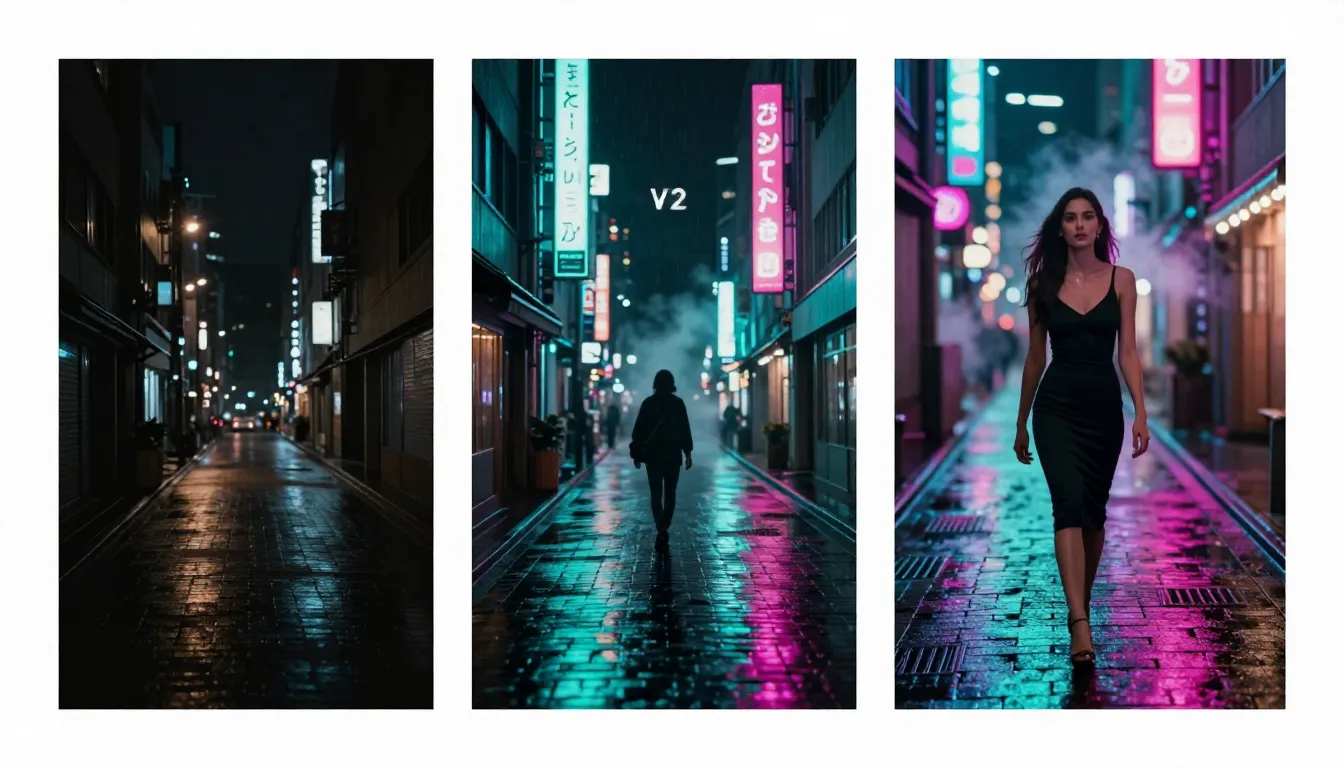
V1 to V3: a vague night scene becomes a cinematic neon-noir street with intentional composition, weather dynamics, and film-reference atmosphere.
Why This Works
- "Tokyo side street" anchors the AI to a specific visual vocabulary: narrow roads, dense vertical signage, vending machines. Generic "city" prompts lack this coherence.
- "Lone figure in a black trench coat walks away" gives the scene a narrative focal point and a clear motion path for the tracking shot.
- "Wet pavement acts as a mirror" explicitly tells the AI to create reflection doubling, which is the single most visually striking element of rainy night photography.
- Film references (Blade Runner, Lost in Translation) give the AI a precise aesthetic target that it can blend, rather than a vague "cinematic" instruction.
Variations
Variation A -- Daytime Market Street:
Bustling narrow market street in Marrakech at midday. Colorful fabric
awnings in saffron, cobalt, and crimson create dappled shade patterns on
the ground. Merchants arrange pyramids of spices in copper bowls. Dust
motes float in shafts of sunlight. A cat sits atop a stack of woven
rugs. Steady handheld camera walking slowly through the market. Warm,
saturated color palette. Documentary-style 4K, natural lighting.
Variation B -- Futuristic Megacity:
A massive elevated highway cuts through a futuristic megalopolis at dusk.
Flying vehicles stream along neon-lit lanes above and below. Holographic
advertisements flicker on the sides of impossibly tall buildings.
A distant megastructure disappears into clouds. Rain falls sideways in
the wind. Low-angle wide shot from a pedestrian bridge. Teal and orange
color palette. Cyberpunk 2077 aesthetic. 4K ultra-detailed.
Prompt #5: Anime & Fantasy -- "The Warrior's Stand"
The Scene
An anime-style warrior standing resolute before an impossible battle. Cherry blossom petals, glowing energy, and a dramatic sky create a scene that could be a key frame from a high-budget animated film.
V1 -- The Basic Attempt
An anime character with a swordThe output: a generic, stiff figure holding a blade. No dynamic pose. No environmental context. No style specificity. "Anime" is a broad category spanning dozens of substyles, and the AI will default to the most generic interpretation.
V2 -- Adding Detail
A female anime warrior in ornate samurai armor stands on a cliff edge
holding a glowing katana. Cherry blossoms fall around her. A dramatic
sunset sky behind her. Detailed anime art style with clean line work.
Better. We now have specific armor, a weapon detail (glowing), environmental elements (cherry blossoms, cliff), and a sky. But we need to push the visual effects, specify the exact art style, and add motion.
V3 -- The Final Version
A fierce female samurai warrior stands at the edge of a shattered cliff
overlooking a burning battlefield far below. She wears battle-worn
crimson and black lacquered armor with gold filigree, one shoulder plate
cracked. Her long white hair whips violently in a supernatural wind.
She grips a katana that radiates crackling blue-white energy along its
blade. Cherry blossom petals swirl upward in a vortex around her. The
sky is a dramatic gradient from blood-red at the horizon through deep
violet to black overhead. Lightning forks across the clouds. The camera
slowly orbits around her in a dramatic reveal. High-detail cel-shaded
anime style with dynamic ink-line edges. Ufotable studio quality.
Vibrant color palette. 4K ultra-detailed.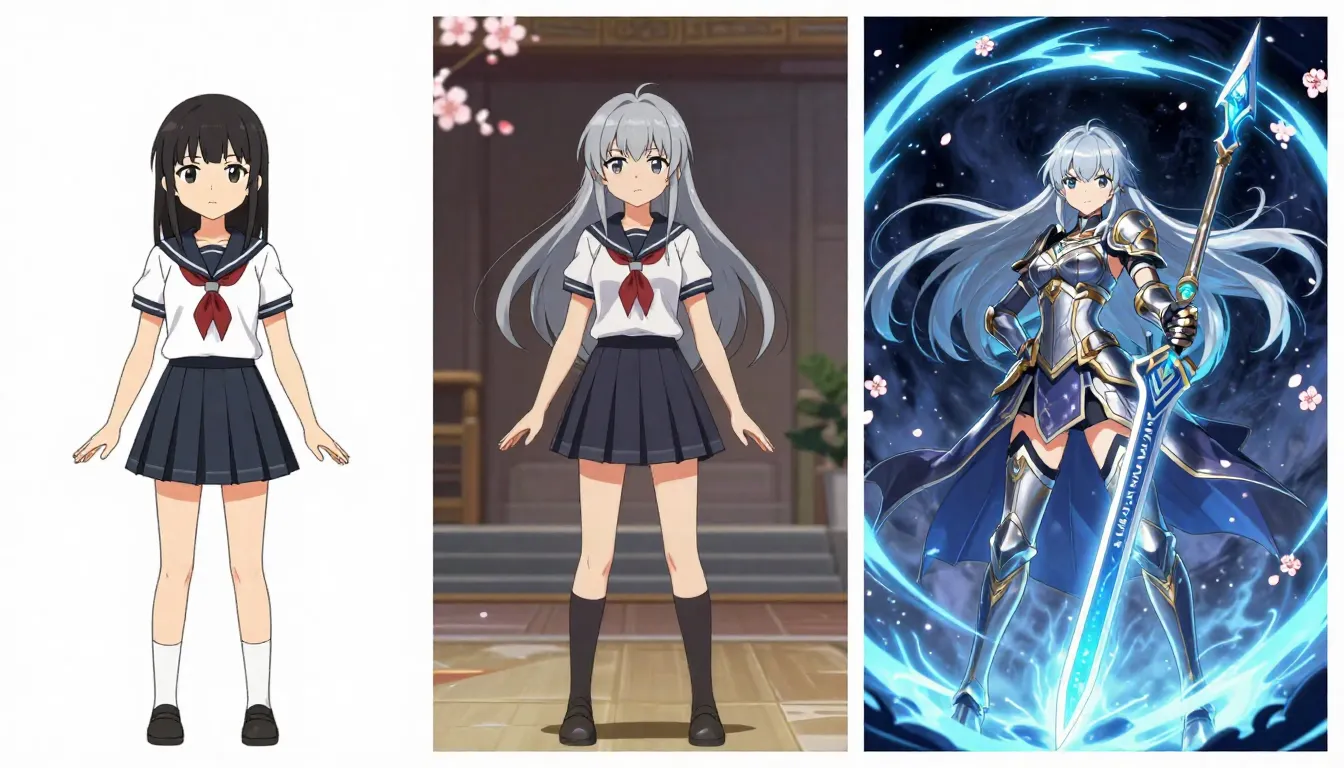
V1 to V3: a generic anime figure becomes a studio-quality key frame with supernatural effects, environmental storytelling, and cinematic camera movement.
Why This Works
- "Ufotable studio quality" references one of the most visually distinctive anime studios (Demon Slayer, Fate series). AI models understand studio-specific aesthetics.
- Battle-worn details ("one shoulder plate cracked") add narrative depth. This warrior has been fighting. It tells a story without dialogue.
- "Cherry blossom petals swirl upward in a vortex" gives specific motion direction. "Cherry blossoms falling" is static and cliched. An upward vortex implies supernatural force.
- "Crackling blue-white energy along the blade" adds the dynamic lighting effect that elevates anime scenes from illustration to animation.
Variations
Variation A -- Dark Fantasy Mage:
A hooded dark elf sorcerer floats cross-legged above a stone altar in
an ancient underground temple. Runes carved into the floor pulse with
deep emerald light. Dozens of ancient tomes orbit slowly around the
sorcerer, their pages fluttering. Dark energy coils from the sorcerer's
outstretched hands like living smoke. Candlelight flickers on obsidian
walls. Slow push-in camera. Dark Souls meets Studio Ghibli aesthetic.
Painterly digital art style. 4K ultra-detailed.
Variation B -- Mecha Pilot:
Dramatic low-angle shot of a massive humanoid mech standing in a
destroyed cityscape. Rain pours down its scarred titanium armor. The
cockpit glows warm amber. One hand grips a massive energy cannon, still
smoking from a recent shot. Sparks shower from a damaged joint. The
pilot is visible as a small silhouette through the cockpit glass.
Lightning illuminates the scene. Gundam-inspired mecha design.
Cel-shaded anime with hyper-detailed mechanical rendering. 4K.
Prompt #6: Food & Beverage -- "The Perfect Pour"
The Scene
A close-up coffee pour that makes you taste the richness through the screen. Every food commercial depends on this kind of shot: the slow cascade of liquid, the rising steam, the warm tones that trigger appetite. In professional production, these shots require specialized rigs and macro lenses. With AI, you describe it.
V1 -- The Basic Attempt
Coffee being pouredThe result: a brown liquid going into a cup. No sensory richness. No appetizing quality. No close-up detail. No steam. The AI treats it like a utilitarian action rather than a sensory experience.
V2 -- Adding Detail
A close-up of rich dark coffee being poured from a ceramic pitcher into
a white cup. Steam rises from the cup. Warm morning light from a window
illuminates the scene. Cozy kitchen background. Slow motion pour.
Now we have a close-up, a specific pouring vessel, steam, directional light, and slow motion. The output will look appealing. But food-commercial quality demands macro-level detail and precise control over texture, light interaction, and motion dynamics.
V3 -- The Final Version
Extreme macro close-up of dark espresso being poured in slow motion from
a brushed copper Turkish coffee pot into a handmade ceramic cup with a
crackle-glaze finish. The liquid cascades in a thick, syrupy ribbon,
creating a swirling crema pattern as it hits the surface. Delicate
wisps of steam curl and dance upward, backlit by warm golden morning
light streaming through a frosted window to the right. Individual micro-
bubbles form and pop on the crema surface. A cinnamon stick and star
anise rest on the saucer beside the cup. Shallow depth of field with the
pour in razor-sharp focus and the background melting into warm bokeh.
The camera slowly drifts downward to follow the pour. Food commercial
cinematography. Warm amber-brown color grade. 8K ultra-realistic,
appetizing, sensory.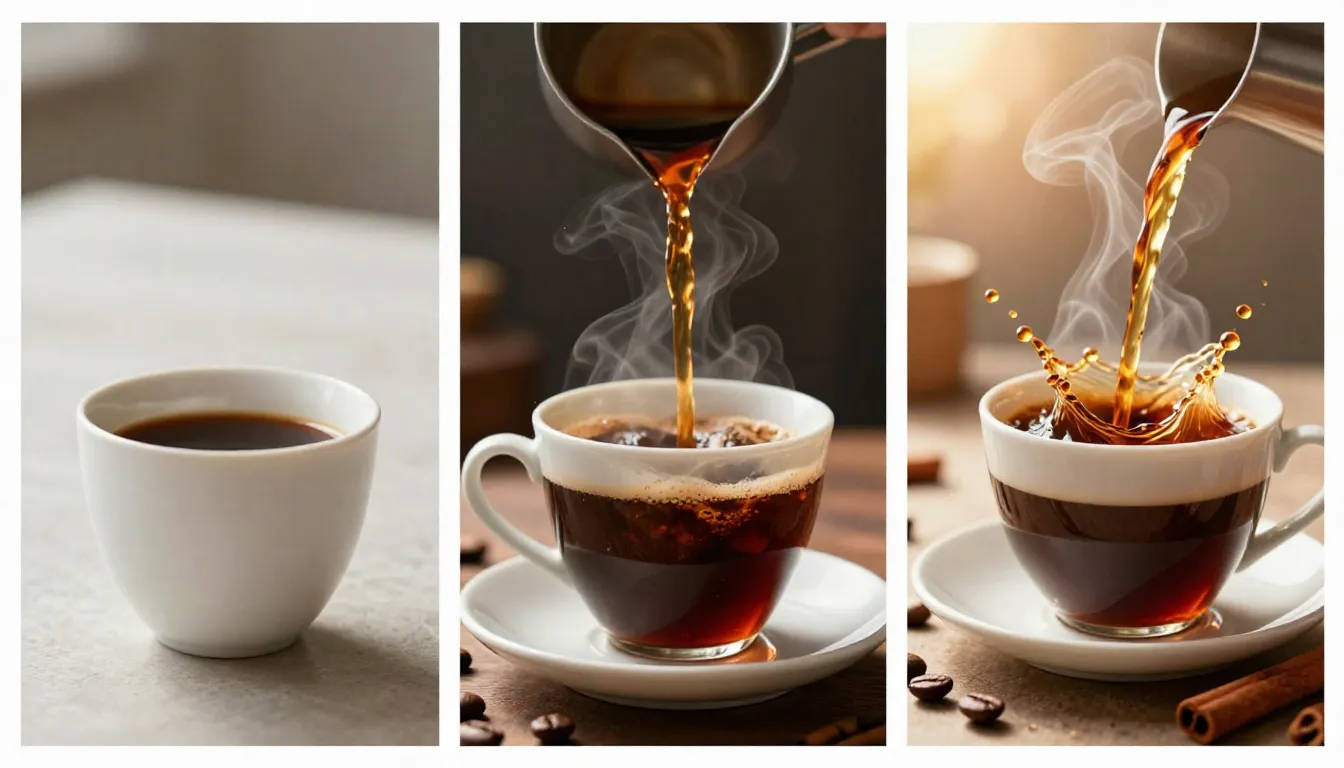
V1 to V3: a generic coffee pour transforms into a food-commercial-grade macro shot with steam dynamics, crema detail, and appetizing lighting.
Why This Works
- "Syrupy ribbon" describes a specific viscosity that communicates quality. Thin, watery pours look cheap. Thick, controlled pours look luxurious.
- "Micro-bubbles form and pop on the crema" pushes the AI to render surface-level detail that you only see in macro food photography. This granularity signals premium production.
- Backlit steam is the most appetizing visual trick in food cinematography. Steam is only visible when backlit, and calling this out ensures the AI positions the light source correctly.
- Props (cinnamon stick, star anise) add sensory context. The viewer can almost smell the scene.
Variations
Variation A -- Chocolate Cascade:
Extreme slow motion close-up of liquid dark chocolate pouring over a
stack of fresh strawberries on a marble slab. The chocolate flows in
thick rivulets over the red fruit, glistening under warm studio
spotlights. A dusting of gold leaf catches the light. Chocolate drips
from the edge of the marble in slow motion. Macro lens, razor-sharp
focus on the pour point. Dark moody background. Luxury food commercial
quality. 4K ultra-realistic.
Variation B -- Craft Beer Pour:
Close-up of an amber craft beer being poured into a tulip glass at a
45-degree angle. Golden liquid flows down the inside of the glass,
building a creamy white head of foam. Tiny bubbles stream upward through
the beer. Warm backlight makes the liquid glow like amber. Condensation
forms on the outside of the cold glass. A wooden bar surface with
scattered hops visible in soft focus. Slow motion. 4K commercial quality.
Prompt #7: Fashion & Beauty -- "The Runway Moment"
The Scene
A fashion editorial moment frozen in time -- fabric in motion, editorial lighting that sculpts the body, and the kind of controlled glamour that fills the pages of Vogue. This is not a snapshot. This is a statement.
V1 -- The Basic Attempt
A model walkingA person moving their legs. No outfit detail. No setting. No lighting mood. No editorial quality. The AI produces a pedestrian (literally) scene with no fashion sensibility.
V2 -- Adding Detail
A tall female model walks down a minimalist white runway in a flowing
red silk gown. The dress moves dramatically with each step. Bright
fashion show lighting from above. Audience blurred in the background.
Editorial photography style.
Now we have an outfit, a setting, fabric movement, and lighting direction. This will produce a recognizable runway scene. But to reach editorial quality, we need fabric physics, specific lighting techniques, and cinematic camera work.
V3 -- The Final Version
A statuesque model strides confidently down a stark white runway in a
floor-length haute couture gown of flowing crimson organza layered over
structured black satin. The sheer fabric billows dramatically behind
her like a wave, catching air with each powerful step. Her expression
is fierce and unwavering. A sharp wind machine effect lifts the fabric
into a sculptural shape to her left. Overhead fashion spotlights create
hard, defined shadows on the runway floor. Rim lighting from behind
outlines her silhouette in white. The front row audience is a blurred
mosaic of camera flashes. Low-angle tracking shot from runway level,
moving with her pace. Shallow depth of field. Vogue editorial style.
Alexander McQueen show energy. 4K cinematic, crisp detail on fabric
textures, high-fashion color grading with deep blacks and saturated
red.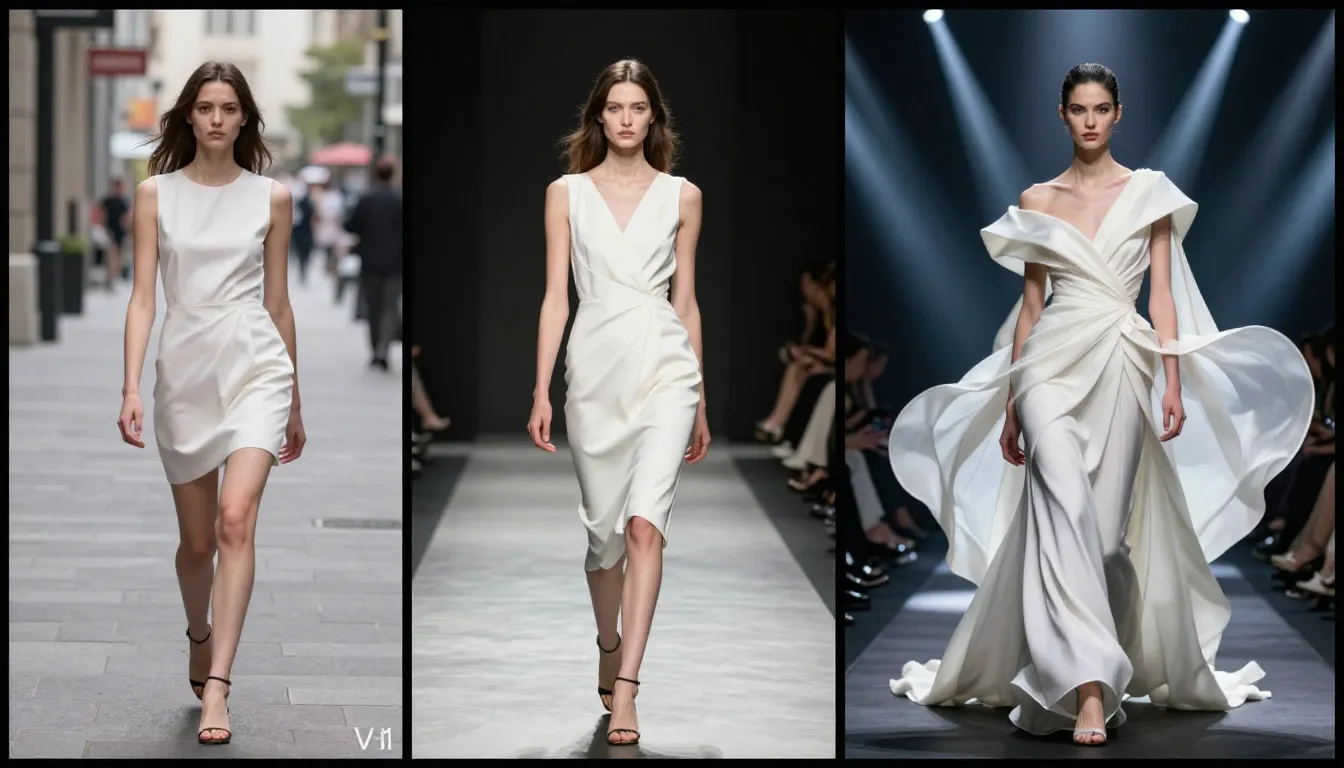
V1 to V3: a person walking becomes a haute couture editorial moment with sculptural fabric, editorial lighting, and runway-level production quality.
Why This Works
- "Crimson organza layered over structured black satin" gives the AI two contrasting fabric types to render: sheer and flowing versus rigid and dark. This contrast creates visual complexity.
- "Wind machine effect" is a term AI models associate with fashion photography production. It triggers the dramatic fabric lift that defines iconic runway moments.
- "Low-angle tracking shot from runway level" places the camera where real fashion photographers sit. This perspective adds power and presence to the model.
- "Alexander McQueen show energy" references a specific design house known for theatrical, dramatic runway presentations. It gives the AI an emotional and aesthetic target.
Variations
Variation A -- Street Style Editorial:
A woman in an oversized camel cashmere coat, vintage denim, and white
sneakers walks along a cobblestone Parisian street in autumn. Fallen
leaves blow past her feet. She adjusts round sunglasses with one hand.
The camera tracks alongside her at walking speed. Soft, overcast Parisian
light. Muted earth-tone color palette. The Row meets Celine aesthetic.
Natural, effortless, editorial. 4K, film grain, shallow depth of field.
Variation B -- Beauty Close-Up:
Extreme close-up beauty shot of a model's face with flawless dewy skin,
bold graphic black eyeliner, and glossy burgundy lips. She slowly turns
her head from profile to three-quarter view. Light catches the highlight
on her cheekbone. Her expression shifts from serene to subtly powerful.
Ring light reflected in her eyes. Clean white background. Beauty
editorial lighting with soft key and sharp catch light. 4K ultra-sharp,
skin texture visible.
Prompt #8: Action & Sports -- "The Frozen Moment"
The Scene
A peak-action sports moment captured with the intensity of a Super Bowl broadcast. The sweat, the strain, the millisecond of maximum effort. Sports photography is about timing. Sports video is about making that timing last.
V1 -- The Basic Attempt
A person playing basketballSomeone bouncing a ball on a court. No specific action, no peak moment, no athletic drama. The AI does not know whether to show a layup, a dribble, or someone tying their shoes.
V2 -- Adding Detail
A basketball player in mid-air going for a slam dunk. Sweat flies off
his body. Arena lights are bright. Crowd in the background cheering.
Dramatic angle. Slow motion.
Now the AI has a specific action (slam dunk), physical detail (sweat), a setting (arena), and a temporal modifier (slow motion). This will produce a recognizable sports moment. But to reach broadcast quality, we need precise anatomical detail, lighting design, and particle physics.
V3 -- The Final Version
Ultra-dramatic slow motion capture of a muscular basketball player at
the apex of a powerful one-handed slam dunk. His body is fully extended,
arm reaching above the rim, fingers gripping the ball as it meets the
net. Every muscle fiber in his forearm is visible. Individual droplets of
sweat spray off his shaved head and outstretched arm, frozen in mid-air
and catching arena light like tiny prisms. The orange ball compresses
slightly against the backboard glass. Below, defenders look up
helplessly with blurred motion. Overhead arena lights create sharp
downward shadows and brilliant rim lighting on the player's shoulders.
The crowd is a bokeh wall of color and camera flashes. Low-angle shot
from below the basket looking up. Extreme slow motion, 1000fps feel.
8K ultra-sharp, hyper-realistic detail in skin texture, fabric wrinkles,
and sweat droplets. ESPN broadcast cinematic quality.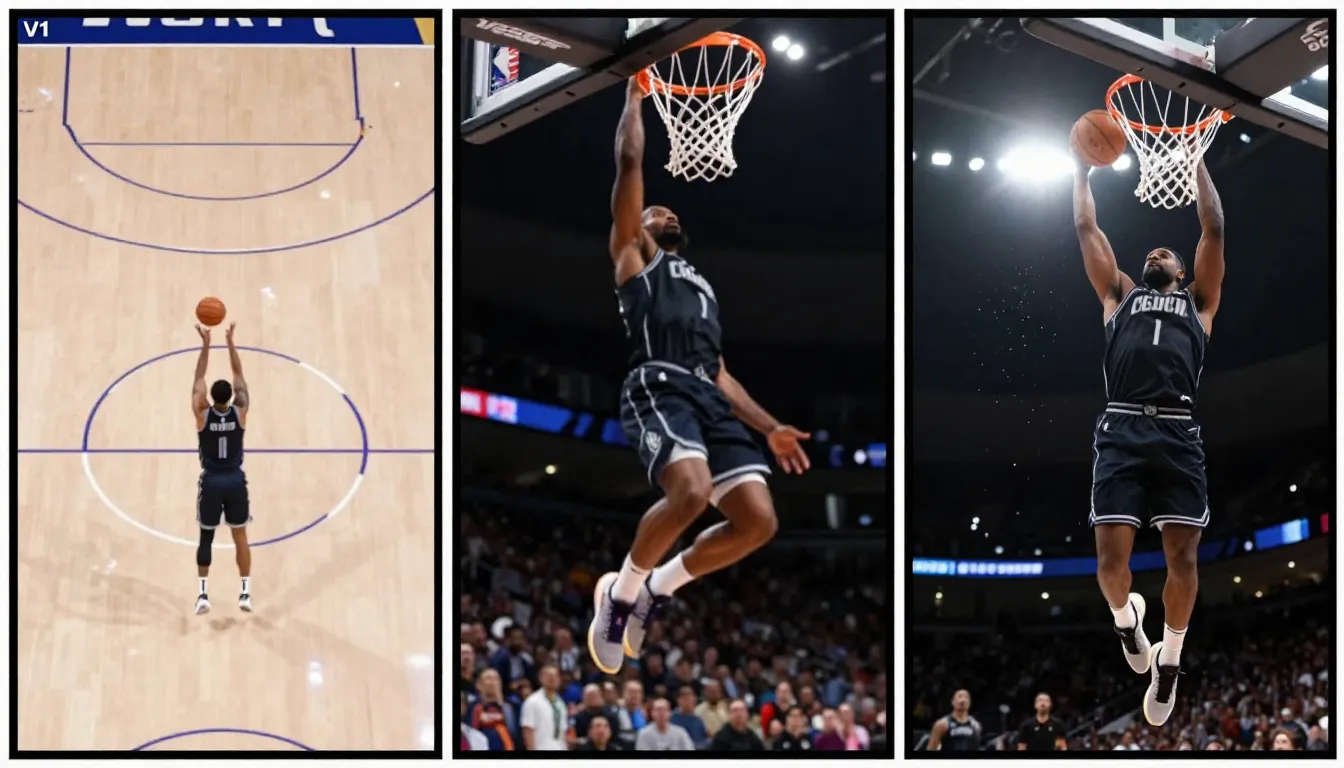
V1 to V3: a person playing basketball becomes a broadcast-quality frozen moment with sweat particle physics, anatomical detail, and dramatic arena lighting.
Why This Works
- "Apex of a powerful one-handed slam dunk" specifies the exact millisecond in the action. Peak-action frames are the most visually compelling.
- "Individual droplets of sweat... frozen in mid-air catching arena light like tiny prisms" gives the AI a specific particle behavior to render. These micro-details sell the realism of slow motion.
- "Low-angle from below the basket looking up" is the iconic broadcast camera angle for dunks. It maximizes the sense of height and power.
- "1000fps feel" tells the AI how slow the motion should be. It references real high-speed camera specifications that AI models associate with specific visual characteristics.
Variations
Variation A -- Soccer Goal Moment:
Extreme slow motion of a soccer striker's foot connecting with the ball
in a full-power volley shot. The boot compresses the ball's surface on
impact. Grass and mud spray upward from the follow-through. The
goalkeeper dives desperately in the background, fingers outstretched.
Side-angle shot at ground level. Rain falls in frozen droplets. Stadium
floodlights create god rays through the rain. 4K ultra-realistic,
hyper-detailed.
Variation B -- Boxing Impact:
Ultra slow motion close-up of a boxer's right hook connecting with a
heavy bag. The leather surface of the bag deforms dramatically on impact,
creating a ripple wave across its surface. Sweat explodes outward from
the glove in a mist. The boxer's wrapped knuckles and taped wrist are
in razor-sharp focus. Gym environment with hard overhead fluorescent
lighting. Dust particles hang in the air. Low-angle. Gritty, raw
aesthetic. 4K cinematic.
Prompt #9: Image-to-Video -- "Bring a Photo to Life"
The Scene
This prompt is different from the previous eight. Instead of text-to-video, we are using image-to-video (I2V) -- uploading an existing photograph and telling the AI what motion to add. This workflow is incredibly powerful for bringing portraits, product photos, and artwork to life. The challenge is giving motion instructions that preserve what makes the original image compelling.
For a complete guide to the image-to-video workflow, see our step-by-step I2V tutorial.
V1 -- The Basic Attempt
Make the person moveThis is the most common I2V mistake. "Move" is not a motion instruction. The AI might sway the person, distort the face, wave their arms randomly, or add bizarre full-body motion. Vague I2V prompts produce unnatural, uncanny results.
V2 -- Adding Detail
The woman slowly turns her head to the right and smiles gently. Her hair
shifts naturally with the movement. Soft breeze moves the fabric of her
dress slightly.
Now the AI has a specific motion (head turn), a direction (right), an expression change (smile), and secondary motion (hair, fabric). The result will look more natural. But we can refine further with subtle atmospheric changes, camera movement, and precise motion speed.
V3 -- The Final Version
The woman slowly turns her head from looking slightly left to gazing
directly into the camera. Her expression transitions from contemplative
to a warm, knowing smile. A gentle breeze lifts wisps of her hair across
her forehead. She subtly exhales, her shoulders relaxing slightly
downward. The fabric of her linen blouse ripples faintly at the collar.
Background leaves on a tree behind her sway gently with the breeze. Warm
afternoon light intensifies slightly as if a cloud has passed, deepening
the golden tones on her skin. Very slow, almost imperceptible dolly in.
Natural, lifelike motion -- no exaggerated movement. Maintain the
photographic quality of the original image. Smooth 24fps.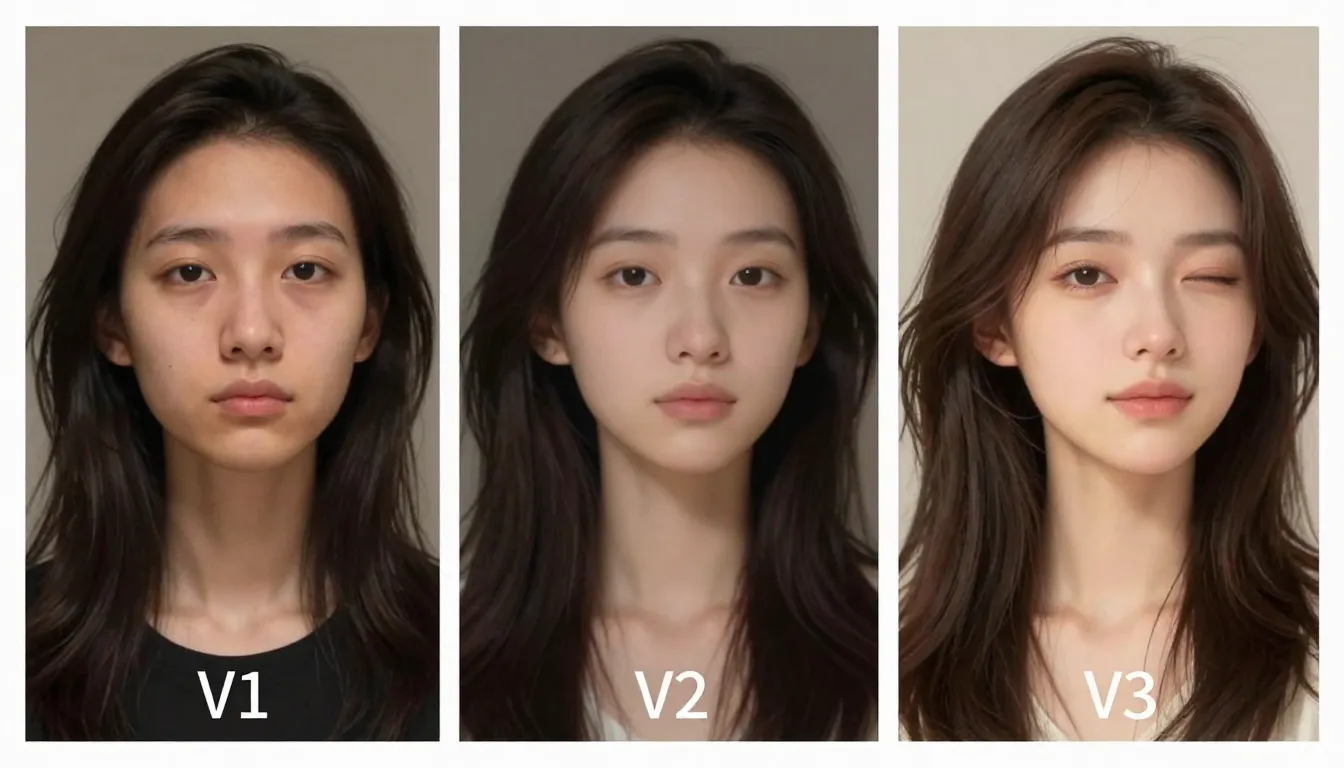
V1 to V3: "make the person move" produces uncanny artifacts. A refined I2V prompt with specific, subtle motion instructions creates natural, lifelike video from a still photo.
Why This Works
- Specific direction of motion ("from looking slightly left to gazing directly into camera") prevents random motion. The AI knows the start and end states.
- Layered motion at different scales: head turn (large), smile (medium), hair wisps (small), blouse ripple (subtle), background leaves (ambient). Multiple motion scales create naturalism.
- "As if a cloud has passed" gives the AI permission to subtly shift the lighting, which adds life without altering the image's established look.
- "No exaggerated movement" is critical for I2V. Without this constraint, AI models tend to overanimate, producing uncanny results. Restraint is the key to convincing I2V.
Variations
Variation A -- Landscape Photo to Video:
Clouds drift slowly from left to right across the sky. Water in the lake
ripples gently with a breeze. Grass in the foreground sways. A flock of
birds crosses the distant sky. The light subtly shifts as if time is
passing -- a slow golden hour transition. Very slow, meditative motion.
Maintain the photographic color grade and sharpness of the original.
Variation B -- Product Photo to Video:
The watch face catches a moving light source that slowly sweeps from
left to right, creating a traveling highlight across the polished metal
bezel and glass face. The second hand ticks smoothly. Subtle reflections
shift on the brushed steel bracelet links. Background remains perfectly
still. Macro-level detail preserved. Smooth, professional product
motion.
Prompt #10: Brand & Marketing -- "The Commercial Shot"
The Scene
A luxury brand commercial that tells a micro-story in a single shot. This is not just a product video -- it is a lifestyle statement. The watch, the wearer, the moment, and the world they inhabit all communicate brand identity simultaneously. For a deep dive on using AI video for e-commerce and product marketing, see our e-commerce video guide.
V1 -- The Basic Attempt
A luxury watch advertisementThe result: a watch floating on a white background or lying flat on a surface. No context, no aspiration, no narrative. This is a catalog image, not a commercial.
V2 -- Adding Detail
A man wearing a luxury silver watch leans against a yacht railing at
sunset. The camera focuses on the watch on his wrist. Ocean in the
background. Warm golden light. Premium feel. Commercial style.
We now have a context (yacht), a lifestyle (luxury), a focal point (the watch on a wrist), and a time of day (sunset). This will produce an aspirational image. But commercial-grade output requires precise narrative, motion choreography, and production-level detail.
V3 -- The Final Version
A distinguished man in his 40s in a perfectly tailored navy linen suit
stands at the polished teak railing of a luxury sailing yacht at golden
hour. He gazes at the horizon with quiet confidence. The camera starts
as a wide establishing shot showing the yacht slicing through
crystalline Mediterranean water, then slowly pushes in to a medium
close-up, finally settling on an extreme close-up of the brushed
titanium dive watch on his left wrist. The watch face reflects the
orange-gold sky. His fingers tap once on the railing -- the watch catches
the light. Sea spray glitters in the air behind him, backlit by the low
sun. The yacht's white sails billow softly overhead. Wind ruffles his
hair and the lapels of his jacket. Warm amber key light from the setting
sun. Cool blue fill light from the reflected ocean. Cinematic
commercial quality. Omega or Rolex brand film aesthetic. Anamorphic
lens, shallow depth of field transitioning with the push-in. 4K,
ultra-premium production value.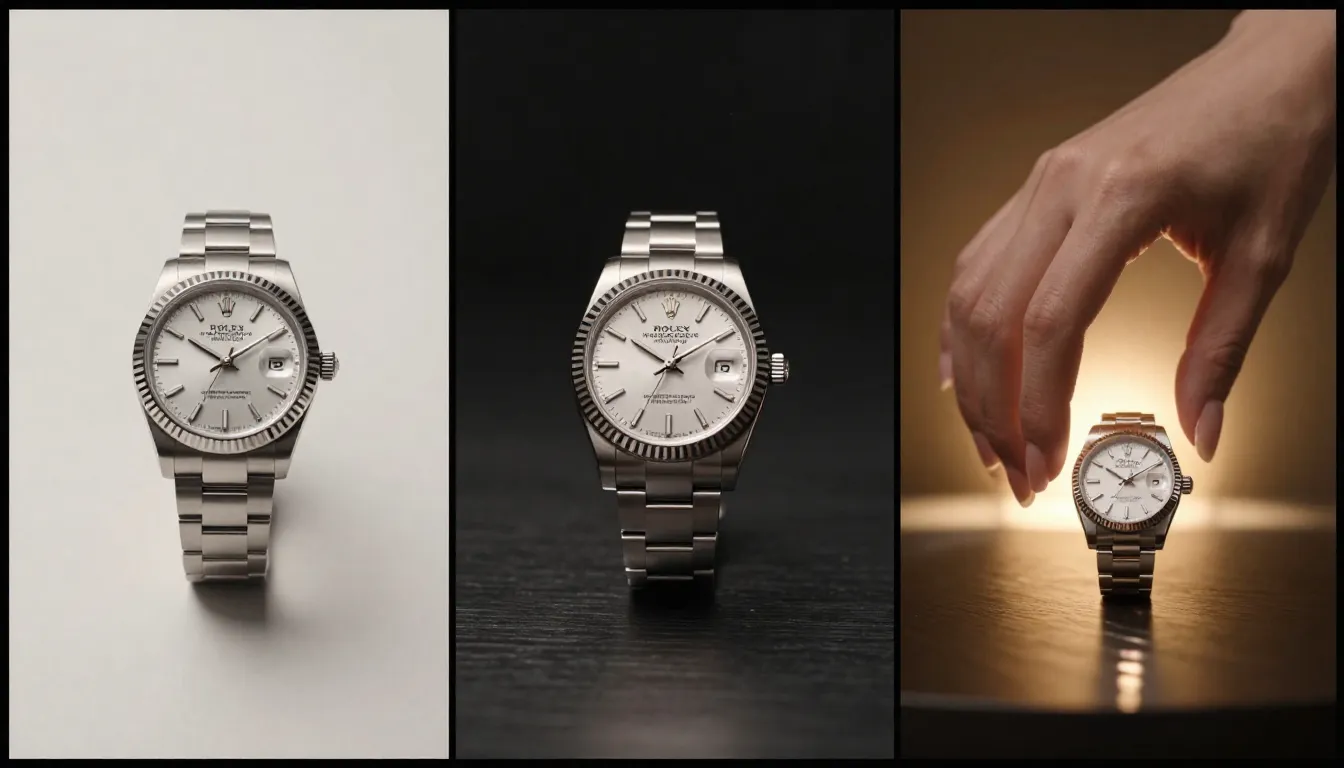
V1 to V3: a generic "luxury watch ad" becomes a cinematic brand film with narrative camera movement, lifestyle context, and premium production value.
Why This Works
- Camera journey (wide to close-up to extreme close-up) creates narrative structure in a single shot. It starts with context, moves to character, and finishes on product. This is the standard arc of luxury brand commercials.
- "Fingers tap once on the railing" is a tiny, deliberate human gesture. It draws the eye to the watch naturally, without the awkwardness of someone explicitly showing their wrist to camera.
- Dual lighting (amber key + blue fill) mimics the natural light conditions on open water at golden hour. This specific combination is the signature look of yacht-lifestyle advertising.
- "Omega or Rolex brand film aesthetic" gives the AI a precise production-quality reference that communicates budget level, color grading approach, and overall visual philosophy.
Variations
Variation A -- Perfume Brand Film:
A woman in a flowing white silk dress walks barefoot through a sunlit
lavender field in Provence. She trails one hand through the lavender
tops as she walks, releasing a visible shimmer of pollen. A crystal
perfume bottle sits on a weathered stone wall in the foreground, the
lavender field reflected in its surface. The camera starts on the bottle,
racks focus to the woman approaching, then returns to the bottle as she
passes. Golden afternoon light. Soft lens flare. Chanel No. 5 campaign
aesthetic. Airy, dreamlike, aspirational. 4K cinematic.
Variation B -- Automotive Brand:
A matte black luxury sedan glides silently along a winding coastal
highway carved into dramatic sea cliffs at dusk. The last light of day
reflects off the car's polished roofline. Headlights carve through
gathering twilight. The camera tracks alongside the vehicle from a low
drone angle, keeping pace. Ocean waves crash against rocks far below.
Subtle interior glow visible through tinted windows. Smooth, powerful,
inevitable. Mercedes or Audi brand film quality. 4K cinematic,
anamorphic, teal and orange color grade.
Quick Reference: All 10 Prompts
| # | Scene | Final Prompt (Key Elements) | Recommended Model | Best Aspect Ratio |
|---|---|---|---|---|
| 1 | Cinematic Portrait | Woman, wheat field, golden hour, 85mm, dolly in | Seedance 2.0 | 16:9 |
| 2 | Product Showcase | Crystal perfume bottle, dual strip lights, orbiting camera | Seedance 2.0 / 1.0 Pro | 16:9 or 1:1 |
| 3 | Nature Cinematic | Dolomites at dawn, cloud sea, eagle, god rays, IMAX | Seedance 2.0 | 21:9 |
| 4 | Urban Street | Tokyo rain, neon reflections, lone figure, tracking shot | Seedance 2.0 | 16:9 or 9:16 |
| 5 | Anime & Fantasy | Female samurai, energy katana, cherry blossoms, orbiting | Seedance 2.0 | 16:9 |
| 6 | Food & Beverage | Espresso macro pour, steam, crema detail, slow motion | Seedance 1.0 Pro | 16:9 or 1:1 |
| 7 | Fashion & Beauty | Haute couture runway, organza fabric, low-angle tracking | Seedance 2.0 | 9:16 or 16:9 |
| 8 | Action & Sports | Slam dunk, sweat particles, below-basket angle, 1000fps | Seedance 2.0 | 16:9 |
| 9 | Image-to-Video | Portrait animation, layered motion, subtle lighting shift | Seedance 2.0 (I2V) | Match source image |
| 10 | Brand & Marketing | Yacht lifestyle, wide-to-close-up camera journey, dual light | Seedance 2.0 | 16:9 or 21:9 |
Save this table for quick reference. Each prompt in this article is ready to copy and paste -- adapt the details to your specific project.
Pro Tips for Prompt Optimization
These five principles will accelerate your prompt-writing skills across any AI video generator.
1. Start Short, Add Detail Incrementally
Never try to write the perfect 100-word prompt on your first attempt. Start with 15-20 words. Generate. Evaluate. Then add one layer of detail at a time. This iterative approach helps you understand which additions have the most impact. Some details will dramatically improve your output. Others will barely register. You cannot know which is which without testing.
2. Change One Variable at a Time
When you iterate from V1 to V2, resist the urge to change everything at once. If you modify the lighting, the camera, the subject, and the setting simultaneously, you will not know which change improved (or hurt) the result. Change one element per iteration. This takes patience, but it builds real understanding of how your generator interprets language.
3. Save Your Golden Prompts
When a prompt produces an exceptional result, save it immediately. Create a personal library organized by category: portraits, products, landscapes, abstract, and so on. Over time, this library becomes your most valuable creative asset. You will reuse structures, swap out subjects, and remix elements from prompts that have already proven themselves.
4. Prioritize Camera Over Subject Description
Here is a counterintuitive truth: camera and lighting instructions often matter more than subject description. A detailed subject description with default camera produces flat results. A simple subject with specific camera movement, lens choice, and lighting produces cinematic results. When you are limited on prompt length, invest your words in how the scene is shot rather than what is in it.
5. Use Negative Framing to Exclude Unwanted Elements
Many AI video generators respond well to exclusionary language. Adding phrases like "no text overlays," "no watermarks," "avoid flat lighting," or "no static camera" can help steer the model away from common failure modes. This is especially useful when you have identified a recurring problem in your generations. Rather than only describing what you want, also describe what you do not want.
FAQ
What makes a good AI video prompt?
A good AI video prompt is specific, structured, and motion-aware. It includes a clear subject description, defined action or motion, an atmospheric setting, camera instructions (shot type and movement), lighting direction, and quality modifiers. The most important principle is specificity -- "a woman with silver-streaked black hair in a charcoal coat walking through falling snow" will always outperform "a woman outside." Equally critical: include motion. Video prompts must describe what moves and how, or the AI defaults to a near-static image.
How long should an AI video prompt be?
The sweet spot is 40 to 80 words. Prompts under 20 words give the AI too much freedom, producing unpredictable, generic results. Prompts over 150 words risk contradicting themselves or confusing the model with too many competing instructions. For most generators, a focused paragraph of 50-70 words that covers subject, motion, camera, lighting, and quality produces the best results. Quality of detail matters more than quantity of words.
Can I use these prompts on other AI video tools?
Yes. Every prompt in this guide works across Seedance, Sora, Kling, Runway, Pika, HaiLuo, and most other text-to-video generators. The core principles -- specific subjects, defined motion, camera instructions, and lighting descriptions -- are universal. That said, different models interpret language differently. A prompt that produces stunning results on Seedance might look slightly different on Sora. Treat these prompts as strong starting points and iterate based on the specific model you use.
Why does my AI video look different from the examples?
AI video generation involves randomness. The same prompt will produce different results each time, even on the same model with the same settings. This is by design -- it enables creative exploration. If your result differs from what you expected, generate 3-5 variations with the same prompt before revising the prompt itself. Often the model will produce an excellent version within a few attempts. Also check your aspect ratio and model version settings, as these significantly affect output.
How do I describe camera movement in prompts?
Use real cinematography terminology. AI models are trained on text that accompanies real film and photography, so they understand professional terms. Key camera movements: "slow dolly in" (camera physically moves forward), "tracking shot" (camera follows subject laterally), "orbiting" (camera circles subject), "crane shot" (camera rises vertically), "pan" (camera rotates horizontally), "tilt" (camera rotates vertically), "whip pan" (fast horizontal snap). Always specify speed: "slow dolly," "gentle orbit," "rapid whip pan." For the deepest control, use Seedance 2.0 with a reference video that has the exact camera movement you want.
Should I use negative prompts?
It depends on the generator. Some AI video tools have a dedicated negative prompt field. Others do not. When available, negative prompts are highly effective for excluding specific problems: "no text," "no watermarks," "no blurry faces," "no static camera." When there is no dedicated field, you can include negative framing within your main prompt: "avoid flat lighting" or "no visible artifacts." Do not fill your negative prompt with dozens of exclusions -- focus on the 2-3 specific issues you have encountered in previous generations.
How many times should I iterate on a prompt?
Three to five iterations is the practical sweet spot for most projects. The V1-to-V3 framework in this guide is not arbitrary -- it maps to a real workflow. V1 establishes the concept. V2 refines the details. V3 polishes the production quality. Beyond V3, you are typically tweaking minor elements. If five iterations have not produced a satisfactory result, the issue is likely not the prompt -- it may be a limitation of the model for that specific type of content. Try a different approach to the scene rather than adding more words to the same prompt.
What's the best AI video generator for prompt control?
Seedance 2.0 currently offers the most comprehensive prompt control for several reasons. It supports text-to-video and image-to-video with consistent results. Camera movement keywords are reliably interpreted. Lighting instructions translate accurately to output. It supports multiple aspect ratios (16:9, 9:16, 1:1, 3:4, 4:3, 21:9) and resolution up to 2K. Character consistency features mean repeated generations of the same character maintain visual coherence. For a full comparison of prompt control across generators, see our best AI video generators comparison.
Conclusion
Writing effective AI video prompts is a learnable skill, not a talent. The 10 prompts in this guide prove the pattern: start basic, add detail incrementally, and pay attention to camera, lighting, and motion above all else.
Every prompt here is copy-paste ready. Take any V3, drop it into your generator, and use it as a starting point. Then iterate. Change the subject. Swap the lighting. Try a different camera angle. Each generation teaches you something about how the model interprets language.
The fastest way to improve is to generate a lot and pay attention to what works. Save your best prompts. Build a library. Over time, you will develop an intuition for what language produces what results.
Open Seedance and try these prompts now --> -- free credits available at signup, no credit card required.
Want to go deeper? Our complete Seedance prompt guide has 50+ additional prompts across every category.
Looking for more? Read our complete Seedance prompt guide with 50+ examples. New to the platform? Start with how to use Seedance. Want to turn existing photos into video? See our image-to-video AI guide. Using AI video for e-commerce? Read our product video guide. Planning a marketing campaign? Check our AI video for marketing guide.
